8/31/2025

Xhorse Multi Prog Pinout to Benz W639 EZS

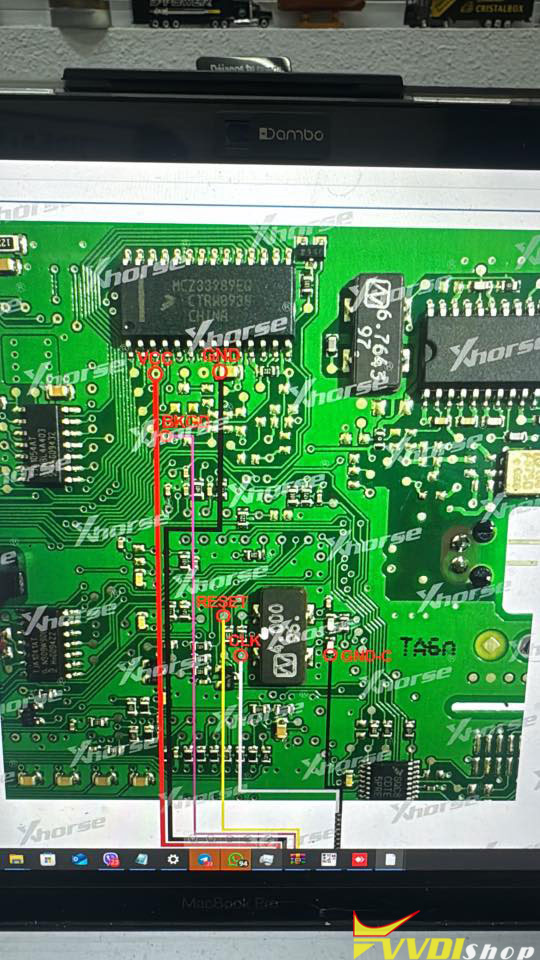
 Here is the pinout MCU for ezs w639 year 2012 for Xhorse multi prog 0L01Y MC9S12DT256CPVE.


If Multiprog only has a diagram directly for the MCU, you may enter the wrong menu.

Xhorse Multi Prog Pinout to Benz W639 EZS 1

Xhorse Multi Prog Pinout to Benz W639 EZS 2

EZS pinout for Multiprog.

If we are talking about EZS Mercedes. You need to select the Immo tab in the device selection, then select Benz and choose the required EZS model from the menu that opens.

Xhorse Multi Prog Pinout to Benz W639 EZS 3

VVDISHOP’s 13th Anniversary Mega Sale

 September 1, 2025  VVDISHOP, a leading global provider of professional automotive Xhorse programming tools, is thrilled to announce its 13th Anniversary Promotion, running from September 1st to September 30th, 2025. To express our deepest gratitude for your unwavering support over the past 13 years, we are launching a massive sale on our flagship XHORSE VVDI tools!

This is the event of the year that our community looks forward to, and we’ve made it bigger and better than ever. It’s the perfect opportunity to upgrade your toolkit, expand your service capabilities, and invest in top-tier technology at unprecedented prices.

VVDISHOP’s 13th Anniversary Mega Sale

Why Shop During the 13th Anniversary Sale?

For over a decade, VVDISHOP has been synonymous with quality, reliability, and cutting-edge technology. Our XHORSE VVDI product line is trusted by locksmiths, mechanics, and auto technicians worldwide for its powerful performance and innovative features.

This anniversary sale is our way of giving back. Whether you’ve been with us since the beginning or are just discovering the power of VVDI tools, now is the time to secure the gear you need to stay ahead of the curve.

What’s on Sale? Mega Deals on XHORSE VVDI Tools!

During this month-long celebration, we are offering significant discounts on our most popular and powerful devices. This is your chance to own the tools that make impossible jobs possible.

  • VVDI2: The all-in-one super tool for key programming, IMMO services. A must-have for any serious professional.

  • VVDI Prog: The ultimate choice for reading, writing, and repairing ECUs, dashboards, and other electronic units via direct chip programming (BDM).

  • VVDI Key Tool Max/Mini: The compact and powerful solution for key generation, remote testing, and diagnostics on the go.

  • VVDI Key Tool Plus: Specializes in advanced immobilizer system services for a wide range of vehicle models.

  • And Many More! Explore our full catalog to find deals on other essential tools and accessories.

How to Get These Mega Deals?

The process is simple:

  1. Visit Our Website: Go to vvdishop.com

  2. Browse the Anniversary Sale Section: Navigate to our dedicated 13th Anniversary Promotion category.

  3. Choose Your Tools: Select the XHORSE VVDI tools that will transform your business.

  4. Checkout and Save: Enjoy instant discounts at checkout. The more you shop, the more you save!

Promotion Period: September 1st, 2025 – September 30th, 2025.
Don’t miss out! These exclusive anniversary prices are available for one month only.

Thank You for 13 Incredible Years!

From the entire team at VVDI SHOP, we want to extend a heartfelt thank you. Your trust and partnership have been the driving force behind our innovation and success for the past 13 years. We are excited to continue providing you with the best tools and support to help your business thrive.

Here’s to many more years of success together!

Upgrade Your Toolbox. Empower Your Business.

The VVDISHOP 13th Anniversary Sale is live now at vvdishop.com!

8/28/2025

Xhorse Multi Prog Reset Honda 77960-TVA-A460-M4 Airbag

 This article provides a step-by-step guide on how to reset the crash data stored in the SRS airbag control module (part #77960-TVA-A460-M4) for 2018-2021 Honda Accord vehicles using the Xhorse Multi-Prog Programmer, allowing you to clear the airbag warning light after a deployment or fault.


Disclaimer: This procedure involves sensitive safety systems. Perform at your own risk. A faulty repair can lead to airbag failure. Always verify the part number matches 77960-TVA-A460-M4.


Required Tools & Files

Tool: Xhorse Multi-Prog

Software: Multi-Prog Software (with Honda SRS support)

Files: A known-good “clean” D-Flash file (64KB) from a non-crashed module.

Equipment: Soldering iron, fine gauge wire, Torx and 10mm sockets.


Step 1: Remove the SRS Module

  1. Disconnect the vehicle’s battery and wait 10+ minutes.
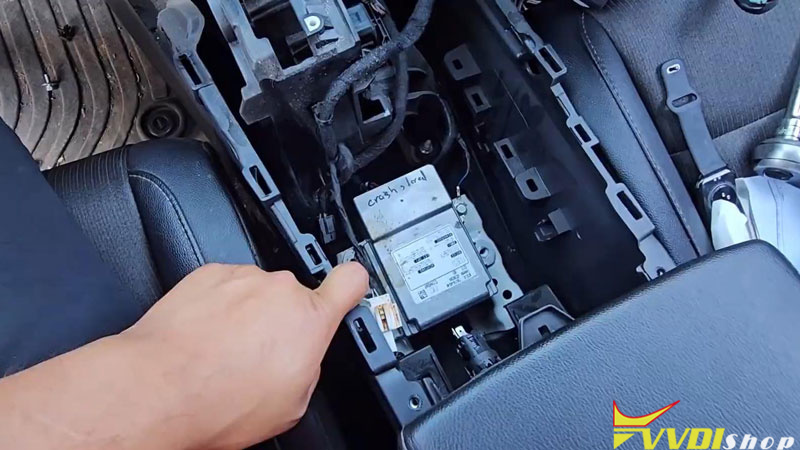
  2. Locate the SRS module under the center console.
  3. Remove the safety clip and unplug the electrical connector.
  4. Unbolt the module (10mm bolts) and carefully remove it from the vehicle.

Xhorse Multi Prog Reset Honda 77960-TVA-A460-M4 Airbag 1

Xhorse Multi Prog Reset Honda 77960-TVA-A460-M4 Airbag 2

Xhorse Multi Prog Reset Honda 77960-TVA-A460-M4 Airbag 3

Step 2: Prepare the Module for Reading/Writing

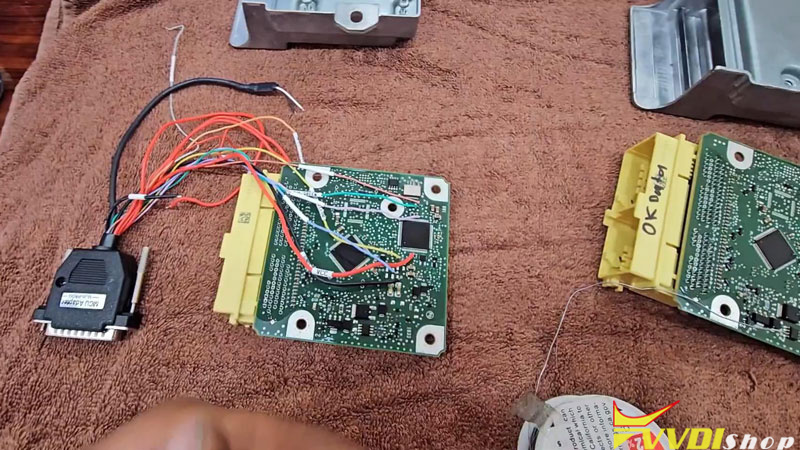
  1. Open the metal casing of the SRS module to access the main PCB.
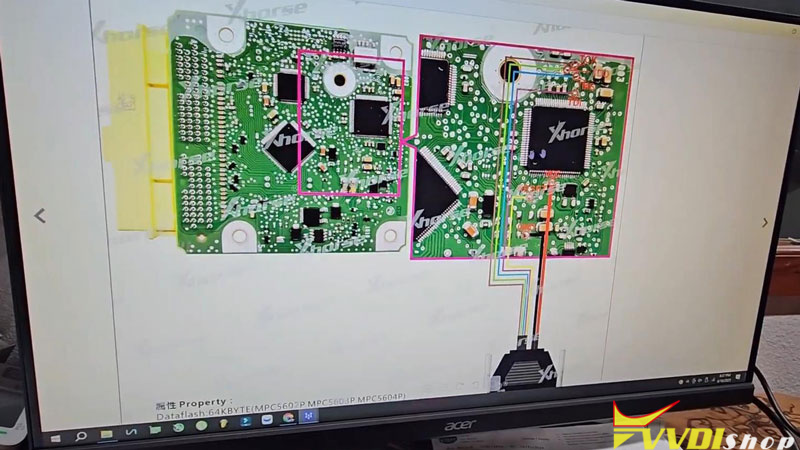
  2. Identify the correct chip and solder points. The target is the R7F701021 microchip.
  3. Solder wires to the necessary points on the PCB as per the diagram below.


Wiring Diagram for Xhorse Multi-Prog:

Multi-Prog PinWire Color (Example)Function
VCCRedPower
GNDBlackGround
TXDPurpleData Transmit
RXDBlueData Receive
RSTGreenReset
CLKBrownClock


Always double-check the pinout against the chip’s datasheet and your specific board layout.

Xhorse Multi Prog Reset Honda 77960-TVA-A460-M4 Airbag 4

Xhorse Multi Prog Reset Honda 77960-TVA-A460-M4 Airbag 5

Xhorse Multi Prog Reset Honda 77960-TVA-A460-M4 Airbag 6

Xhorse Multi Prog Reset Honda 77960-TVA-A460-M4 Airbag 7

Step 3: Read & Backup Original Data (CRITICAL)

  1. Connect the wires to your Xhorse Multi-Prog.
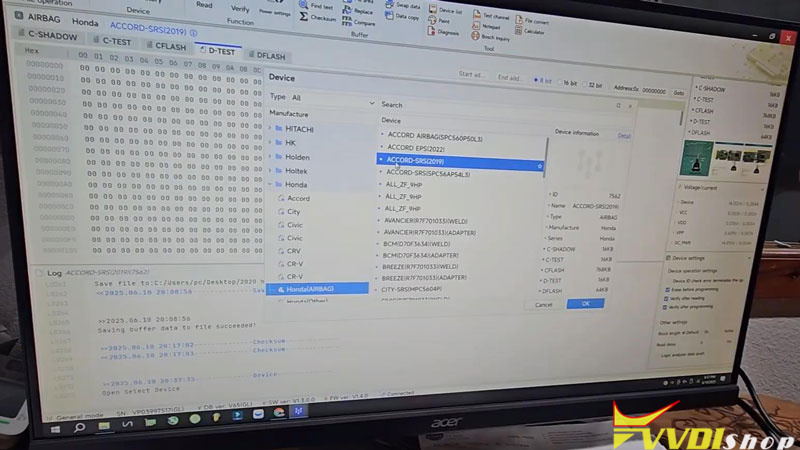
  2. In the software, select: Device -> Honda(Airbag) -> Accord-SRS (2019).
  3. Perform a full backup (READ) of all accessible memory areas:

C-Flash

D-Flash (Most Important for Crash Data)

C-Test

D-Test


  1. SAVE these files securely. This is your backup if anything goes wrong.

Xhorse Multi Prog Reset Honda 77960-TVA-A460-M4 Airbag 8


Step 4: Write the Clean Data

The goal is to overwrite the crash data in the D-Flash with a clean file.

  1. Source a Clean D-Flash File:
  • Extract it from a known-good donor module (preferred method).
  • Use a paid online reset service (e.g., carprog.online).


  1. In Multi-Prog, select WRITE.
  2. Load your clean D-Flash file (the 64KB .bin file).
  3. Execute the write command. The process will erase and reprogram the chip.
  4. Optional but Recommended: Also write the clean C-Flash file if you have it.


Note: Some memory areas (like C-Shadow) may be locked and cannot be written. This is normal. The D-Flash is the primary target for resetting crash data.

Xhorse Multi Prog Reset Honda 77960-TVA-A460-M4 Airbag 9

Xhorse Multi Prog Reset Honda 77960-TVA-A460-M4 Airbag 10


Step 5: Verify and Reinstall

  1. Desolder the wires and carefully reassemble the SRS module.
  2. Reinstall the module into the vehicle and reconnect the battery.
  3. Turn the ignition ON. The airbag light should illuminate briefly and then turn OFF, indicating a successful reset.
  4. Use a professional scanner to check for any active SRS fault codes and confirm all system checks pass.

Xhorse Multi Prog Reset Honda 77960-TVA-A460-M4 Airbag 11


Troubleshooting & Tips

  • “Connection Fail” Error: Check your solder connections; they are the most common point of failure. Ensure wires are secure and not shorting.
  • Software Detects Crash After Write: Some online file analyzers may give false positives. The true test is the airbag light behavior in the vehicle.
  • File Source: Using a file from an identical part number module is crucial. Files are often VIN-specific, but a clean state can be written.
  • Always work on a stable, static-free surface and handle the PCB carefully.


By following this guide, you can successfully reset the crash data on a Honda Accord SRS module, turning off the airbag light and restoring the vehicle’s safety system.


www.vvdishop.com

8/26/2025

Program 2020 Dodge Charger Key with Xhorse Key Tool Max Pro

 This article provides a step-by-step guide on programming a new smart key for a Dodge Charger (2019-2021 model) using the Xhorse VVDI Key Tool Max Pro and FCA JCD bypass cable.


Understanding the Challenge: The Smart Key System

Modern Dodge Chargers are equipped with a sophisticated security system called an immobilizer. The car’s computer must recognize a unique code from a programmed key before it will allow the engine to start. When all keys are lost, the car cannot be started normally, and the key data must be reprogrammed directly into the vehicle’s computer. This requires specialized equipment to bypass the security and communicate with the car’s modules.


To perform this procedure, you will need:

  • Xhorse Key Tool Max Pro (or Key Tool Plus): This device handles the reading of the security PIN code and the programming of the new keys.
  • JCD 2 Bypass Cable (or Equivalent): This is a crucial adapter. It has two connectors:

One OBD-II connector for the diagnostic port.

A second OBD-II port where you plug in your key programmer.

Two loose wires (typically red and black) with small pins for direct connection.

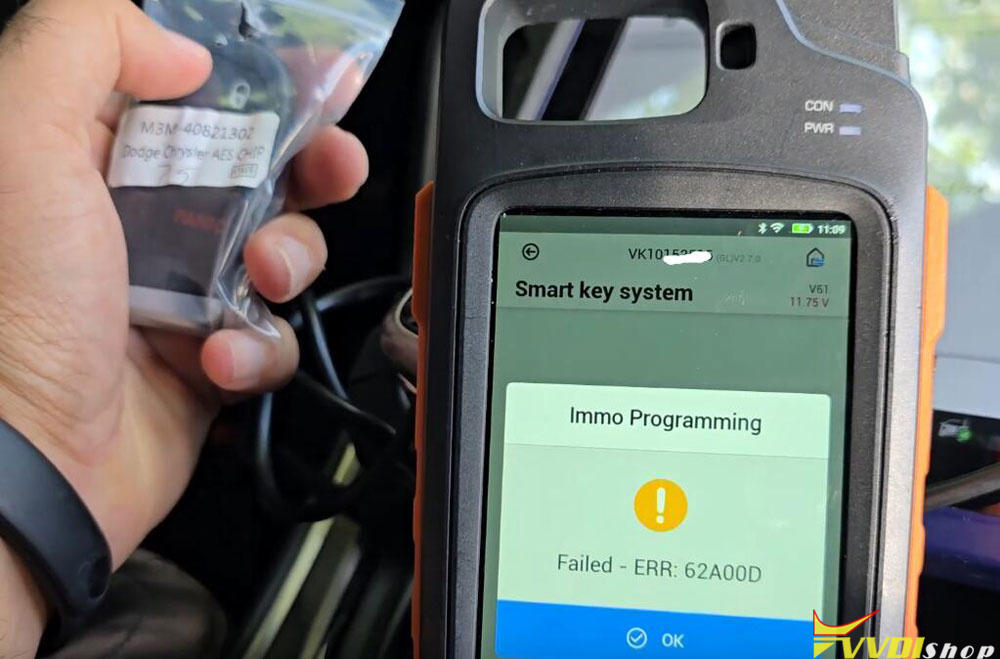
  • Blank Smart Keys: You must have at least one new, uncut smart key compatible with the Dodge Charger. There are two common types: one with an AES chip and another with a more common 46 chip. It is vital to ensure you have the correct key for your specific vehicle model year.
  • Basic Tools: A trim removal tool or a flat-head screwdriver to carefully remove the passenger-side kick panel.


Step-by-Step Programming Procedure:

Warning: This is a technical procedure for professional automotive locksmiths. Incorrectly following these steps could potentially disrupt the vehicle’s electronic systems. Always ensure your tools are updated and you understand the process fully before beginning.

Step 1: Physical Connection and Bypass

  1. Locate the Green Connector: On the passenger side of the vehicle, near the footwell, you will find a kick panel. Carefully unclip and remove this panel to reveal a wiring harness. Look for a distinctive green connector.

  2. Disconnect the Green Connector: Unplug this green connector from its housing. You will see it has three terminal pins inside.

  3. Connect the Bypass Cable Wires: This is the most critical step for physical connection.

    • Identify the three pins on the green connector.

    • Connect the RED wire from the JCD 2 cable to the pin on the right-hand side.

    • Connect the BLACK wire to the center pin.

    • Important: The first pin (left-hand side) is not used. Leave it disconnected.

    • Tip: Taking a photo for reference before connecting can help avoid mistakes.

  4. Complete the Tool Connection:

    • Plug the OBD-II connector from the JCD 2 cable into the car’s OBD-II port (usually under the dashboard near the driver’s knees).

    • Plug the Xhorse Key Tool Max Pro into the second OBD-II port on the JCD 2 cable.

Program 2020 Dodge Charger Key with Xhorse Key Tool Max Pro 1

Program 2020 Dodge Charger Key with Xhorse Key Tool Max Pro 2

Program 2020 Dodge Charger Key with Xhorse Key Tool Max Pro 3

Program 2020 Dodge Charger Key with Xhorse Key Tool Max Pro 4

Step 2: Program Smart Key

Navigate the Tool’s Menu:

  • Power on the Key Tool Max Pro.
  • Navigate to the main menu and select “MMO Programming”.
  • Select the brand “Dodge.”
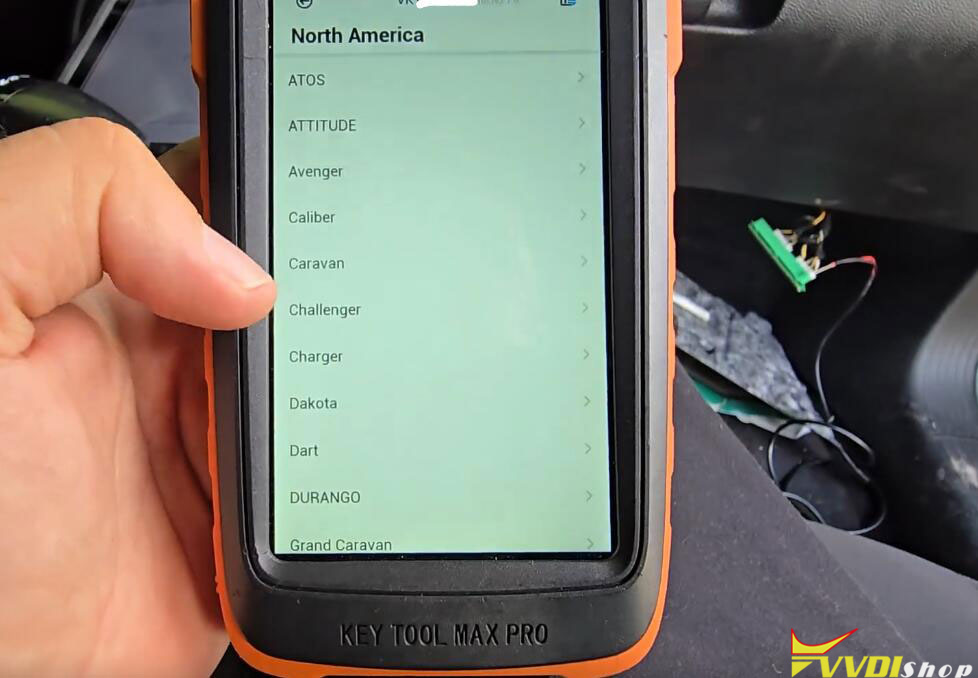
  • Choose the region (e.g., “North America”).
  • Select the model (“Charger”) and the correct year range (e.g., “2019-2021”).
  • Select “Read PIN Code“.

Program 2020 Dodge Charger Key with Xhorse Key Tool Max Pro 5

Program 2020 Dodge Charger Key with Xhorse Key Tool Max Pro 6

Program 2020 Dodge Charger Key with Xhorse Key Tool Max Pro 7

Program 2020 Dodge Charger Key with Xhorse Key Tool Max Pro 8

Read the PIN Code:

  • The tool will instruct you to ensure the ignition is OFF and the hazard lights are ON. Comply with these instructions.
  • The tool will require an internet connection to communicate with its database and retrieve the vehicle’s unique security PIN code.
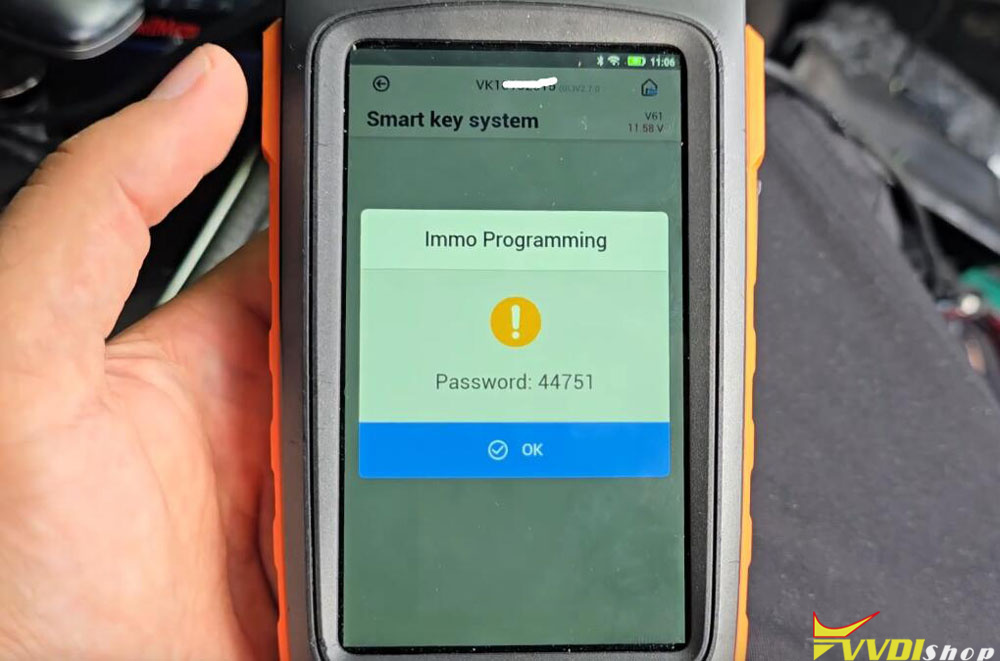
  •  The tool will process the request and, if successful, display a 5-digit code (e.g., 44751). Write this code down carefully; you will need it immediately.

Program 2020 Dodge Charger Key with Xhorse Key Tool Max Pro 9

Program 2020 Dodge Charger Key with Xhorse Key Tool Max Pro 10

Add a New Smart Key:

  • Back in the menu, now select “Add Smart Key.”
  • The tool will prompt you to enter the PIN code you just retrieved. Input it correctly.
  • Next, the tool will give instructions on how to present the new key. Typically, this involves placing the new, unprogrammed smart key directly on the Start/Stop button.
  • While the key is in place, you will be instructed to press the LOCK button on the key fob itself.
  • The tool and the vehicle will now communicate to synchronize the new key. This process may take a moment. You may hear the door locks cycle, indicating success.

Program 2020 Dodge Charger Key with Xhorse Key Tool Max Pro 11

Program 2020 Dodge Charger Key with Xhorse Key Tool Max Pro 12

Program 2020 Dodge Charger Key with Xhorse Key Tool Max Pro 13

Program 2020 Dodge Charger Key with Xhorse Key Tool Max Pro 14

Step 3: Troubleshooting and Finalization

  • Key Type Matters: Not all blank keys may work. If the programming attempt fails (“Save Failed”), try a different type of key (e.g., an AES chip key instead of a 46 chip key, or vice versa).
  • Check Connections: If the tool fails to communicate, double-check that the wires on the green connector are secure and on the correct pins.
  • Clearing Old Keys: The tool may have an option to “Clear Keys” or “Reset ECU.” This wipes all previously stored key IDs from the car’s memory. Use this function with extreme caution, as it will erase all keys. After a clear, you only need to program one key to start the car, but any old keys will no longer work.
  • Final Test: Once the tool confirms “Programming Successful,” turn the ignition on with the new key. Attempt to start the vehicle. If successful, the key has been programmed correctly.

Program 2020 Dodge Charger Key with Xhorse Key Tool Max Pro 15

Program 2020 Dodge Charger Key with Xhorse Key Tool Max Pro 16

Program 2020 Dodge Charger Key with Xhorse Key Tool Max Pro 17

www.vvdishop.com