10/30/2025

Xhorse Multi Prog BMW CAS4 Adapter Chip Crack Failed

 Problem:

Read BMW CAS4 module with Xhorse Multi Prog and XDNP12 CAS4 solder free adapter.

Pins flown in/cleaned, in the pin test passes ok, Procka Mask selected correctly, external power power plugged in – processor detects as unknown and does not want to secure.

Error chip crack failed.

Any advice?

Xhorse Multi Prog BMW CAS4 Adapter Chip Crack Failed 1

Xhorse Multi Prog BMW CAS4 Adapter Chip Crack Failed 2

Solution:

Double check connection, if pin test passes ok,  when using solder free adapter, try to lower VPP voltage to 3.3V and VCC to 5V. 

You have to manually change the values of vcc and vdd.


Or read directly without an adapter.

Xhorse Multi Prog BMW CAS4 soldering 1

Xhorse Multi Prog BMW CAS4 soldering 2

10/28/2025

How to Generate Hyundai 47 Chip with Xhorse Super Chip?

 Question:

Will Xhorse generate Hyundai 47 blade chip using VVDI Super Chip XT27A. Tried all of them didn’t work.


Here is the clue.

Xhorse XT57B definitely will do but it is not available yet. The XT27A also works.
Here is the tip to generate Hyundai 47 with XT27A.

Try with New 7938 -xt27. It’s working.

Generate Hyundai 47 Chip with Xhorse Super Chip

Generate ID47, then tap “New 7938 chip” and then “Generate”. Not ID47 Hyundai.

10/23/2025

Xhorse Multi Prog Clone Audi A6 2016 BCM2

 User review:

Confirmed! Xhorse Multi-prog with GEN2 Audi BCM2 adapter clone encrypted Audi BCM2!!!
Audi A6 2016 – Encrypted BCM2 3635/0825
Read old BCM2 and write DFLASH and PFLASH to new BCM2.
But before write have to “Erase Chip” manual.
Multiprog software have default option “ERASE BEFORE PROGRAMMING”…but not work.
Need manual erase chip.

Xhorse Multi Prog Clone Audi A6 2016 BCM2 1

Xhorse Multi Prog Clone Audi A6 2016 BCM2 2

Xhorse Multi Prog Clone Audi A6 2016 BCM2 3


Xhorse Multi Prog Update Database V80

 Xhorse Multi Prog programmer released new database V80 on October 23rd, 2025.


Database V80
2025-10-23 14:08:26
+ Others>DongFeng>added taillight options for the Dongfeng Fengguang 580
+ Others->Porsche->added Porsche Cayenne taillight option

+ Others->Audi->added Audi Q7 rear module – 2012 option
+ Others->Mercedes Benz->added

New Mercedes-Benz 164 rear BCM,
New Mercedes-Benz 164 rear BCM(UART),
Old Mercedes-Benz 164 rear BCM,
Old Mercedes-Benz 164 rear BCM (UART),
Mercedes-Benz 164 front BCM,
Mercedes-Benz 164 front BCM (UART option)
+ Airbag -> BYD -> Added to BYD: Han airbag (R7F701330) – LOCK – Read option
+ microcontroller->Fremont Micro->FT32F0xx
FT32F030C8AT7,
FT32F030C8BU7,
FT32F030CBAT7,
FT32F030F6AP7,
FT32F030F6CU7,
FT32F030F8AP7,
FT32F030G8BU7,
FT32F030K6AT7,
FT32F030K6BT7,
FT32F030K8AT7,
FT32F030K8BU7,
FT32F030R8AT7,
FT32F030RBAT7,
FT32F032G8BS7,
FT32F032G8CS7,
FT32F032K8BU7,
FT32F072C8AT7,
FT32F072C8BT7,
FT32F072CBAT7,
FT32F072CBBT7,
FT32F072K6BT7,
FT32F072KBBT7,
FT32F072KBBU7,
FT32F072KBCU7,
FT32F072KBCW7,
FT32F072KBDW7,
FT32F072R8AT7,
FT32F072R8BT7,
FT32F072RBAT7 option
+ microcontroller->Fremont Micro->FT32F1xx
FT32F103C8AT7,
FT32F103CBAT7,
FT32F103R8AT7,
FT32F103RBAT7,
FT32F103RCAT7,
FT32F103RDAT7,
FT32F103REAT7,
FT32F103T8AU7,
FT32F103TBAU7,
FT32F103VCAT7,
FT32F103VDAT7,
FT32F103VEAT7,
FT32F113C8AT7,
FT32F113CBAT7,
FT32F113R8AT7,
FT32F113RBAT7,
FT32F113V8AT7,
FT32F113VBAT7 option
+ microcontroller->Fremont Micro->FT60Exx
FT60E010A,
FT60E011A,
FT60E021,
FT60E022,
FT60E023,
FT60E024,
FT60E025,
FT60E02F,
FT60E112,
FT60E112A,
FT60E11F,
FT60E120,
FT60E121,
FT60E122,
FT60E122A,
FT60E123,
FT60E123A,
FT60E12F,
FT60E210,
FT60E211 option
+ microcontroller->Fremont Micro->FT60Fxx
FT60F010A,
FT60F011A,
FT60F021,
FT60F021VA,
FT60F021VB,
FT60F022,
FT60F022VA,
FT60F023,
FT60F024,
FT60F025,
FT60F02F,
FT60F112,
FT60F112A,
FT60F11F,
FT60F120,
FT60F121,
FT60F122,
FT60F122A,
FT60F123,
FT60F123A,
FT60F12F,
FT60F210,
FT60F211 option
+ microcontroller->Fremont Micro->FT61Exx
FT61E042,
FT61E042A,
FT61E043,
FT61E043A,
FT61E045,
FT61E0A1,
FT61E0A2,
FT61E0A3,
FT61E0A5,
FT61E0AF,
FT61E131,
FT61E131B,
FT61E132A,
FT61E133A,
FT61E133B,
FT61E135,
FT61E13F,
FT61E141,
FT61E142,
FT61E143,
FT61E143A,
FT61E145,
FT61E145A,
FT61E14F,
FT61EC20,
FT61EC21A,
FT61EC21B,
FT61EC22,
FT61EC22A,
FT61EC23,
FT61EC2F option
+ microcontroller->Fremont Micro->FT61Fxx
FT61F020,
FT61F021A,
FT61F021B,
FT61F022A,
FT61F022B,
FT61F023,
FT61F02F,
FT61F042,
FT61F042A,
FT61F043,
FT61F043A,
FT61F045,
FT61F086E,
FT61F087,
FT61F087E,
FT61F087G,
FT61F088E,
FT61F0A1,
FT61F0A2,
FT61F0A3,
FT61F0A5,
FT61F0AF,
FT61F131,
FT61F131B,
FT61F132A,
FT61F133A,
FT61F133B,
FT61F134A,
FT61F135,
FT61F13F,
FT61F141,
FT61F142,
FT61F143,
FT61F143A,
FT61F143B,
FT61F145,
FT61F145A,
FT61F14F,
FT61F245,
FT61F345,
FT61FC20,
FT61FC21A,
FT61FC21B,
FT61FC22A,
FT61FC23,
FT61FC2F,
FT61FC303,
FT61FC305,
FT61FC30A,
FT61FC31,
FT61FC31B,
FT61FC32A,
FT61FC33A,
FT61FC33B,
FT61FC35,
FT61FC3F,
FT61FC41,
FT61FC42,
FT61FC43,
FT61FC43A,
FT61FC43B,
FT61FC45,
FT61FC45A,
FT61FC4F,
FT61FC61A,
FT61FC62A,
FT61FC63A,
FT61FC65A,
FT61FC66A,
FT61FC67A,
FT61FCC1A,
FT61FCC2A,
FT61FCC3A,
FT61FCC5A,
FT61FCC6A,
FT61FCC7A option
+ microcontroller->Fremont Micro->FT62Exx
FT62E131,
FT62E132,
FT62E133,
FT62E135,
FT62E13F,
FT62E210,
FT62E211 option
+ microcontroller->Fremont Micro->FT62Fxx
FT62F023,
FT62F027,
FT62F083,
FT62F085E,
FT62F086E,
FT62F087A,
FT62F087B,
FT62F087D,
FT62F087F,
FT62F088E,
FT62F0G7A,
FT62F0G8A,
FT62F0GBA,
FT62F0GCA,
FT62F0M7A,
FT62F0M8A,
FT62F0MBA,
FT62F0MCA,
FT62F131,
FT62F132,
FT62F133,
FT62F135,
FT62F13F,
FT62F210,
FT62F211,
FT62F231,
FT62F232,
FT62F233,
FT62F235,
FT62F283,
FT62F283B,
FT62F285B,
FT62F286A,
FT62F287A,
FT62F287B,
FT62F287C,
FT62F288,
FT62F288A,
FT62F333,
FT62F383B,
FT62F385B,
FT62F387A,
FT62F387B,
FT62F3G7B,
FT62FC31,
FT62FC32,
FT62FC33,
FT62FC35,
FT62FC3F,
FT62FC61B,
FT62FC63A,
FT62FC63B,
FT62FC65A,
FT62FC65B,
FT62FC66A,
FT62FC67A,
FT62FC67C,
FT62FCC3B,
FT62FCC5B,
FT62FCC6A,
FT62FCC7A,
FT62FCC7B,
FT62FCC7C,
FT62FCC8A option
+ microcontroller->Fremont Micro->FT64Exx
FT64E0A1,
FT64E0A2,
FT64E0A3,
FT64E0A5,
FT64E0AF option
+ microcontroller->Fremont Micro->FT64Fxx
FT64F0A1,
FT64F0A2,
FT64F0A3,
FT64F0A5,
FT64F0AF option


www.vvdishop.com

Add 2014 Ford KA ID46 Smart Key with Xhorse Key Tool MIDI

 In this guide, we’ll walk through programming a spare remote key for a Ford KA 2014 using the Xhorse VVDI Key Tool MIDI. This model uses a Fiat-based immobilizer system, similar to the Fiat 500 (2008–2017).


Tools and Parts Needed:

VVDI Key Tool MIDI

A new Ford KA Key

Original Working Key


Step-by-Step Programming Guide

  1. Connect to the Vehicle

Locate the OBD port behind the dashboard panel, connectKey Tool MIDI toOBD.

Add 2014 Ford KA ID46 Smart Key with Xhorse Key Tool MIDI 1

  1. Access the Correct System

Since the Ford KA 2014 uses a Fiat-based system, but the Key Tool MIDI doesn’t list it in menu now(Update will be coming soon).

  • Go to: IMMO Programming → EUROPE → FIAT → Select by Area → Fiat 500 Flip key(2008–2017) → IMMO system(DELPHI 70F3632/70F3633_ID46) → Start programming


  • Two system options may appear. Start with Type 1.

Add 2014 Ford KA ID46 Smart Key with Xhorse Key Tool MIDI 2

Add 2014 Ford KA ID46 Smart Key with Xhorse Key Tool MIDI 3

  1. Read PIN and Key Data
  • Select “Display Immobilizer Information(PIN, Key ID)” to read the PIN code and key data from the BSI (Body Security Interface).


  • The tool will display the PIN (e.g., 34385) and current key count.


  1. Generate Dealer Key
  • Choose “Make Dealer Key”.
  • Place the new keyinto the Key Tool MIDI programming coil.
  • The tool will generate the dealer key successfully.

Add 2014 Ford KA ID46 Smart Key with Xhorse Key Tool MIDI 4

Add 2014 Ford KA ID46 Smart Key with Xhorse Key Tool MIDI 5

Add 2014 Ford KA ID46 Smart Key with Xhorse Key Tool MIDI 6


  1. Program All Keys
  • Go to “Key Programming”.
  • The PIN code should auto-fill. Confirm and proceed.
  • Follow the on-screen instructions to program each key one by one.

Important: Always program original keys first to avoid locking them out.

  • Insert each key, turn the ignition ON, and confirm programming.Repeat for all keys (original and new).


After programming, the tool should show the updated key count (e.g., 3 keys).

Test each key to ensure it starts the vehicle.

Add 2014 Ford KA ID46 Smart Key with Xhorse Key Tool MIDI 7

Add 2014 Ford KA ID46 Smart Key with Xhorse Key Tool MIDI 8

Add 2014 Ford KA ID46 Smart Key with Xhorse Key Tool MIDI 9

Sync Remote Central Locking Tips

If the remote doesn’t work initially:

  • Disconnect the OBD cable, either reset the BSI or disconnect the battery.
  • Insert the key, turn ignition ON, and repeatedly press the remote button. Activate central locking multiple times to sync.
  • If issues persist, try the “Remote Renew” or “Unlock Key” function, or repeat the process using the other BSI type in the tool.


Final Checks

Verify all keys start the vehicle, test remote locking and unlocking.

Ensure no warning lights remain on the dashboard.

Add 2014 Ford KA ID46 Smart Key with Xhorse Key Tool MIDI 10

With the Xhorse VVDI Key Programmer, programming a spare key for the Ford KA 2014 is quick and reliable. Always remember to reprogram all existing keys to maintain system access.


www.vvdishop.com

10/22/2025

Xhorse Multi Prog Clone Renault Duster SID306 ECU

 How to clone Renault Duster SID306 ECU using Xhorse Multi Prog programmer?


First, connect the original ECU, read and save the backup data.
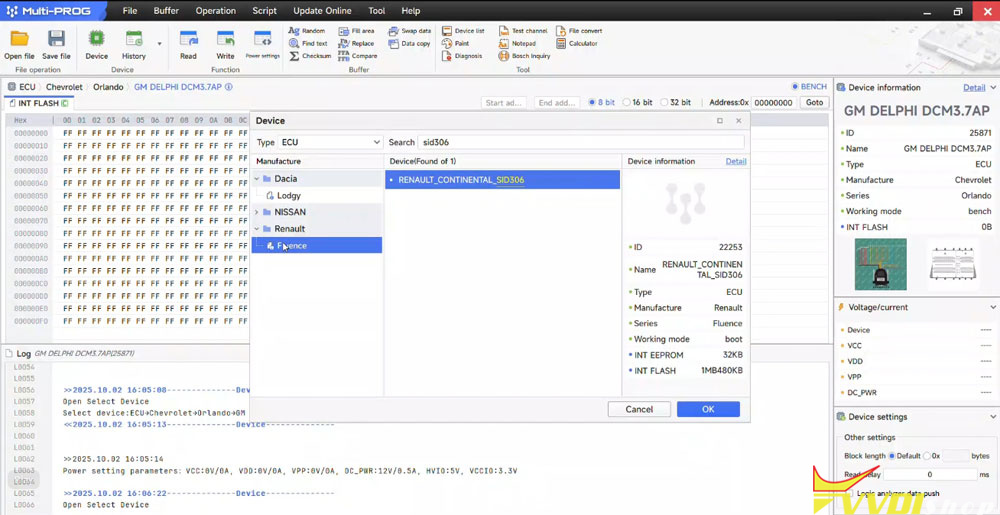
Select Renault Continental SID306 protocol.

Xhorse Multi Prog Clone Renault Duster SID306 ECU 1

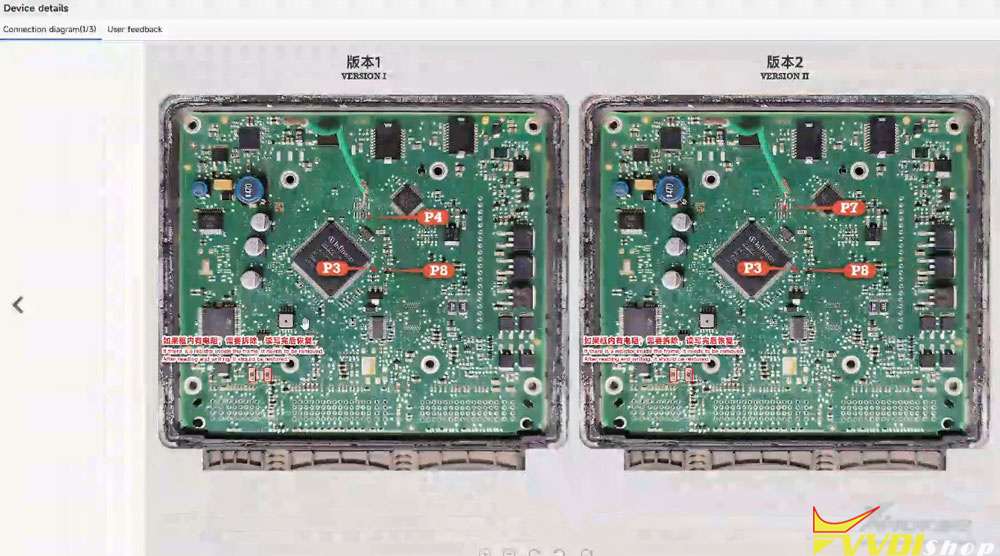
Check the boot connection diagram.

Xhorse Multi Prog Clone Renault Duster SID306 ECU 2

Xhorse Multi Prog Clone Renault Duster SID306 ECU 3
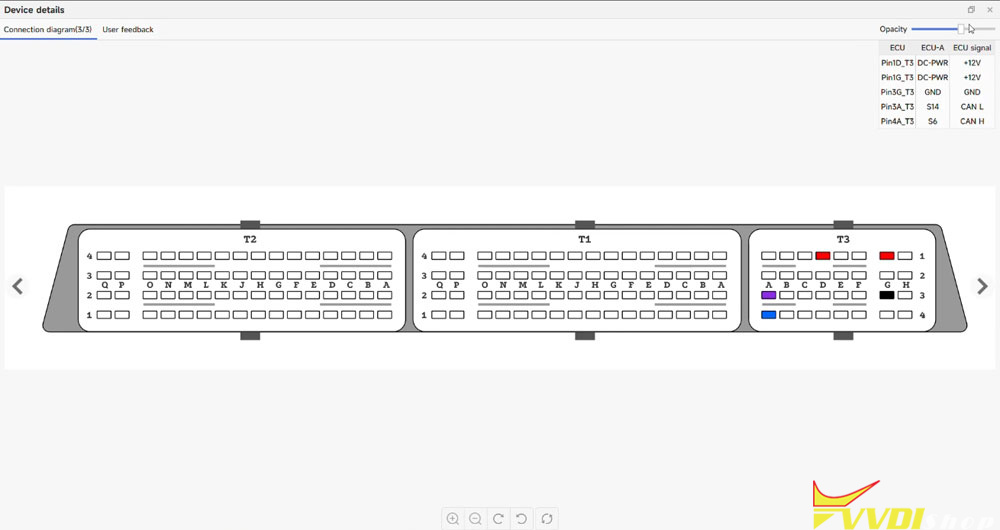
Connect ECU with multi prog according to the pinout.
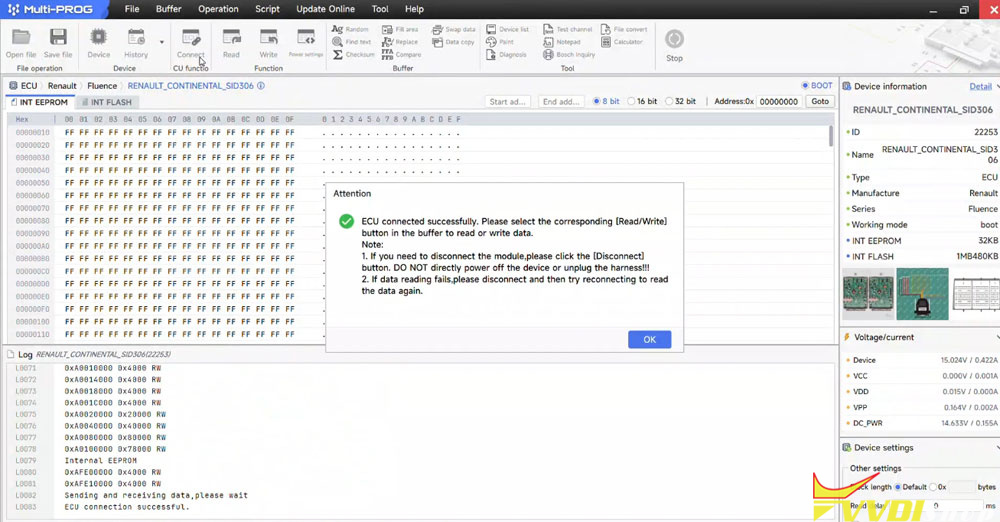
Connect ECU.

Xhorse Multi Prog Clone Renault Duster SID306 ECU 4
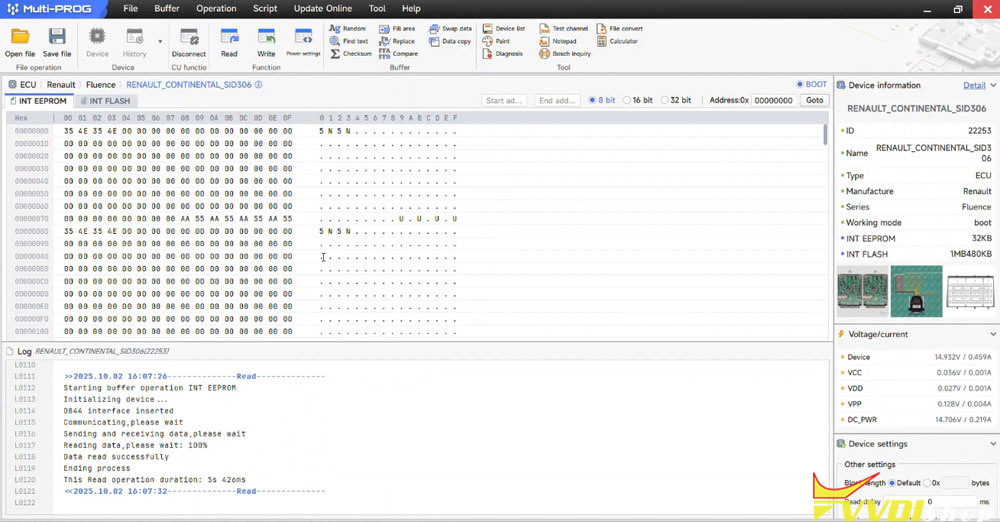
Read INT eeprom and save.

Xhorse Multi Prog Clone Renault Duster SID306 ECU 5
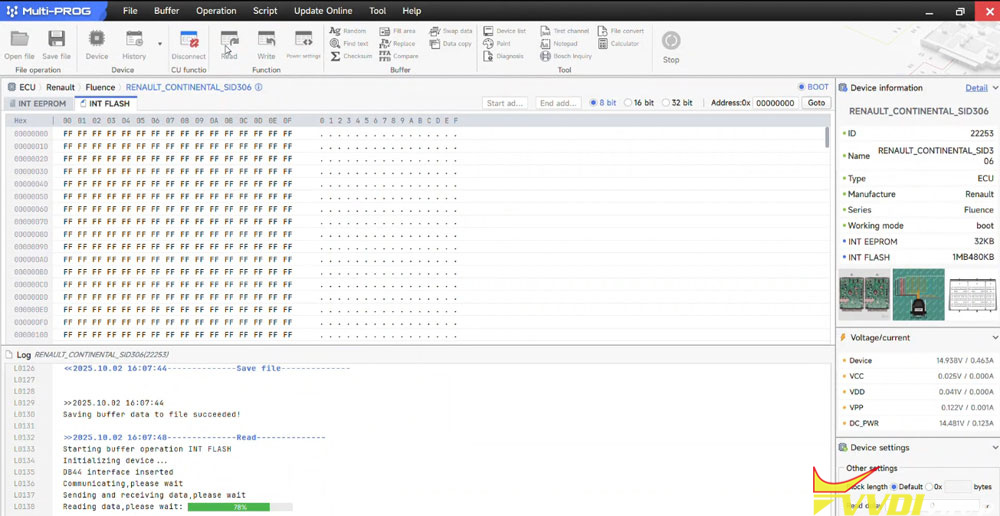
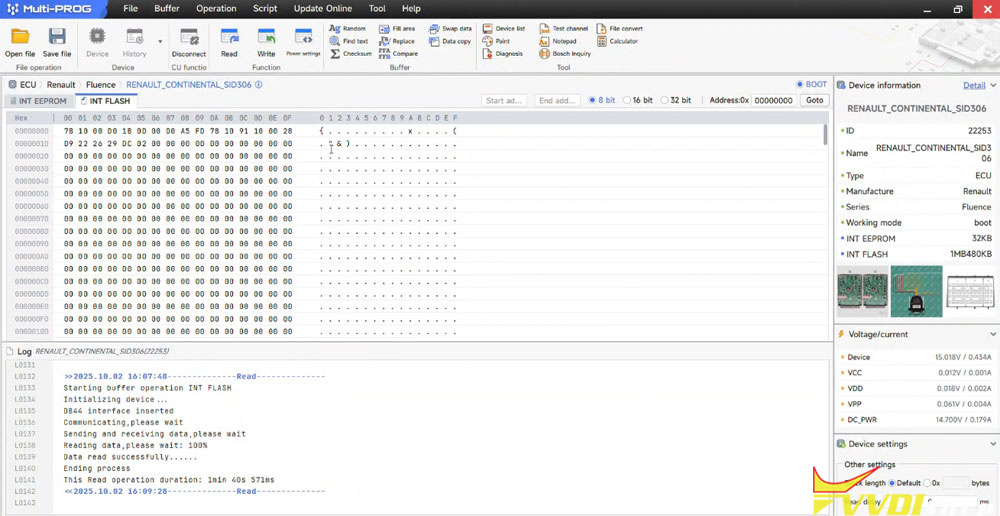
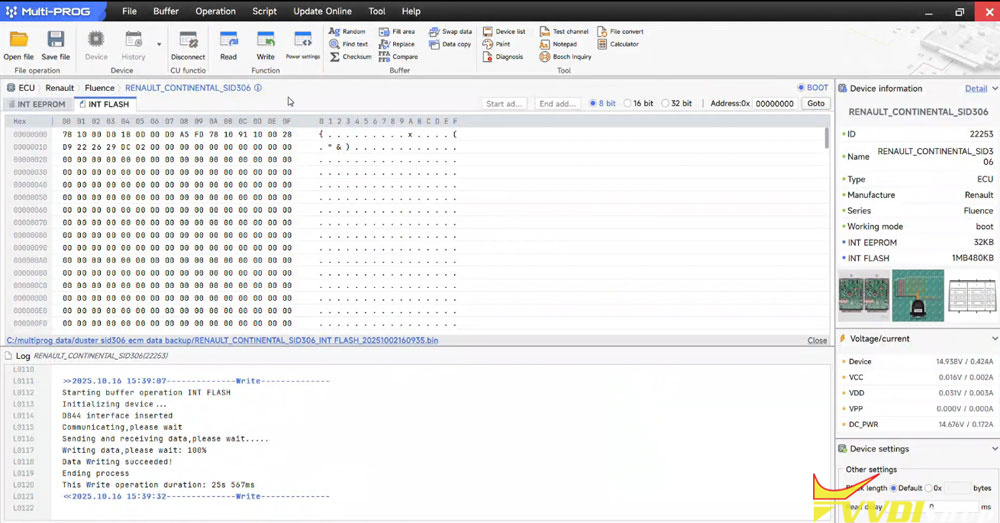
Read INT flash and save.

Xhorse Multi Prog Clone Renault Duster SID306 ECU 6

Xhorse Multi Prog Clone Renault Duster SID306 ECU 7
Disconnect the original ECU.

Now connect the donor ECU and write back the original data.
Connect ECU.
Write INT eeprom.

Xhorse Multi Prog Clone Renault Duster SID306 ECU 8

Xhorse Multi Prog Clone Renault Duster SID306 ECU 9

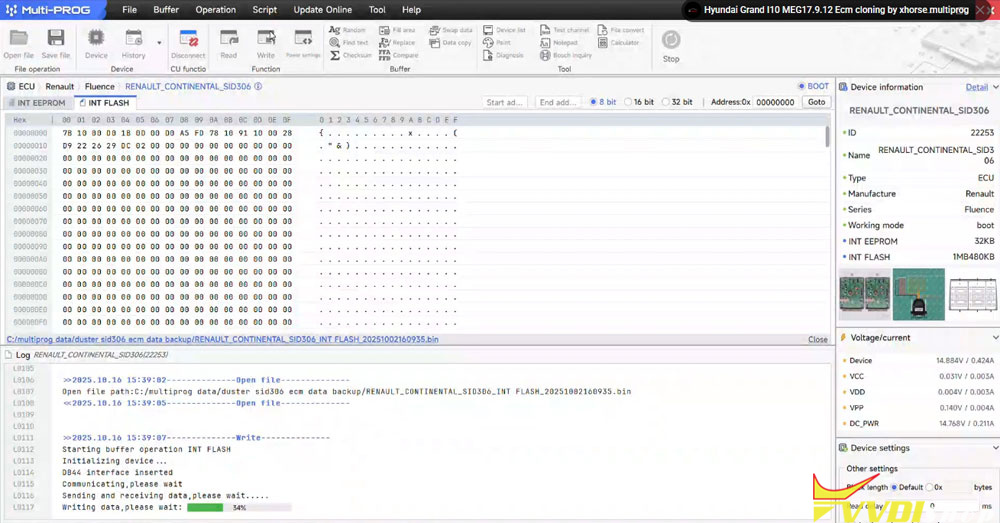
Write INT flash to donor ECU.

Xhorse Multi Prog Clone Renault Duster SID306 ECU 10

Xhorse Multi Prog Clone Renault Duster SID306 ECU 11

Install the donor ECU to vehicle.

Done.

www.vvdishop.com

How to Solve VVDI MLB Tool ‘Device Not Connected’ Error?

 Problem:

Failed to use Xhorse VVDI MLB Tool MLB function. The system says the device is not connected. Any solution?

VVDI MLB Tool ‘Device Not Connected’ Error 1

VVDI MLB Tool ‘Device Not Connected’ Error 2

VVDI MLB Tool ‘Device Not Connected’ Error 3

Possible solutions:
1.
Check drivers restart pc, try again.

If the driver was detected, contact us to install CDM V2.12.28 driver.

VVDI MLB Tool ‘Device Not Connected’ Error 4

2. Chip doesn’t look secured on well.
Desolder the new chip and solder it again very good and it is work for you.

The solder paste could be potentially shorting other pins… gotta work on that and solder skills.

10/21/2025

Xhorse Key Tool ID46 Calculation Asks for Verification?

 Problem:

Tried to calculate BYD ID46 transponder with xhorse vvdi mini key tool. It says the function need to do real-name verification. How to do?

Xhorse Key Tool ID46 Calculation Asks for Verification 1

Solution:

Do real-name verification as the device indicates.

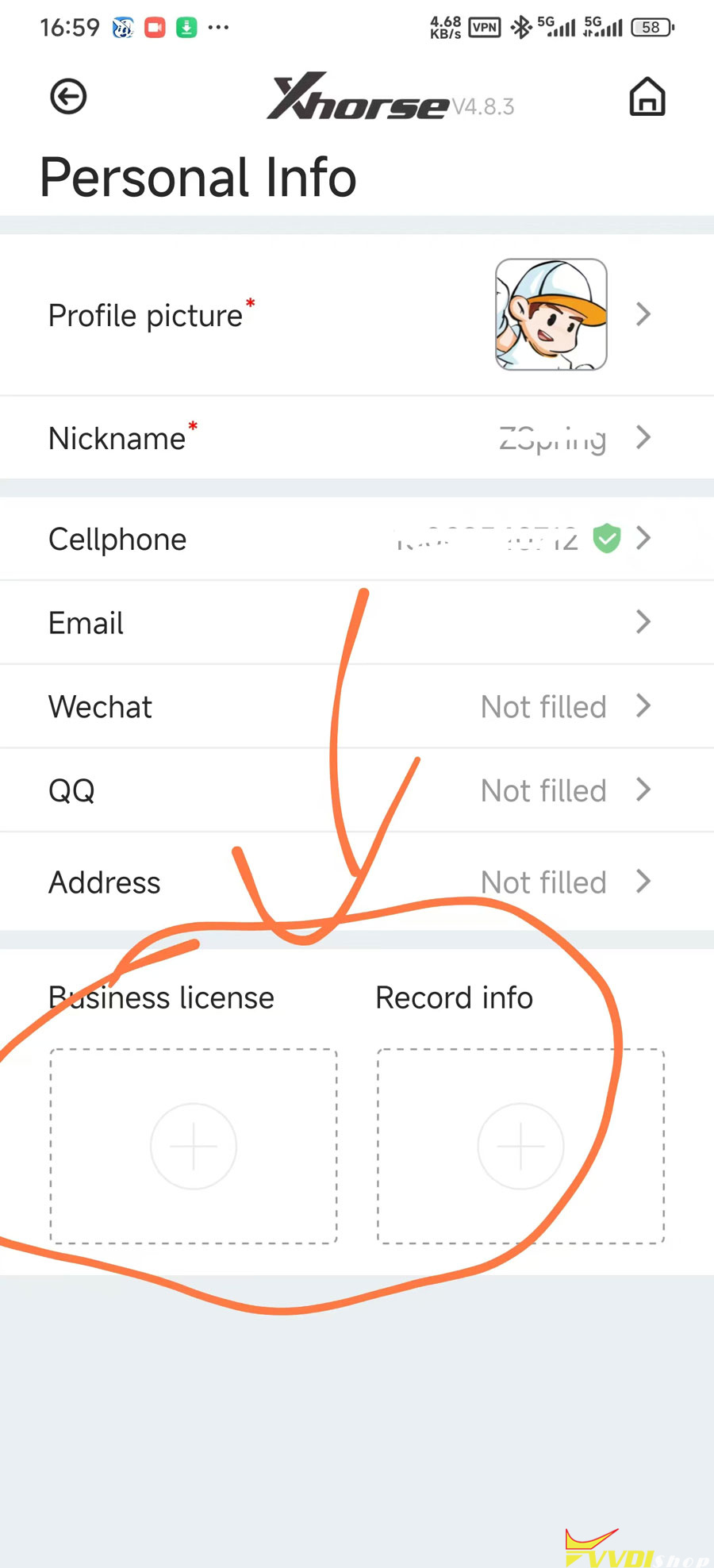
In App main page, go to About- Personal Info.

Fill in persional information, name, phone number, email etc.

Submit your business license and record info to verify.

Xhorse Key Tool ID46 Calculation Asks for Verification 2

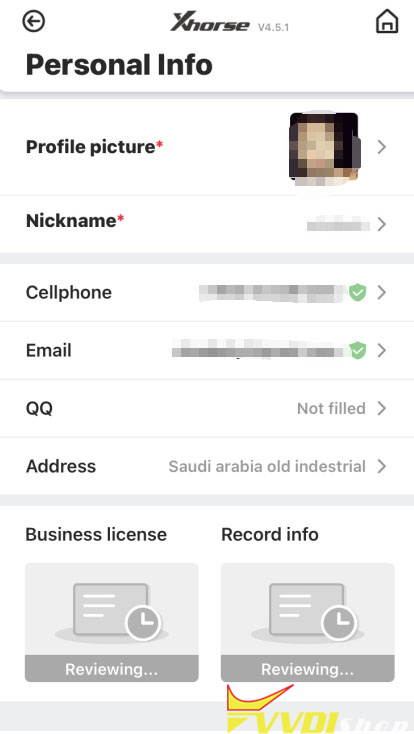
Xhorse team will verify your information.

Xhorse Key Tool ID46 Calculation Asks for Verification 3

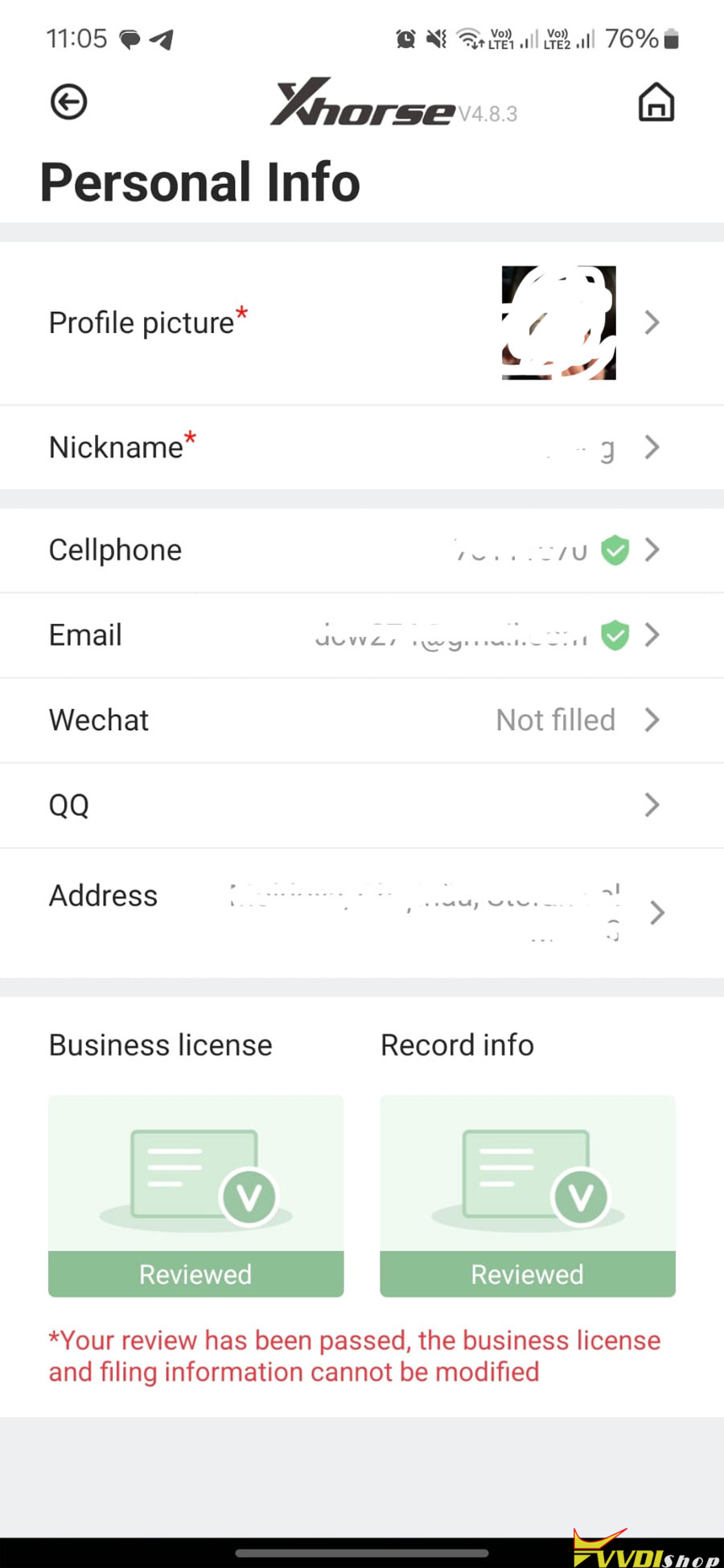
Your review has been passed. Now you can do ID46 online calculation.

Xhorse Key Tool ID46 Calculation Asks for Verification 4