Showing posts with label VVDI MLB Tool. Show all posts

2/28/2026

Xhorse VVDI MLB Tool Network Request Timeout Solution

Problem:

I’m having problems with the Xhorse VVDI MLB Tool server; it won’t connect. I’ve tried with several computers, and it does recognize the SW SN. Any ideas?

Xhorse VVDI MLB Tool Network Request Timeout

Solution:

1 – disable antivirus program.
2 – run software as administrator.
3 – share 4G network from mobile phone to test.

2/23/2026

Xhorse VVDI Key Tool Plus Add Audi A6 2019 MLB Key

User report:

Audi 2019 a6 c8 mlb add key with xhorse vvdi key tool plus all successful.

Dismantle key, read key data with VVDI MLB tool.
Make dealer key and learn key back to car with key tool plus.

Using OEM solution MLB key.
Done takes about hour tops.

Xhorse VVDI Key Tool Plus Add Audi A6 2019 MLB Key 1

Xhorse VVDI Key Tool Plus Add Audi A6 2019 MLB Key 2

Xhorse VVDI Key Tool Plus Add Audi A6 2019 MLB Key 3

Xhorse VVDI Key Tool Plus Add Audi A6 2019 MLB Key 4


2/05/2026

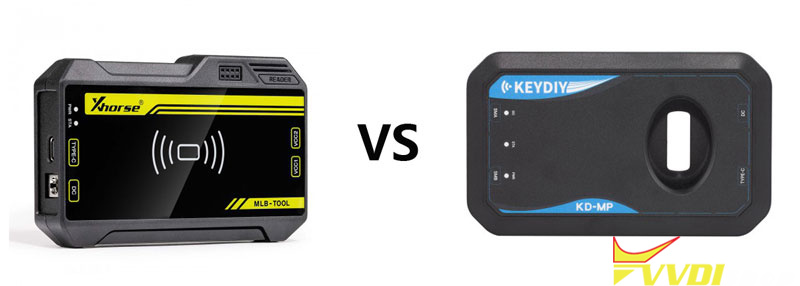
Xhorse VVDI MLB Tool or Keydiy KD-MP for VAG

For the MLB platform (Audi, Porsche, Bentley, Lamborghini), the Xhorse VVDI MLB Tool and KEYDIY KD-MP are the leading specialized solutions. These essential tools bypass the complexities of high-end VAG immobilizers where traditional OBD tools fail. Whether for All Keys Lost (AKL) or adding new keys, choosing the right interface is critical for a safe, successful outcome.

vvdi mlb tool vs keydiy kd-mp


Detailed Comparison: Xhorse MLB Tool vs. KEYDIY KD-MP Specifications

To understand which device fits your workshop’s technical requirements, we have compiled a detailed breakdown of their operational specifications:

FeatureXhorse VVDI MLB ToolKEYDIY KD-MP Tool
Primary VAG PlatformMQB48 & MLB (Audi, Porsche, VW, Bentley)MLB & MQB48
Calculation Speed~8 minutes (Highly stable server)~8 minutes (Cloud-reliant)
Data ManagementLocal File Saving + Cloud BackupPrimarily Cloud-based Storage
Hardware RequirementRequires Key Tool Plus or VVDI2Standalone USB to PC or Bluetooth
Key CompatibilityOriginal & Xhorse Specialized KeysOriginal &KEYDIY Specialized Keys
Cost Per OperationFree (with VVDIRemotes) or 200 Points200 KDCoins per calculation
Special FeaturesBuilt-in Immo Status Detection & 22k ReaderIntegrated Bluetooth OBD “Whistle”
Firmware ControlManual Version Management (Rollback-ready)Auto-update via App/Software
Key WritingHigh-fidelity Wireless WritePoint-to-point Wireless Write
Data SovereigntyHigh(Local Database Encryption)Moderate(Server Dependent)


The Xhorse Advantage: Why It Remains the Professional Benchmark

While both tools are effective, theVVDI MLB Tool is widely regarded as the premium choice for professional environments where data integrity and long-term cost-efficiency are paramount.


  1. Advanced Data Sovereignty

Xhorse provides technicians with the ability to save immobilizer data files locally. This local management is vital for high-end shops; it ensures you have a permanent record of the vehicle’s data, allowing you to generate additional keys in the future without re-calculating or paying extra fees. Unlike purely cloud-reliant tools, Xhorse prevents job failures during server downtime and ensures the privacy of sensitive immobilizer data.


  1. Economic Sustainability

The Xhorse ecosystem is built for high-volume users. By using Xhorse MLB-specific keys, the calculation process is essentially free. Since locksmiths can earn bonus points through other Xhorse products, the VVDI MLB Tool often results in the lowest total cost of ownership(TCO) in the industry.


  1. Superior Detection & Safety

The Xhorse tool features a sophisticated Immo Detection module. Before any writing occurs, the tool can verify the key’s current state (locked/unlocked/initialized). This prevents the accidental waste of expensive original keys and ensures a higher success rate for complex Porsche and Audi jobs.


  1. Ecosystem Synergy

If your shop already utilizes the VVDI Key Tool Plus or VVDI2, the MLB Tool acts as a native component. The software workflow is consistent, meaning less time spent learning new interfaces and more time spent completing jobs.

vvdi mlb tool

Conclusion: Why Xhorse is the Top-Tier Recommendation

The Xhorse VVDI MLB Tool offers a level of stability and local control that is hard to match. Its specialized hardware is engineered for the precision required by Audi and Porsche systems, making it a reliable cornerstone for any automotive security business. For technicians prioritizing data security, local backups, and minimal operational costs, Xhorse remains the undisputed industry standard.

vvdi mlb tool

Ready to upgrade your VAG programming capabilities? Visit www.vvdishop.comtoday to secure your Xhorse VVDI MLB Tool and explore the full range of professional locksmith equipment designed to take your business to the next level.

11/30/2025

Add VW Golf 2020 MQB48 Key Data with VVDI MLB Tool

 Today’s experience with the VW Golf 2020 MQB48 key was very difficult, but the process was successful.

The instrument panel is digital and the key is smart.

Read original key data with Xhorse VVDI MLB Tool MQB48 adapter.

Generate dealer key and learn key with VVDI Key Tool Plus.

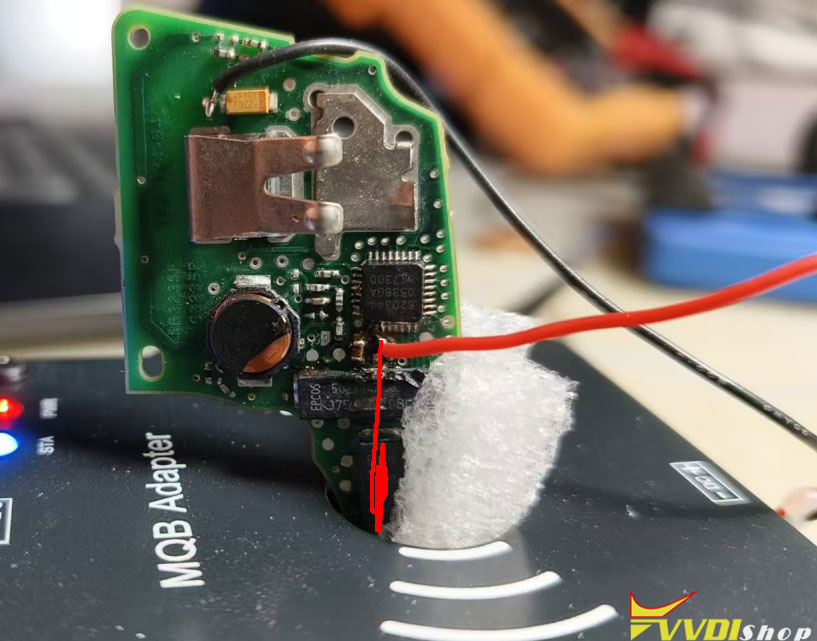
I used read fast time all the time. The main thing is to make sure your wires are soldered properly and the key is positioned securely and the right way.

The Tricky part is to remove the mini capacistor.

You need a microscope and some solder skills.
Then no problem.

Add VW Golf 2020 MQB48 Key Data with VVDI MLB Tool 1

Add VW Golf 2020 MQB48 Key Data with VVDI MLB Tool 2

Add VW Golf 2020 MQB48 Key Data with VVDI MLB Tool 3

Add VW Golf 2020 MQB48 Key Data with VVDI MLB Tool 4

Add VW Golf 2020 MQB48 Key Data with VVDI MLB Tool 5


11/04/2025

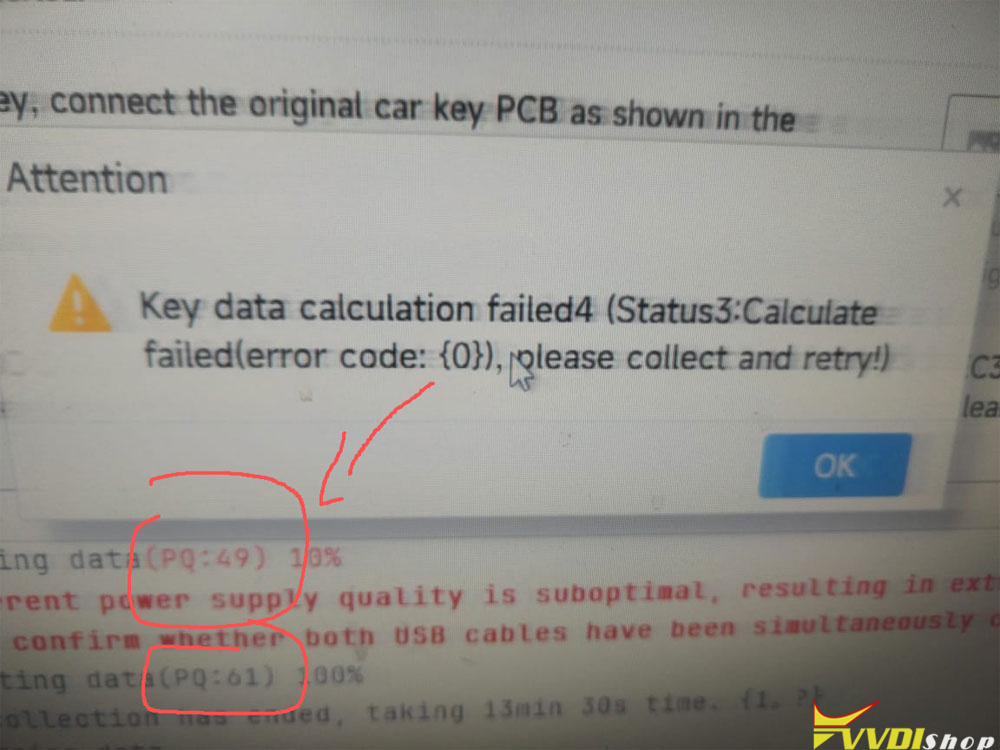
How to Solve VVDI MLB Tool Key Data Calculation Failed 4?

 Problem:

Xhorse VVDI MLB Tool failed to collect original key data for a Skoda Octavia.

Error “Key data calculation failed4, error code 0”.

VVDI MLB Tool Key Data Calculation Failed 4 error 1

Possible reasons and solutions:

During data collection, the PQ value is low which means the calculation signal quality is poor.

VVDI MLB Tool Key Data Calculation Failed 4 error 2

Do the following:

1). Replace it with a shorter USB cable to connect to the computer.

2). Place the key properly during data collection, as shown in the figure.

VVDI MLB Tool Key Data Calculation Failed 4 error 3

10/22/2025

How to Solve VVDI MLB Tool ‘Device Not Connected’ Error?

 Problem:

Failed to use Xhorse VVDI MLB Tool MLB function. The system says the device is not connected. Any solution?

VVDI MLB Tool ‘Device Not Connected’ Error 1

VVDI MLB Tool ‘Device Not Connected’ Error 2

VVDI MLB Tool ‘Device Not Connected’ Error 3

Possible solutions:
1.
Check drivers restart pc, try again.

If the driver was detected, contact us to install CDM V2.12.28 driver.

VVDI MLB Tool ‘Device Not Connected’ Error 4

2. Chip doesn’t look secured on well.
Desolder the new chip and solder it again very good and it is work for you.

The solder paste could be potentially shorting other pins… gotta work on that and solder skills.

9/25/2025

Put Capacitors Back to MLB Key with Xhorse MLB Tool?

 Question:

Done Audi Q7 2019 using Xhorse VVDI MLB tool, please confirm if you have to put the capacitors back in place and what happens if you don’t.

I managed to pull immo off the key and made dealer key with MLB Vvdi, first time trying it , haven’t tried to learn it yet as far as I can tell the key can be detected by mlb tool and remote working on oem with those two capacitors out.

Put Capacitors Back to MLB Key

Here is the clue.

Some users reported not putting back capacitors, the key still works.

Others put back only the bigger one, the key still works like new.

Key will work without, but those components are there for a reason they stabilise MCU. If you are a professional, you should put it back.

If you don’t put capacitors back, that will most likely make the key inconsistent or damage components in the long run.

The capacitors are there to stabilize/regularize the current to the remotes cpu, it will still work for a while but you have to remember they are there to ensure the CPU doesn’t get fried. So say a few weeks or a few months down the line the original remote fails that’s on you to fix.

Those are decoupling capacitors used to reduce HIGH FREQUENCY noise on the power rail on the MCU. Still will function but might fail due to rail voltages not being stable due to too much noise on the rail. Typically In pico Farhad range.

7/15/2025

Xhorse MLB Tool Add Audi TT 2016 MQB48 Key

 User feedback:

Add a spare key to Audi TT 2016 with Xhorse VVDI MLB Tool + VVDI2.
Virtual cockpit.
Its not MLB key its mqb48. It looks like an MLB key but its not.
Obtain key data with MLB Tool + MQB48 adapter from working key.
Then learn key with VVDI2.

Tool used:

VVDI MLB Tool + MQB48 adapter

A new MLB key

VVDI2

Xhorse MLB Tool Add Audi TT 2016 MQB48 Key 1

Xhorse MLB Tool Add Audi TT 2016 MQB48 Key 2

Xhorse MLB Tool Add Audi TT 2016 MQB48 Key 3


6/22/2025

New VVDI MLB Tool Have Enhanced Chip Installed

 Problem:

Xhorse MLB Tool – MQB Adapter install.
I have the MQB adapter for VVDI MLB Tool.
I watched a youtube about flipping this board over to swap the chip.
My coil wires are secured, circled blue in the picture. Prevent board from flipping.
Who has dealt with this? Did you manage to break the glue holding the coil wires without breaking the wires themselves ? There is barely any room to work.

New VVDI MLB Tool Have Enhanced Chip 1

New VVDI MLB Tool Have Enhanced Chip 2

Solution:

It could be you already have the new mlb version that comes with the updated chip. No need to swap it. Look at the mask on the IC and compare to the mqb one.

Newer ones will have the enhanced chip installed already.

Don’t need to replace the chip again.