
Introduction & Initial Challenge:
The vehicle in question, a BMW X6 F16 BDC system, arrived with a complete key loss (AKL). In such modern BMWs, simply programming a new key via the OBD-II port is not possible without first obtaining critical security data and preparing the vehicle’s central computer. The primary challenge involves two main steps:
Reading the Immobilizer Security Number (ISN) from the Engine Control Unit (DME).
Unlocking and preparing the Body Domain Controller (BDC) to accept new keys.
Step 1: Reading the ISN from the DME
Since no keys were present, the first step was to physically access the vehicle’s engine control units.
Remove DME from the vehicle. The specific model was identified as Bosch 0261 S15 497 (MEVD 17.2.h).
You can read ISN code with CG FC200 programmer on bench.
Step 2: Unlock and Prepare the BDC
With the ISN acquired, the next step was to prepare the BDC, the vehicle’s main security and access module.
Physical Access: The BDC was carefully removed from the vehicle. Its cover was opened to reveal the internal circuit board and the essential M95xxx EPROM chip.
Read and save BDC 95256 eeprom data with vvdi prog and clip adapter.


Bench Setup: The BDC was placed on a dedicated test bench, where power and necessary connectors were attached to simulate being in the vehicle.
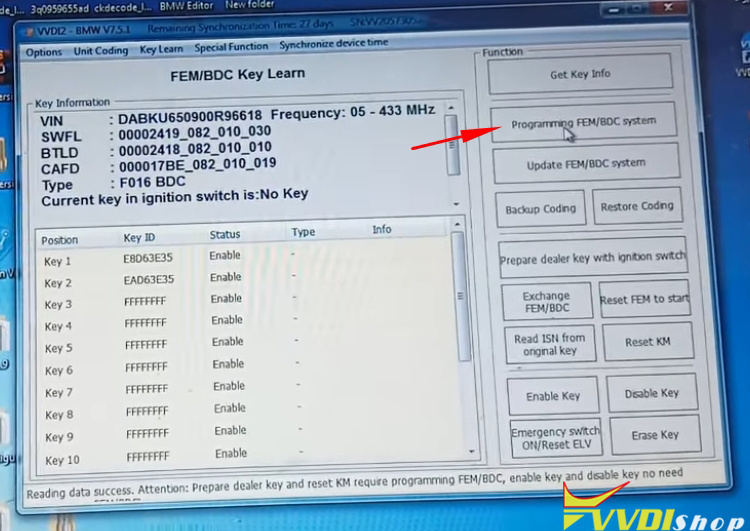
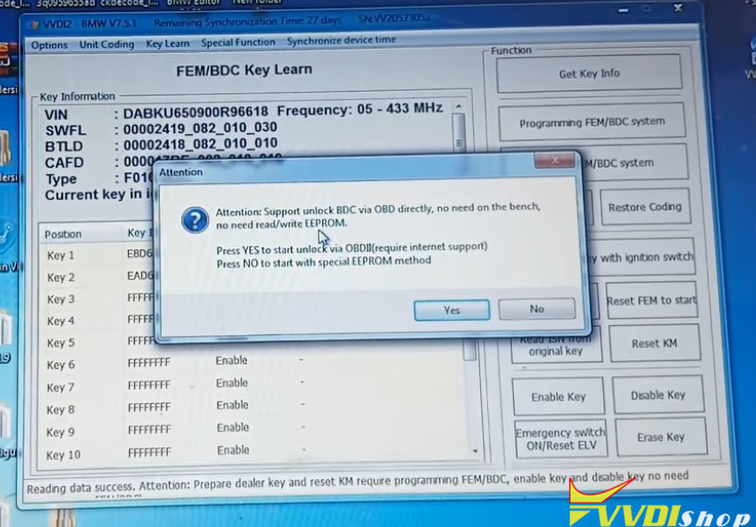
Unlocking via VVDI2: Instead of directly reading and writing the EEPROM, we used the VVDI2. By selecting the “BDC Key Learn” function and choosing to program/unlock the BDC directly via OBD (simulated on the bench), the tool connected to an online server.
Server-Side Unlocking: This process involved the server generating a modified “flash file.” The VVDI2 tool then wrote this file to the BDC, a process that took several minutes. Upon completion, a message confirmed the “FEM BDC update success.”


Step: Programming Key
After the BDC was successfully unlocked, we proceeded to program the first new key.
Key Learning: Back in the VVDI2’s “BDC Key Learn” menu, the “Add Key” function was used. The previously saved ISN was pasted into the tool.
Success with Anomalies: The key was successfully learned, and the car started successfully. The remote functions also worked after a battery was installed in the key fob.
Persistent Fault Code: A diagnostic scan revealed a persistent “SWFL Lost” (Steering Wheel Lock) fault code. Clearing this fault permanently would require a full update of the BDC using BMW’s official ESys software, a step deferred based on the customer’s potential need for only one key.


No comments:
Post a Comment
Note: Only a member of this blog may post a comment.