Showing posts with label vvdi prog. Show all posts

10/28/2026

Xhorse VVDI Prog Read Fiat BCM D70F3237

This is a tutorial pinout for BCM fiat (bravo/doblo etc….). It is color wire diagram for Xhorse VVDI Prog.

For reading flash D70f3237.

When do this job it is advised to remove eeprom when reading/writing flash; EEPROM ST95160 read in external programmer.

Xhorse VVDI Prog Read Fiat BCM D70F3237 1

Xhorse VVDI Prog Read Fiat BCM D70F3237 2

Xhorse VVDI Prog Read Fiat BCM D70F3237 3


VVDI Prog Read and Write Peugeot 307 BSI G0X

Read and write the Peugeot 308 Valeo BSI G0X with Xhorse VVDI Prog programmer.

Model: Peugeot 307
BSI: G0X 912DG128A

In VVDI Prog software, select
2-MCU
Motorolla MC68HC(9)12
MC912DG128A- unsecured

Photos attached:

VVDI Prog Read and Write Peugeot 307 BSI G0X 1

VVDI Prog Read and Write Peugeot 307 BSI G0X 2

VVDI Prog Read and Write Peugeot 307 BSI G0X 3

VVDI Prog Read and Write Peugeot 307 BSI G0X 4

VVDI Prog Read and Write Peugeot 307 BSI G0X 5

VVDI Prog Read and Write Peugeot 307 BSI G0X 6


8/27/2026

Xhorse VVDI Prog Replace Freelander 2 BCM BG9T-14D572-LA

Replaced Land rover Freelander 2 BCM using Xhorse VVDI Prog programmer successfully.

Part number: BG9T-14D572-LA

Read and flash CPU and 95320 eeprom data.  Then install BCM module back to car without programming.

VVDI Prog Menu:

Type 2
Renesas M32C
M30882FJ

Xhorse VVDI Prog Replace Freelander 2 BCM BG9T-14D572-LA 1

Xhorse VVDI Prog Replace Freelander 2 BCM BG9T-14D572-LA 2

Xhorse VVDI Prog Replace Freelander 2 BCM BG9T-14D572-LA 3

Xhorse VVDI Prog Replace Freelander 2 BCM BG9T-14D572-LA 4

Xhorse VVDI Prog Replace Freelander 2 BCM BG9T-14D572-LA 5

Xhorse VVDI Prog Replace Freelander 2 BCM BG9T-14D572-LA 6


8/26/2026

Xhorse VVDI Prog Delphi MT62.1G ECU Pinout

Here comes the Xhorse VVDI Prog pinout to Delphi MT62.1G ECU.

Yellow-RESET
Orange -JCOMP
Brown -TCK
Purple -TDI
Black -GND
Green -TDO
Blue -TMS

Need to connect a 100 ohm resistor between JCOMP and VCC.

In VVDI Prog software, select
2-Microcontroller
Motorola MPC563 series
MPC5634M

Xhorse VVDI Prog Delphi MT62.1G ECU Pinout 1

Xhorse VVDI Prog Delphi MT62.1G ECU Pinout 2

Xhorse VVDI Prog Delphi MT62.1G ECU Pinout 3

Xhorse VVDI Prog Delphi MT62.1G ECU Pinout 4


7/14/2026

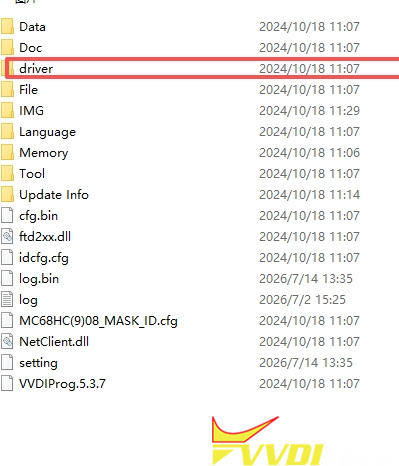
Xhorse VVDI Prog Config File Error Not Find Device?

Problem:

Tried to update Xhorse VVDI Prog software to V5.3.8. But it failed and reported Config File Error and Not find Device. Any idea?

Xhorse VVDI Prog Config File Error  1

Xhorse VVDI Prog Config File Error  2

Solution:

Check if the yellow light on the VVDI Prog is flashing. If it isn’t, unplug the device and plug it back in to try reading it again.

You can also navigate to the VVDI Prog folder, go to the “DRIVER” directory, and double-click the 2016 file to install the driver.

Xhorse VVDI Prog Config File Error  3

If it still isn’t working, disconnect everything—including the power supply—and connect only the USB cable. If the yellow light doesn’t flash even after unplugging and reconnecting it, the device is faulty.

7/08/2026

Repair Jaguar XF BCM with Xhorse VVDI Prog and Multi Prog

Does Xhorse Multi Prog or VVDI Prog repair Jaguar XF BCM data?

Repair Jaguar XF BCM with Xhorse VVDI Prog 1

You can use same software as FRM repair. A common issue on this BCM, and others that share the same type of Freescale MCU (BMW etc) is when the power is disconnected from the vehicle before the module has went to sleep, the MCU contents corrupt.
This means the emulated eeprom becomes scrambled.
We can recover this from the d-flash allowing the car to be restored to working condition.

Read flash, make eeprom file, delete eeprom and write repaird eeprom file.


Procedure:

Read dflash (vvdiprog or multiprog- IMMO-Jaguar-BCM 9S12XET256 ). Xhorse key tool plus also also read flash for this BCM.
Set the partition manually for reading.
eee 0kb dflash 128
Use the convert tool for BMW FRM3.
Remove first bytes to obtain 2kb
Set partition eee 2kb and dflash 16kb
Write eeprom.

Repair Jaguar XF BCM with Xhorse VVDI Prog 2

Repair Jaguar XF BCM with Xhorse VVDI Prog 3

Example:

Jaguar XF in today with a BCM failure caused by battery disconnection.
Repaired and running perfectly again.

Repair Jaguar XF BCM with Xhorse VVDI Prog 4


6/30/2026

VVDI Prog and VVDI2 Program Volvo S60 2004 All Keys Lost

It’s a very old car- a 2004 Volvo S60 with Megamos ID48 transponder key. All keys have lost. The customer had owned it for over 20 years but had accidentally lost every single key. He had tried finding someone to make replacements, but everyone told him it couldn’t be done.


It can be done with Xhorse VVDI Prog and VVDI2 bundle.


Procedure:

Remove and disassemble the CEM immo box from car.

The immobilier data is stored in the chip 28F400B5B.
Desolder the chip and solder to vvdi prog SOP44 adapter.
Read chip data with vvdi prog.
In VVDI Prog software, select Intel- AB28F400B5B(PSOP44).
Read and save CEM 28F400 flash data.
Run VVDI2 software, select

Region: Europe
Brand:Volvo
Model: S60
Type: -2003(28F400)

Uploaded the immo data read by vvdiprog.

Place a Megamos ID48 chip and make dealer key via dump.

Cut a new mechanical key.

Now car starts.

Images attached:

VVDI Prog and VVDI2 Program Volvo S60 2004 All Keys Lost 1

VVDI Prog and VVDI2 Program Volvo S60 2004 All Keys Lost 2

VVDI Prog and VVDI2 Program Volvo S60 2004 All Keys Lost 3

VVDI Prog and VVDI2 Program Volvo S60 2004 All Keys Lost 4

VVDI Prog and VVDI2 Program Volvo S60 2004 All Keys Lost 5

VVDI Prog and VVDI2 Program Volvo S60 2004 All Keys Lost 6

VVDI Prog and VVDI2 Program Volvo S60 2004 All Keys Lost 7

VVDI Prog and VVDI2 Program Volvo S60 2004 All Keys Lost 8

VVDI Prog and VVDI2 Program Volvo S60 2004 All Keys Lost 9

VVDI Prog and VVDI2 Program Volvo S60 2004 All Keys Lost 10


6/03/2026

Xhorse VVDI Prog Delphi MT62.1 ECU Pinout

Xhorse VVDI Prog read and write JAC vehicles Delphi MT62.1 engine control module ECU successfully. BITBOX can only recognize ID, PCM (genuine) can read but it is costy. VVDI-Prog can read this ecu if using the correct pinout.


Check the wiring diagram pinout here:

Xhorse VVDI Prog Delphi MT62.1 ECU Pinout 1

Xhorse VVDI Prog Delphi MT62.1 ECU Pinout 2

Xhorse VVDI Prog Delphi MT62.1 ECU Pinout 3

Xhorse VVDI Prog Delphi MT62.1 ECU Pinout 4

Xhorse VVDI Prog Delphi MT62.1 ECU Pinout 5

Xhorse VVDI Prog Delphi MT62.1 ECU Pinout 6

Xhorse VVDI Prog Delphi MT62.1 ECU Pinout 7

Xhorse VVDI Prog Delphi MT62.1 ECU Pinout 8

Xhorse VVDI Prog Delphi MT62.1 ECU Pinout 9

Xhorse VVDI Prog Delphi MT62.1 ECU Pinout 10

If it fails to read MT62.1 ECU by this pinout, try this:

VCC not connected; connect a 302-ohm resistor to REST. Cut the line on the right. Most importantly, connect a 1k resistor from the VCC point to JCOMP.

Xhorse VVDI Prog Delphi MT62.1 ECU Pinout 11

Xhorse VVDI Prog Delphi MT62.1 ECU Pinout 12

Xhorse VVDI Prog Delphi MT62.1 ECU Pinout 13

Xhorse VVDI Prog Delphi MT62.1 ECU Pinout 14

Xhorse VVDI Prog Delphi MT62.1 ECU Pinout 15

FYI:

VVDI Prog Pinout to Dephi MT62.1G ECU

Xhorse VVDI Prog Delphi MT62.1 ECU Pinout 16

Xhorse VVDI Prog Delphi MT62.1 ECU Pinout 17