Showing posts with label Xhorse XM38 smart key. Show all posts

11/01/2026

Xhorse Generate 2025 Hyundai Tucson 4A XM38 Smart Remote

In its recent database upgrade, XHORSE app has added the 2025 Hyundai Tucson ID4A program, and it can now generate 4A smart key using Xhorse XM38.

Xhorse Generate 2025 Hyundai Tucson 4A XM38 1

Generate Xhorse XM38 universal, XM38 Hyundai, XM38 BMW F smart remote under the Tucson 2025 ID4A-95440-N8100 option.

Chip type ID4A.

Key button configuration:
VVDI remote function- smart key customization
Lock-01
Unlock-02
Trunk-07

Xhorse Generate 2025 Hyundai Tucson 4A XM38 2
Xhorse Generate 2025 Hyundai Tucson 4A XM38 3

After generating the Xhorse XM38 remote, program XM38 with a proper OBD programmer (Xhorse Key Tool Plus does not have this menu. Some users have tested working with Autel IM608 and Launch X431 IMMO device).

You may need to buy pin code because many OBD programmer will not retrieve the password for this model.

Previously, programming keys for this vehicle required an original factory key, but now the cheaper XM38 can be used.
 

7/07/2026

Xhorse XZPG00EN Smart Key Peugeot Keyless Not Working Solution

Problem:

Tried to add a smart key to a Peugeot 2019 5008, the original pcb A3M05, the new key pcb same oem A3M05, PCB all layout same, 2nd key remote work ok! But keyless start not work! Xhorse XZPG00EN PSA smart key keyless doesn’t work, remote work, and start near ignition coil work. Any solution?

Xhorse XZPG00EN Smart Key Peugeot Keyless Not Working

Solution:

Xhorse XZPG00EN is the special remote for some PSA 4A system models only.

Use Xhorse XM38 instead. 

Xm38 Xhorse remotes work pretty consistently with these.

I added a key using the Xhorse XM38, and it works perfectly on a Peugeot 3008.

6/22/2026

Xhorse XM38 Failed to Generate VW Golf 8 5D Key?

Problem:

I wanna program an Xhorse key for a VW golf 8 MQB49 5D, but when I try to prepare the key it doesn’t work. Xhorse told me to put a BMW F series or xm38 but it doesn’t work.

I tried with Xhorse xm38 and BMW F Series XM38 smart remote. And xm38 it told me « need contact support, need update » but I have the last update.


Xhorse XM38 Failed to Generate VW Golf 8 5D Key 1

Xhorse XM38 Failed to Generate VW Golf 8 5D Key 2

Xhorse XM38 Failed to Generate VW Golf 8 5D Key 3

Xhorse XM38 Failed to Generate VW Golf 8 5D Key 4

Solution:

You cannot generate VAG 5D key using the universal XM38 remote.

Use BMW F XM38 XSBMB1BM or XSBMK1BM remote instead. The Xhorse dedicated 5D key is not yet released.

Take out PCB and generate again.

If still not working, use OEM 5D Key instead.

If the original key has UWB function, must use OEM 5D key.

6/08/2026

Xhorse Toyota XM38 Boot Button Not Working Solution

Here comes the problem:

Successfully programmed a Xhorse XM38 smart key for a Toyota, and the lock/unlock functions worked perfectly. However, the boot (trunk) button was completely unresponsive.


The Problem

  • The original Toyota key worked fine (lock, unlock, and boot buttons all functional).

  • The new XM38 smart key was programmed successfully.

  • Lock and unlock worked, but the boot button did nothing.

Xhorse Toyota XM38 Boot Button Not Working 1

This guide will walk you through the simple process to enable the boot button on an XM38 smart key, so you can avoid the same issue.


The Solution

Activating the boot button requires not just programming the key, but also modifying a setting via a key programming tool. Below is the step-by-step process as demonstrated using the Key Tool Plus (the same process works with other devices like MINI Key Tool or Key Tool Max Pro).


Step 1: Prepare the Key

  1. Open the XM38 key shell.

  2. Remove the PCB (printed circuit board).

  3. Insert a battery into the PCB.

Step 2: Program the Remote

  1. Go to the Remote Program menu on your device.

  2. Navigate to Asia → Toyota.

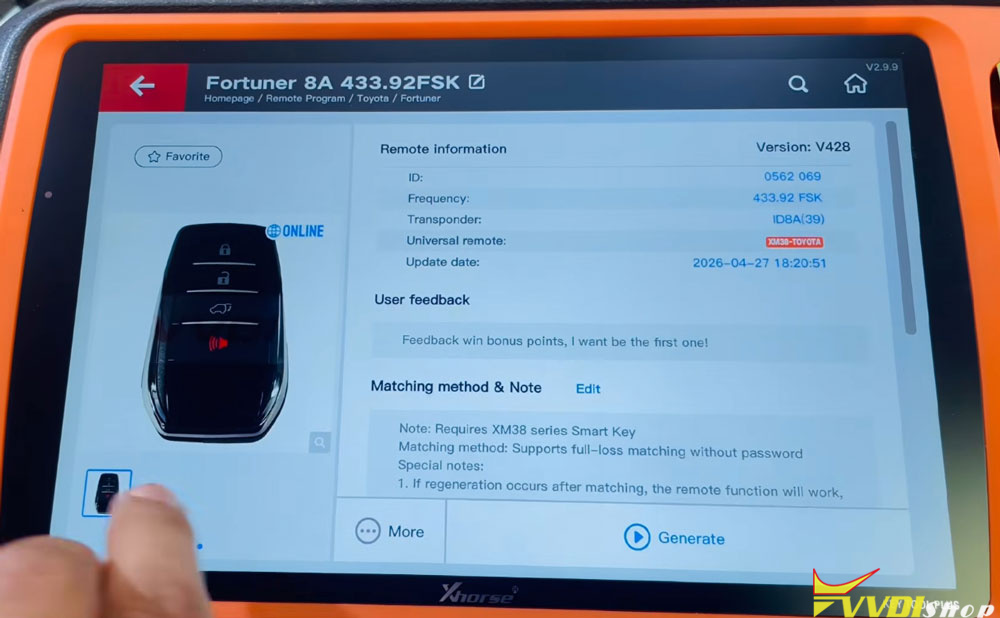
  3. Select the second option for Fortuner (the relevant model).

  4. Choose the first photo option: Toyota Smart Key.

  5. Generate the data. (This may take a moment as it generates online.)

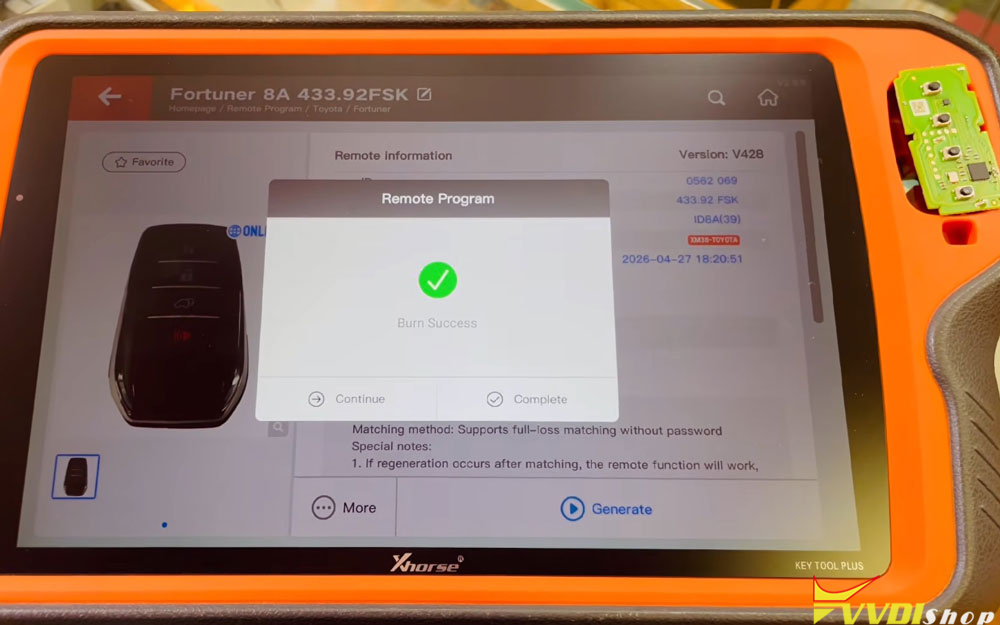
  6. Wait for writing to reach 100% and confirm Burn Success Complete.

At this point, lock and unlock will work, but the boot button will still be inactive.

Xhorse Toyota XM38 Boot Button Not Working 2

Xhorse Toyota XM38 Boot Button Not Working 3

Step 3: Enable the Trunk Button via Special Functions

  1. Return to the Home Page on your device.

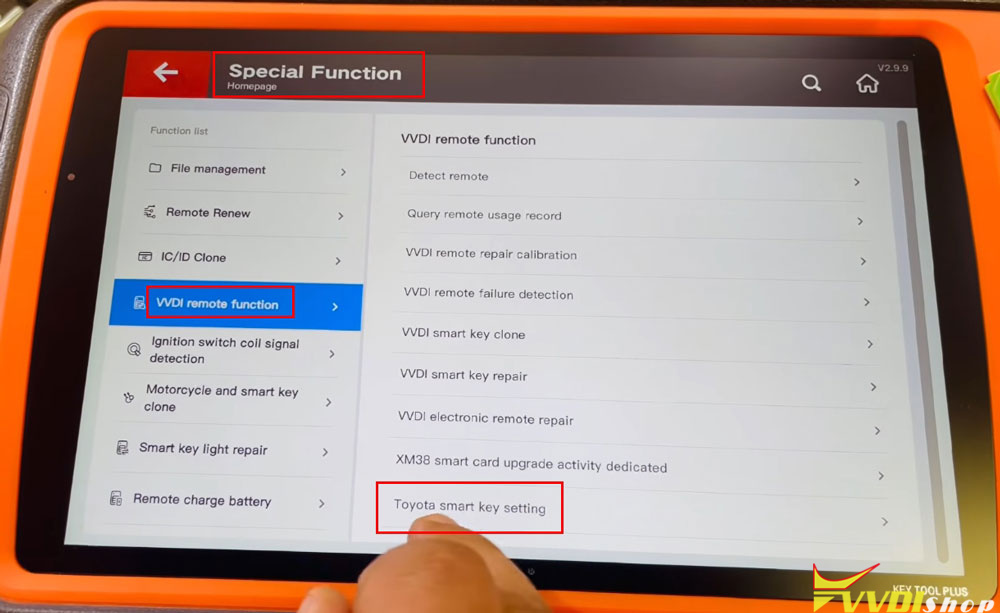
  2. Go to Special Function.

  3. Select VVDI Remote Function.

  4. Choose Toyota Smart Key Settings.

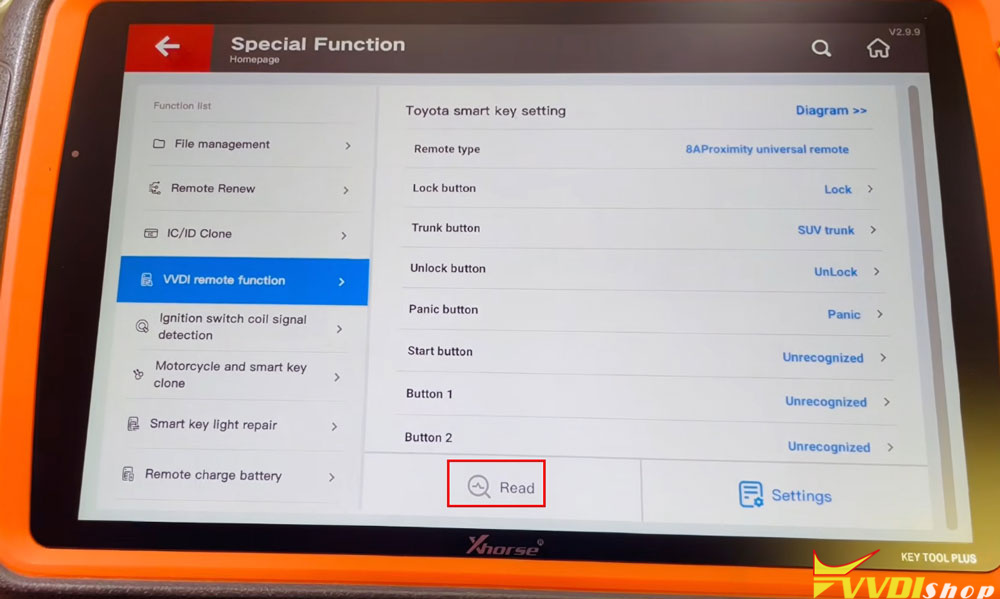
  5. Press OK, then select Read to load the current key details.

Xhorse Toyota XM38 Boot Button Not Working 4

Xhorse Toyota XM38 Boot Button Not Working 5

Step 4: Modify the Trunk Button Setting

  1. In the settings, you’ll see an option to modify the Trunk Button.

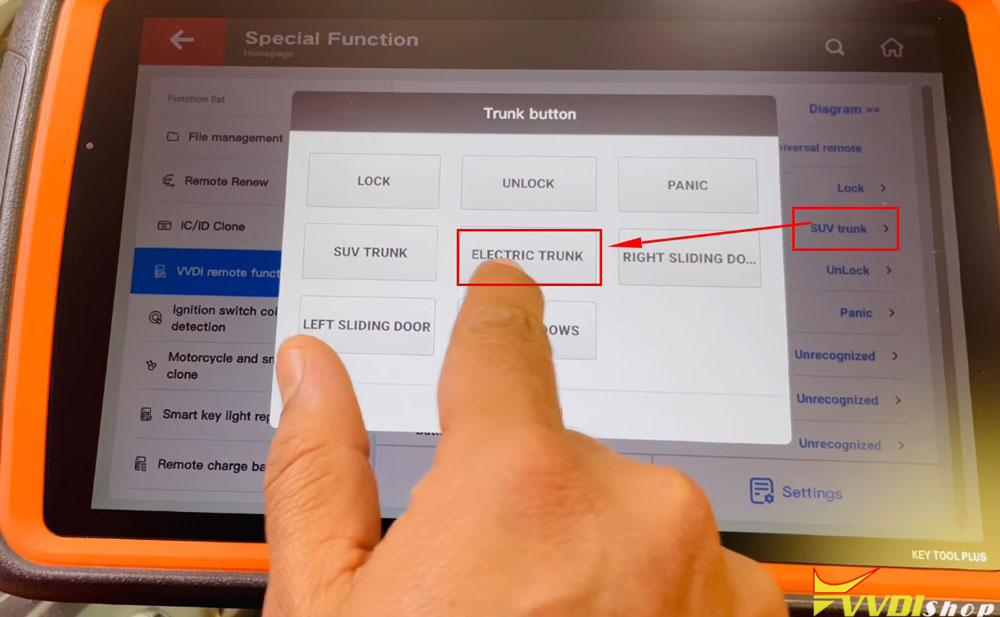
  2. If the setting shows SUV Trunk, change it to Electric Trunk.

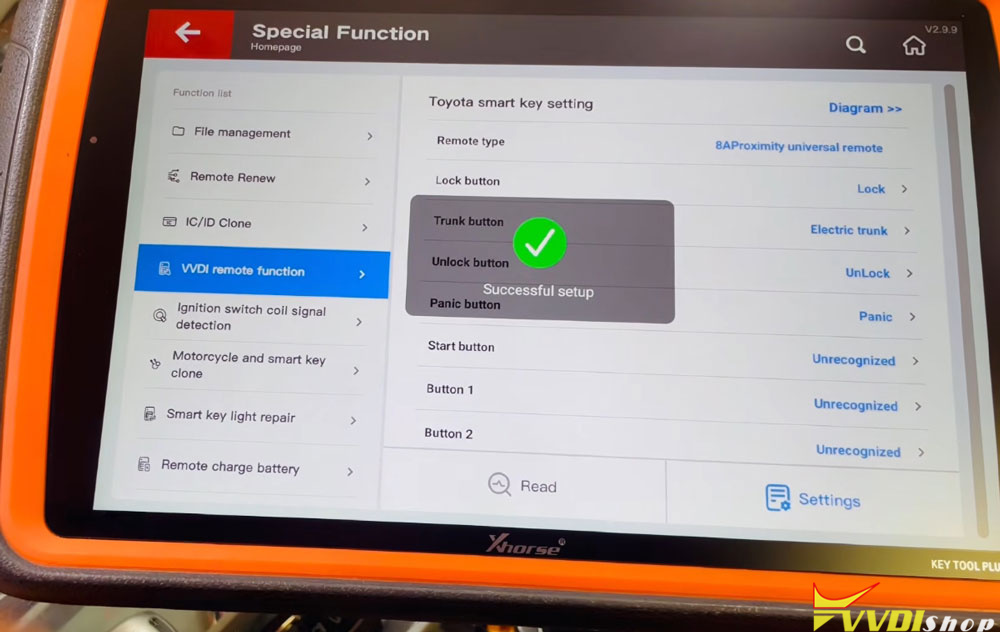
  3. Press OK, then go into Settings and click once more.

  4. You should see a confirmation: Setting Successful.

Xhorse Toyota XM38 Boot Button Not Working 6

Xhorse Toyota XM38 Boot Button Not Working 7

Step 5: Verify

After completing these steps, the boot button on your XM38 smart key will work exactly like the original key.


Why This Matters

With this two-minute fix, you can avoid the same loss and provide a fully functional key to your customer.

www.vvdishop.com

3/16/2026

Xhorse XM38 2022 Kia Proximity Weak Solution

Problem:

Great success on 2022 kia seltos. The Xhorse XM38 smart key worked perfectly but sorta had weak proximity had to have out of pocket sit it on center console working perfectly is there a way to adjust proximity ?

Xhorse XM38 2022 Kia Proximity Weak 1

Xhorse XM38 2022 Kia Proximity Weak 2

Solution:

You can adjust it in the smart key settings on VVDI keys on Key tool plus or key tool max.

Just keep in mind if you increase transmit power, fob battery drain dramatically increases.

Or use Xhorse XZKA82EN remote.

Use this kind of remote. It’s especially made for Kia /Hyundai. Programmed one to my car and it’s perfect.

Xhorse XZKA82EN

12/28/2025

Xhorse XM38 Toyota RAV4 No Proximity Function Solution

 Problem:

Tried to generate 2011 Toyota RAV4 AKL proximity with Xhorse key tool max pro using XM38 Toyota smart key. Tried every option available for the 11 model and with some option I get no beeps and with some I get a single beep when adding new proximity after smartbox reset. Any solution?

Xhorse XM38 Toyota RAV4 No Proximity Function

If you have one beep it means that the transponder sets correctly but the proximity part of the key isn’t, you need your change frequencies in order to find the working one.

Possible solutions:

Solution 1:

RAV4 & Highlander generally share the same keys around that era.
In special functions/vvdi remote settings/toyota scan your XM38 & check the signal strength (0 is the strongest – 7 is weakest)
We’ve had cars with the right profile not detect because the signal strength was a 4, changed to 1 and went straight in with 2 beeps.


Solution 2:

Take out battery of xm38 after correct remote generation.
For some weird reason the double beeps on successful add, only happen with no battery in remote.
It’s counter intuitive as you usually just leave battery in to generate. Try it next time, it’ll work perfect. Have to do this on prox Toyotas only.