Showing posts with label vvdi2 vw. Show all posts

4/11/2022

2009 VW Tiguan All keys lost with VVDI2 in Service Mode

 Here is the tips to program 2009 VW Tiguan with all keys lost by xhorse vvdi2 in ABS service mode.  The procedure can also be applied to these login type include (CDCxx+24C32, A3/TT/R8 (CDC32xx), NEC24C32, NEC24C64, NEC24C64(2012 TFT color display), NEC24C64(2013-), NEC24C64(2013 TFT color display), Audi A1, Audi Q3).

  • Open the dash, read the eeprom with programmer.
  • Upload the binf le to the vvdi2 and mofidy.
  • Write the modified file to the eeprom
  • Connect the dashboard on the car and write the original file back by OBD
  • Then read the immo data and program the key.

Don’t forget to SAVE ABS coding with VVDI before the process. You can restore with VVDI2 too.

This function is in the same menu of vvdi2 as eeprom update section, dash with micronas + 24C32.


Xhorse VVDI2 Service mode

All login type have similar operation for lost all keys,

backup ABS coding->read EEPROM with BDM programmer->Prepare a service EEPROM data->write service EEPROM data to cluster->Put instrument in car->select correct login type->Load

original EEPROM file->activate car OBDII communication->write EEPROM via OBDII->read immo data->save immo data->make dealer key->add key->reset instrument.

2009 VW Tiguan All keys lost with VVDI2 in Service Mode

Service mode all Keys lost:

Some login type cannot read immo data while lost all working key. Login type include (CDCxx+24C32, A3/TT/R8 (CDC32xx), NEC24C32, NEC24C64, NEC24C64(2012 TFT

color display), NEC24C64(2013-), NEC24C64(2013 TFT color display), Audi A1, Audi Q3). This type can make dealer key with following steps:

1) Activate OBD communication by open dangerous light, press on the brakes for several times. Backup ABS coding, you can run backup function on bottom right corner, or enter diagnostics 03 ABS, backup abs coding

2) Find EEPROM chip from instrument, usually use 24C32 or 24C64 chip, read EEPROM dump with BDM programmer and save as original EEPROM dump

3) Enter “Service Mode”, load original EEPROM dump and prepare service EEPROM dump. Attention: DON’T overwrite the original EEPROM dump

4) Write service EEPROM dump to EEPROM chip (24C32 or 24C64)

5) Restore dashboard to car

6) Back to main window and select right login type

7) Load original EEPROM dump (IMPORTANT!!!)

8) Activate OBD communication by open dangerous light, press on the brakes for several times

9) Press “Write EEPROM” write original dump to dashboard via OBDII (IMPORTANT!!!)

10) After write success, read immo data and save (IMPORTANT!!!)

11) Make a new dealer key and add to immobilizer system

12) If car use keyless key, learn the dealer key with learn method (with immo data support)

13) Start engine with new dealer key, complete.

www.vvdishop.com

8/09/2020

How to Change VW EDC17 Immo Data in EEPROM with VVDI2?

Here vvdishop.comm presents how work Xhorse VVDI2 VAG for change immo data in eeprom from Seat Ibiza EDC17U01 .


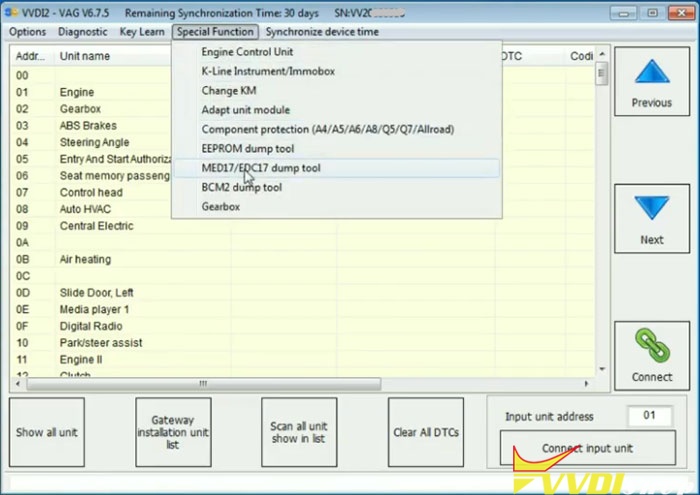
Run VVDI2 Quick Start->Seat->Special Function->MED17/EDC17 dump tool

vvdi2-change-edc17-immo-data-1

vvdi2-change-edc17-immo-data-2


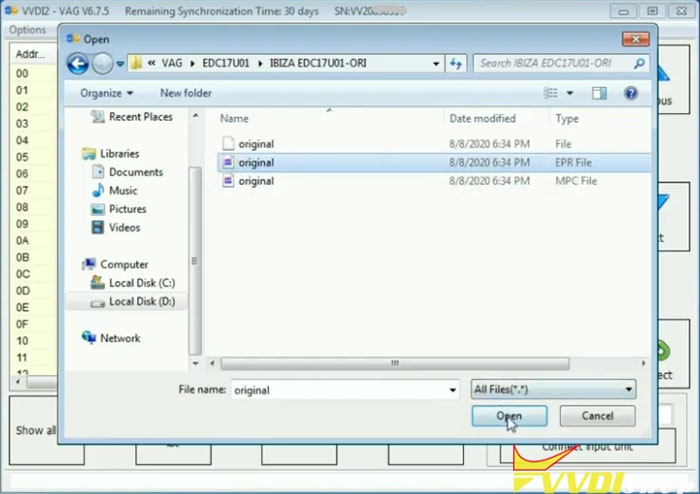
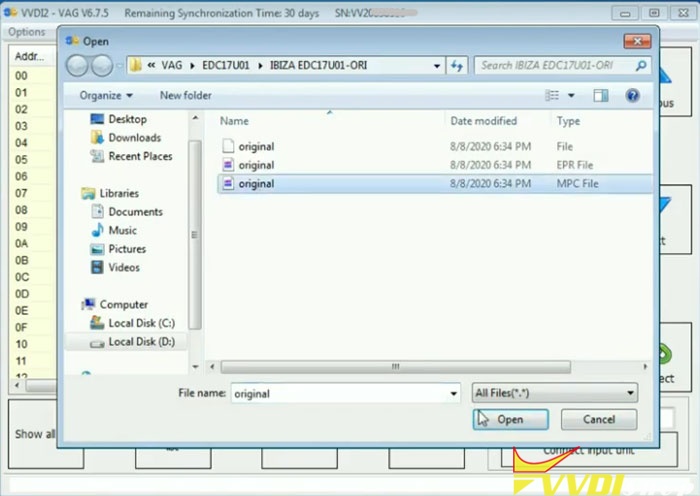
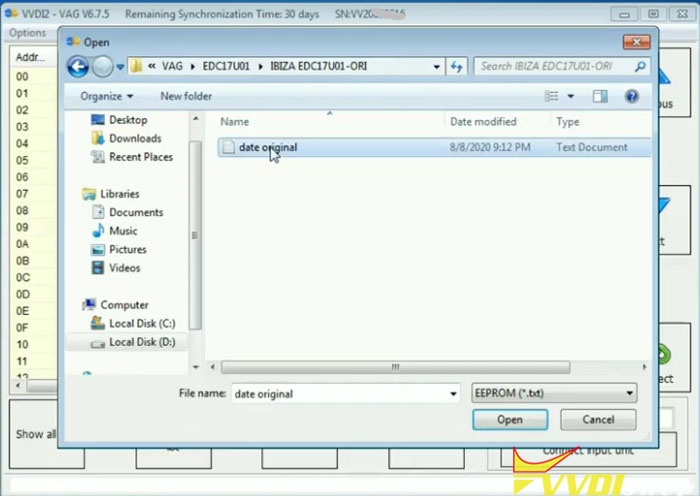
Load EEPROM File,  upload original Ibiza EDC17U01 eeprom

vvdi2-change-edc17-immo-data-3

vvdi2-change-edc17-immo-data-4

Load Flash file, upload original EDC17U01 flash file

vvdi2-change-edc17-immo-data-5

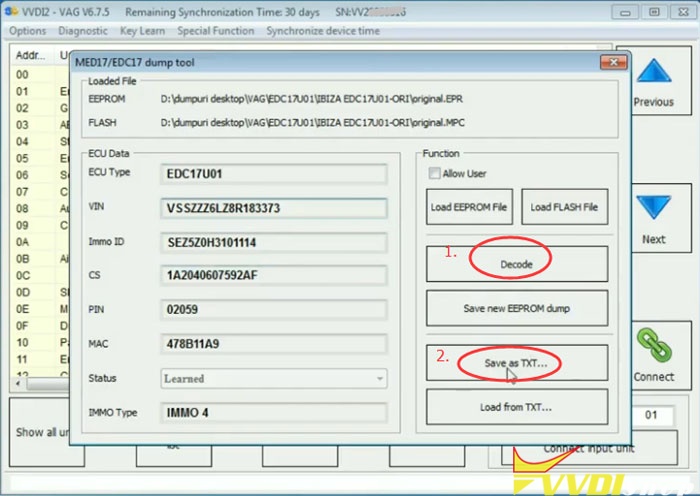
Then press Decode

vvdi2-change-edc17-immo-data-6

Decode ECU information, incl. ECU Type, CIN, CS, PIN MAC, Immo type

vvdi2-change-edc17-immo-data-7

Save as TXT

Upload EEPROM file and Flash File you want to change respectively

vvdi2-change-edc17-immo-data-8

vvdi2-change-edc17-immo-data-9


Then Decode
missing IMMO ID, Load from TXT saved previously

vvdi2-change-edc17-immo-data-10

vvdi2-change-edc17-immo-data-11

Decode success. Save new EEPROM dump.

vvdi2-change-edc17-immo-data-12

vvdi2-change-edc17-immo-data-13

Open txt file to check ECU information

vvdi2-change-edc17-immo-data-14

change EDC17 immo data in eeprom success.


www.vvdishop.com


https://www.vvdishop.com/service/vvdi2-change-vw-edc17-immo-data-in-eeprom.html

10/17/2019

VVDI2 and OBD Helper adds VW Passat MQB JC Keyless Remote

Only working with one OBD helper can VVDI2 add new keys on VW Passat MQB JC keyless remote key.

Immo type:
MQB -Johnson Controls

Need:
VAG OBD helper (with Network Connection)
One original keyless GO key
vw-passat-mqb-jc-keyless-vvdi2-obd-helper-1
vw-passat-mqb-jc-keyless-vvdi2-obd-helper-2
Video Guide

Step 1. Use OBD helper to read the MQB – NEC35XX part immo data
The original remote key can start the car, press the ” Engine start /stop” to turn on ignition on.
vw-passat-mqb-jc-keyless-vvdi2-obd-helper-3

vw-passat-mqb-jc-keyless-vvdi2-obd-helper-4
Install VAG OBD Helper V1.0.0 software on the computer, connect OBD Helper to the VW – Magotan.
Click on “Read car information” to have info of manufacture, VIN, Immo type, power, key count, KeyID etc.
Reading data…
Connecting to server…
MQB -NEC35XX part immo data success saved…
vw-passat-mqb-jc-keyless-vvdi2-obd-helper-5

vw-passat-mqb-jc-keyless-vvdi2-obd-helper-6
Step 2: Prepare dealer key first, then learn the new dealer key to car.
Unplug VAG OBD Helper from the VW – Magotan, then connect VVDI2 cable.
vw-passat-mqb-jc-keyless-vvdi2-obd-helper-7

Open VVDI2 software, go to VW /Audi /Skoda Online Key Learn -> Special Function
Click on “Diag” and have message Johnson Controls will be supported in future.
Click on “Key Learn” -> “MQB platform instrument immobilizer” -“Instrument with NEC35xx (Continental /VDO).
vw-passat-mqb-jc-keyless-vvdi2-obd-helper-8

vw-passat-mqb-jc-keyless-vvdi2-obd-helper-9
Click on “Immo data prepare key” to load immo data.
vw-passat-mqb-jc-keyless-vvdi2-obd-helper-10

vw-passat-mqb-jc-keyless-vvdi2-obd-helper-11
Choose car manufacture “VW”, then “Next”.
vw-passat-mqb-jc-keyless-vvdi2-obd-helper-12
Click on “Yes” to continue prepare normal dealer key.
vw-passat-mqb-jc-keyless-vvdi2-obd-helper-13
Put the original key into the coil of VVDI2 machine.
Select “add key”.
vw-passat-mqb-jc-keyless-vvdi2-obd-helper-14

vw-passat-mqb-jc-keyless-vvdi2-obd-helper-15

vw-passat-mqb-jc-keyless-vvdi2-obd-helper-16

vw-passat-mqb-jc-keyless-vvdi2-obd-helper-17
Do you want to save the synchronize data? you can prepare a dealer key with synchronize data while lost all key.
vw-passat-mqb-jc-keyless-vvdi2-obd-helper-18

vw-passat-mqb-jc-keyless-vvdi2-obd-helper-19
Please input the new key (Xhorse key XSMQB1EN 3 Buttons)into device programmer.
vw-passat-mqb-jc-keyless-vvdi2-obd-helper-20
Prepare dealer key success, please learn the new dealer key to car.
vw-passat-mqb-jc-keyless-vvdi2-obd-helper-21
Click on “Add key”.
You should backup EEPROM and Immo data before learn key.
vw-passat-mqb-jc-keyless-vvdi2-obd-helper-22
Input 2 learning key number.
Click on “Load immo data”.
Click on “Next”
Put the dealer key nearby car ignition switch.
vw-passat-mqb-jc-keyless-vvdi2-obd-helper-23

vw-passat-mqb-jc-keyless-vvdi2-obd-helper-24

vw-passat-mqb-jc-keyless-vvdi2-obd-helper-25
Click on “Yes” to agree car has keyless.
vw-passat-mqb-jc-keyless-vvdi2-obd-helper-26

Click on “Yes” to learn keyless GO key.
vw-passat-mqb-jc-keyless-vvdi2-obd-helper-27

vw-passat-mqb-jc-keyless-vvdi2-obd-helper-28
Learned key number /Total key number:1/2.
Please put 2 key nearby car ignition switch and the press ok.
vw-passat-mqb-jc-keyless-vvdi2-obd-helper-29

vw-passat-mqb-jc-keyless-vvdi2-obd-helper-30
Start learning…
All keys successfully learned.
vw-passat-mqb-jc-keyless-vvdi2-obd-helper-31

vw-passat-mqb-jc-keyless-vvdi2-obd-helper-32

vw-passat-mqb-jc-keyless-vvdi2-obd-helper-33

vw-passat-mqb-jc-keyless-vvdi2-obd-helper-34
Done.

Big thanks to VAG OBD helper, that VVDI2 can add new key for MQB -Johnson Controls keyless GO key.