Showing posts with label vvdi2 vag. Show all posts

3/03/2024

EDC16U1 Change KM and IMMO Off with Xhorse VVDI2

 How-to: read EDC16U1 ECU CS, MAC code, change km and IMMO Off using Xhorse vvdi2 programmer.


Run vvdi2 software

Select VW program

Go to Special Function-> Engine Control Unit
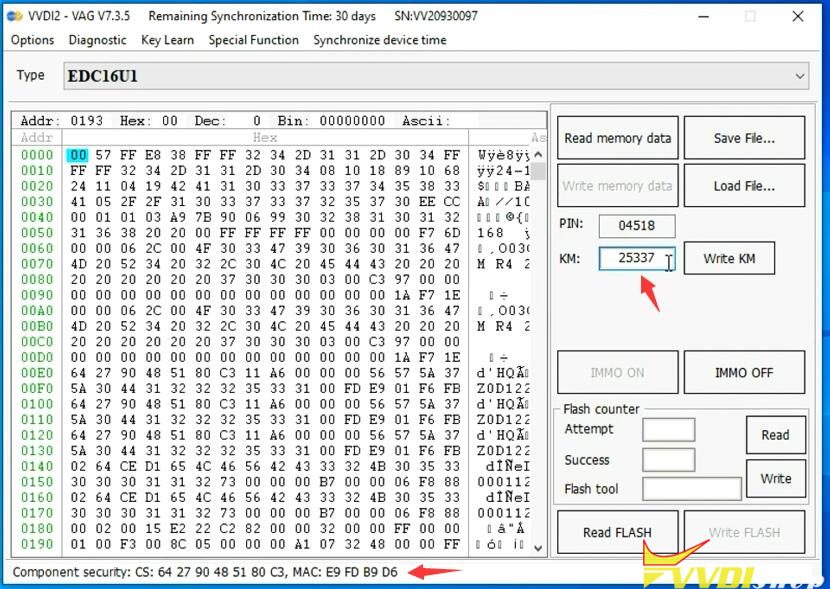
Read memory data

EDC16U1 Change KM and IMMO Off with Xhorse VVDI2 1

Detect type as EDC16U1

Read CS and MAC successfully

EDC16U1 Change KM and IMMO Off with Xhorse VVDI2 2
Input KM you desired to change and press write KM

Switch ignition OFF for 5 seconds, then switch ignition ON
Write KM successfully

EDC16U1 Change KM and IMMO Off with Xhorse VVDI2 3

EDC16U1 Change KM and IMMO Off with Xhorse VVDI2 4

EDC16U1 Change KM and IMMO Off with Xhorse VVDI2 5

EDC16U1 Change KM and IMMO Off with Xhorse VVDI2 6

EDC16U1 Change KM and IMMO Off with Xhorse VVDI2 7

Select IMMO OFF
Switch ignition OFF for 5 seconds, then switch ignition ON
IMMO OFF with vvdi2.
Switch ignition OFF for 5 seconds, then switch ignition ON

EDC16U1 Change KM and IMMO Off with Xhorse VVDI2 8

EDC16U1 Change KM and IMMO Off with Xhorse VVDI2 9

EDC16U1 Change KM and IMMO Off with Xhorse VVDI2 10

EDC16U1 Change KM and IMMO Off with Xhorse VVDI2 11

EDC16U1 Change KM and IMMO Off with Xhorse VVDI2 12

www.vvdishop.com

1/18/2024

Xhorse VVDI2 Read 2018 Audi Q3 NEC+24C64 IMMO Data

 Today I have an instrument cluster from 2018 Audi Q3 with all keys lost. What I’m going to do is to turn the odometer on and extract immo data with Xhorse VVDI2. Once getting the immo data, I can make a key.


Let’s go start disassembling this cluster.

Connect the dashboard to VVDI2 programmer.

Xhorse VVDI2 Read 2018 Audi Q3 NEC+24C64  IMMO Data 1

Xhorse VVDI2 Read 2018 Audi Q3 NEC+24C64  IMMO Data 2

Xhorse VVDI2 Read 2018 Audi Q3 NEC+24C64  IMMO Data 3

Open VVDI2 software to login.

  1. The dashboard is dark when you see this tips. You need finish all operation before reset instrument.
  2. Read EEPROM and save it.
  3. Read immo data and save it.
  4. Prepare a dealer key(You can go to step7 if have working key also don’t want add key).
  5. Reset Instrument.
  6. Add key, use immo data to learn the new dealer key to car.
  7. Finish other customer requests.


NOTE: The dashboard will remain dark until “Reset Instrument”.


Reading data, please wait…

User “Reset Instrument” to active instrument after all the operation is finished.

Reading data success.

Save EEPROM data file.


Read IMMO data.

Save IMMO data file.


Now I’ve successfully got all immo info including VIN, CS, PIN, MAC and keys. With the file so that I can continue to prepare key and make dealer key.

Xhorse VVDI2 Read 2018 Audi Q3 NEC+24C64  IMMO Data 4

Xhorse VVDI2 Read 2018 Audi Q3 NEC+24C64  IMMO Data 5

Xhorse VVDI2 Read 2018 Audi Q3 NEC+24C64  IMMO Data 6

Xhorse VVDI2 Read 2018 Audi Q3 NEC+24C64  IMMO Data 7

Xhorse VVDI2 Read 2018 Audi Q3 NEC+24C64  IMMO Data 8

www.vvdishop.com

1/14/2024

Xhorse VVDI2 Failed to Add Seat Leon 2018 Key by OBD Solution

 Problem:

I tried today and failed, to add key to Seat Leon 2018.
Used xhorse vvdi2 and autel 508.
None could read immo data through obd.
What’s the way to add key to this cluster?
Vvdi2 recognised cluster as nec 36xx vdo.

Xhorse VVDI2 Failed to Add Seat Leon 2018 Key by OBD 1

Xhorse VVDI2 Failed to Add Seat Leon 2018 Key by OBD 2

Xhorse VVDI2 Failed to Add Seat Leon 2018 Key by OBD 3

Solution:

NEC35XX Locke you need to do it on bench via vvdi prog. Need to have MQB license activated on your vvdi prog+vvdi2.

MQB solder free adapters are cleaner and easier to use.  If don’t use adapters, do soldering way.

5/29/2023

Xhorse VVDI2 Adds VW Caddy 2018 MQB48 Key

 How-to: program spare VW Caddy year 2018 MQB remote key using xhorse vvdi2 vag key programmer.


Here the customer wanted 3 remote spare keys (4 in total).
Tried ALL of Xhorse and Keydiy without success.
The remote didn’t work for anyone!!! That’s why an original was programmed.
In addition, have programmed 2 keys without remote using XT1M MQB chip. The customer had thus received his 4 keys. Unfortunately only 2 remote keys.

Xhorse VVDI2 Adds VW Caddy 2018 MQB48 Key 1

Step 1: Backup eeprom & immo data
Run VVDI2, Select Key Learn->MQB platform instrument immobilizer->Instrument with NEC+24C64 MQB key
Read EEPROM and save
Read IMMO data and save
Reset instrument to activate the instrument after all operation are finished.

Xhorse VVDI2 Adds VW Caddy 2018 MQB48 Key 2

Xhorse VVDI2 Adds VW Caddy 2018 MQB48 Key 3

Xhorse VVDI2 Adds VW Caddy 2018 MQB48 Key 4

Xhorse VVDI2 Adds VW Caddy 2018 MQB48 Key 5

Xhorse VVDI2 Adds VW Caddy 2018 MQB48 Key 6

Xhorse VVDI2 Adds VW Caddy 2018 MQB48 Key 7

Step 2. Remote Programming
Select Add key

Xhorse VVDI2 Adds VW Caddy 2018 MQB48 Key 8

Xhorse VVDI2 Adds VW Caddy 2018 MQB48 Key 9

Xhorse VVDI2 Adds VW Caddy 2018 MQB48 Key 10

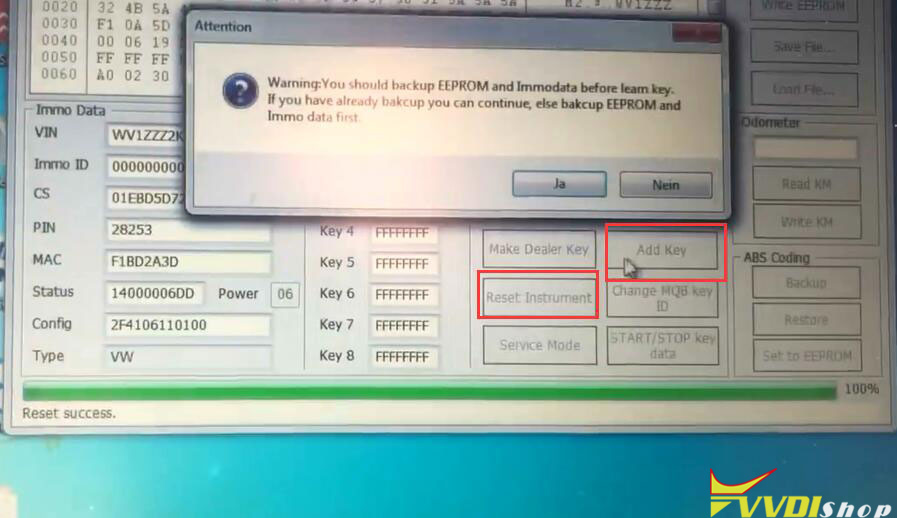
You should backup EEPROM and Immo data before learn key.
Select Learn key, login with security code from immo data
Load immo data and input key number need to learn: 2
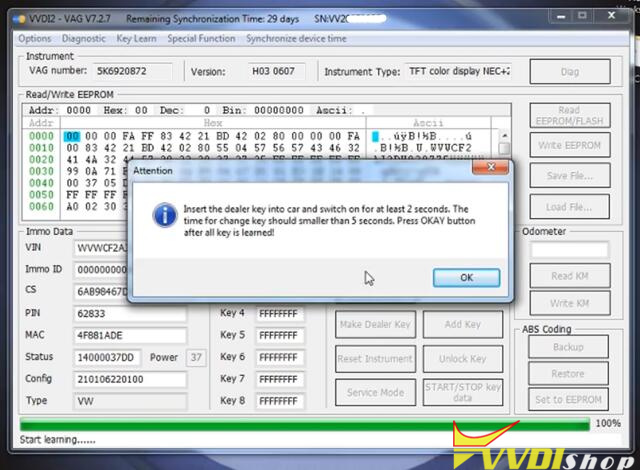
Insert the dealer key into car and switch on for at least 2 seconds.
Start learning key
Insert next key within 5s and switch on the ignition

Xhorse VVDI2 Adds VW Caddy 2018 MQB48 Key 11

Xhorse VVDI2 Adds VW Caddy 2018 MQB48 Key 12

Step 3. MQB48 transponder programming

Xhorse VVDI2 Adds VW Caddy 2018 MQB48 Key 13

using xhorse XT1M MQB48 transponders
Select immo data prepare key
update immo data to generate dealer key
Prepare normal dealer key
input new key (XT1M transponder) into vvdi2 programmer

Xhorse VVDI2 Adds VW Caddy 2018 MQB48 Key 14

Xhorse VVDI2 Adds VW Caddy 2018 MQB48 Key 15

Xhorse VVDI2 Adds VW Caddy 2018 MQB48 Key 16

Xhorse VVDI2 Adds VW Caddy 2018 MQB48 Key 17

Prepare dealer key success
Load immo data again to generate 2nd xt1m transponder
Prepare 3rd dealer key success
Insert xt1m chip into key shell.

Xhorse VVDI2 Adds VW Caddy 2018 MQB48 Key 18

Step 4. Transponsdr key programming
select Add key function
Select Learn key, login with the security code from immo data
Load immo data and input key number need to learn: 4

Xhorse VVDI2 Adds VW Caddy 2018 MQB48 Key 19

Xhorse VVDI2 Adds VW Caddy 2018 MQB48 Key 20

Insert the dealer key into car and switch on for at least 2 seconds.
Start learning key
Insert next key within 5s and switch on the ignition
repeat operation and learn all 4 keys until completed.

Test all keys.


www.vvdishop.com

2/12/2023

How to Add VW Golf 6 MK6 Key with Xhorse VVDI2?

 VW Golf 6 MK6 has a working key and need to add a new spare key using xhorse vvdi2 key programmer. Check instructions below.


Procedure:

Connect by obd2 on car.
Ignition is on with a working key.

Run VVDI2 software, select VW->Diag
VVDI2 detects instrument type TFT color display NEC 24C64 (-2012)
Read EEPROM/Flash->Read EEPROM

Add VW Golf 6 MK6 Key with Xhorse VVDI2 1

Add VW Golf 6 MK6 Key with Xhorse VVDI2 2

Switch on with the working key before press OK

Add VW Golf 6 MK6 Key with Xhorse VVDI2 3

But it says non-standard login failed
This time we choose manually
Go to Key Learn->4th Immobilizer system VW/Skoda/Seat->Instrument with NEC+24C64
Read EEPROM/Flash->Read EEPROM->Login Method 2

Add VW Golf 6 MK6 Key with Xhorse VVDI2 4

Add VW Golf 6 MK6 Key with Xhorse VVDI2 5

Add VW Golf 6 MK6 Key with Xhorse VVDI2 6

Reading data
Reading data success

Add VW Golf 6 MK6 Key with Xhorse VVDI2 7

Add VW Golf 6 MK6 Key with Xhorse VVDI2 8

Save eeprom data
Then Read Immo Data->Login Method 2
Read Immo data success and save data

Add VW Golf 6 MK6 Key with Xhorse VVDI2 9

Add VW Golf 6 MK6 Key with Xhorse VVDI2 10

Add VW Golf 6 MK6 Key with Xhorse VVDI2 11

Select Make Dealer Key and Login Method 2
Put new key into vvdi2 vag coil

Add VW Golf 6 MK6 Key with Xhorse VVDI2 12

Prepare VW normal dealer key and press NEXT

Add VW Golf 6 MK6 Key with Xhorse VVDI2 13

Make dealer key ok and locked
Then Add key

Add VW Golf 6 MK6 Key with Xhorse VVDI2 14

You should backup eeprom and immo data before learn key.
Select Learn key with security code from immo data, put key into the ignition switch.

Add VW Golf 6 MK6 Key with Xhorse VVDI2 15
Load immo data and input 2 keys to be learned
Select No this car does not have keyless.

Add VW Golf 6 MK6 Key with Xhorse VVDI2 16
Insert the dealer key into car and switch on for at least 2 seconds. The time for change key should less than 5 seconds.
Wait till appear 1-2 on cluster, then ignition on with second key.
Now 2-2, then ok
All keys were successfully learned.
Reset instrument.
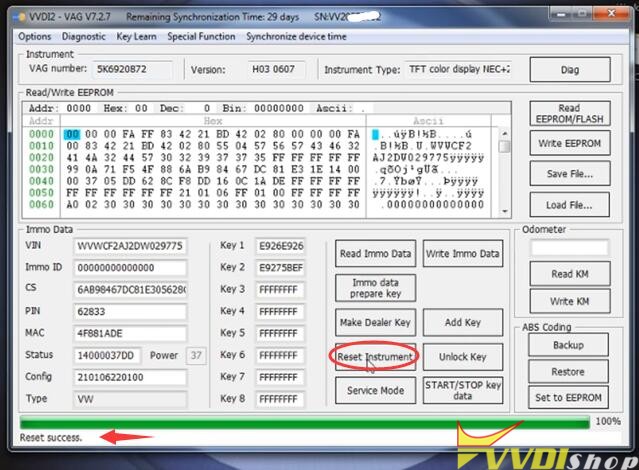
Add VW Golf 6 MK6 Key with Xhorse VVDI2 17

Done.

www.vvdishop.com