Problem
My Xhorse VVDI Prog M35080/D80 Adapter can read 160d0wq chip successfully, but cannot erase & write it. No error. It says cracking then erase and after erase. What’s the problem? Please help me.

Solution
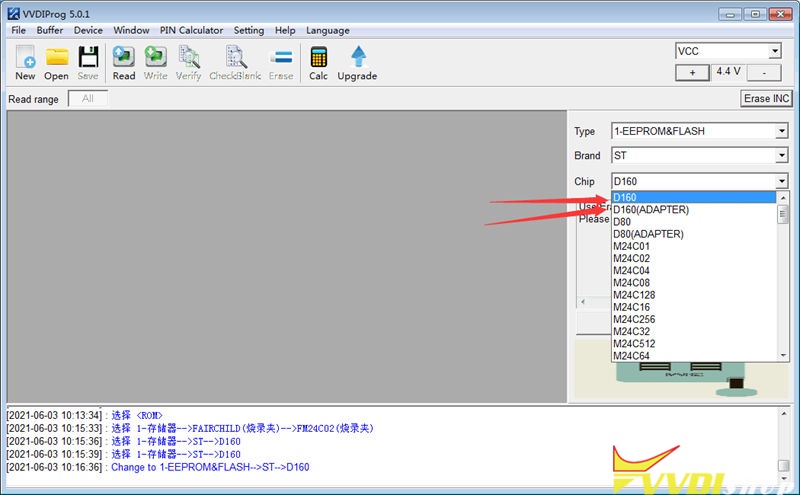
Please make sure you’ve selected the correct options, it has probability of failure to erase & write the chip. It is suggested to use the Xhorse 35160DW Chip to do it instead.

Note: The chip can be used as replacement of ST company 35080xxx, 35160xx, 080D0xx, 160D0xx …etc.
How to use 35160DW Chip with VVDI Prog?
- Backup data.
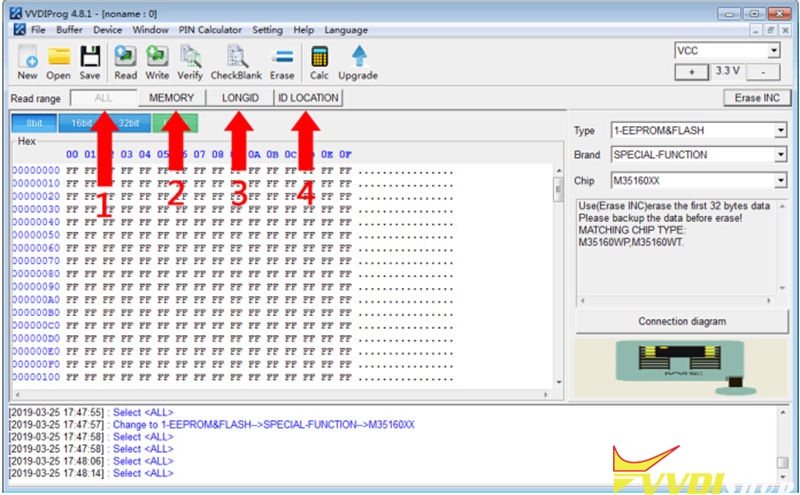
Read & save the dashboard original IC from “MEMORY + LONGID + ID LOCATION” or “ALL” option.

- Write data.
Replace original chip to 35160xx chip, write step1 to save 3 dumps to each partition(MEMORY/LONGID/ID LOCATION) on Xhorse chip by VVDI Prog.
- Mileage correction.
Perform “Erase INC” button(erasing the front 2 lines), select “ALL” or “MEMORY” option to read data for verify.
The front 2 lines should be all ‘0’ when reading data, manually input the target mileage, then perform “Write” option, completed!
- Verify data.
Soldering the chip back to dashboard, check whether it is working well without red dot.