Showing posts with label vvdi. Show all posts

3/22/2022

VVDI MB Program Benz W215 1D69J Key

 Question:

Has anyone been able to get the password to a Mercedes Benz W215 with vvdi mb tool?

VVDI MB Program Benz W215 1D69J Key  1

1D69J
HC05
put volts to pin 16

VVDI MB Program Benz W215 1D69J Key  2

try like this but failed.


Solution:

Read EIS dump with HC05 adapter and try again.

VVDI MB Program Benz W215 1D69J Key  3

Removing the mic

VVDI MB Program Benz W215 1D69J Key  4

VVDI MB Program Benz W215 1D69J Key  5

Read EIS dump with vvdi prog

VVDI MB Program Benz W215 1D69J Key 6

Write key with vvdi mb tool successfully.

VVDI MB Program Benz W215 1D69J Key 7

5/23/2017

How to Use VVDI2 to Program Key for Fiat Bravo 2008

An old Fiat Bravo 2008 have lost all keys.  Most OBD key programmers can only program its remote, but cannot program chip key. Can only write start key.
fiat-bravo
Step 1: Remove BSI
Dissemble the BSI under the dashboard which is made by Magneti Marelli company.
fiat-bravo-bsi-1
fiat-bravo-bsi-2
Step 2: Write Key
Remove BSI and open it, locate 8-foot CPU, be careful to find chip 95160. You are required to read the CPU 95160 chip data.
fiat-bravo-bsi-95160-1
fiat-bravo-bsi-95160-2
Solder CPU 95160 chip and read data by ecu programmer, i.e VVDI Prog and save data
read-fiat-bravo-bsi-95160-data
You can use Xhorse VVDI2 or TM100 key programmer to write key. For example, you use VVDI2, upload 95160 data just read.
Select region:Europe,Fiat-Bravo,2009-95160, then you will see key number and position etc info.
Select unused key position, follow prompt to insert a brand new 7936 (ID46 chip) into VVDI2
vvdi2-write-key
Confirm Yes if VVDI2 ask you to generate dealer key.
Generate key success and generate new 95160 chip data. Write the new data back to 95160 cpu chip.
Re-solder the cpu and reinstall BSI.
Write key success.

Step 3:
Use other key programmer to program remote, i.e X300.

3/22/2017

W204 OBD mileage correction: Digiprog3? VVDI MB? FVDI? AVDI?

There are lots of threads talking about Mercedes-Benz W204 mileage correction. Some use Digiprog 3 odometer programmer, some use VVDI mercedes or FVDI commander or original AVDI. So, which one should be best for W204 km change? Here you go…

Here list some good questions and answers between forum members. Read them first.

Q: w204 possible only dash?A: NOT possible only dash.
you have to do dash and can-filter.
or use digiprog or elprosys or abritus72 or enigma
Q: Any one done 2014 by OBD?A: Use can blocker, make backups and never will have problems…
Q: Anyone done Mercedes W204 2014 by OBD?
if yes, what tool can do thisA: avdi,fvdi,digiprog…..
Q: digiprog3 and fvdi, which better for W204 mileage?A: I killed one with fvdi, it crashes. the ZGW will need recoding.
I do not recommend using fvdi on w204.
Have better change with digiprog3
I did 2012 with it
Q: How to make right on w204 with fvdi?A: Original equipment or solder can blocker.
Q: Any good experience of digi?A: I did a few 204 212 with digiprog 3 v4.94. ,no problem.
Q: How about AVDI for 204?A: I’ve got AVDI ORG but can’t do 2013 W204
but yesterday i killed also the ZGW of one W204 2011 the First Time.
have Smok tool to repair this until you done backup
I don’t know if you can do it 2014
Q: Cluster was changed in car. How do I have the cluster automatically go back to original mileage? Only tool I have is VVDI MB BGA tool. Thanks
A: for w204 through vvdi mb
if you want to bloack km synchronization between EZS and dashboard, you need backup CGW (gateway0 EEPROM and FLASH before write km
Q: Anyone tried with Smok?A: I’ve got now smok Merc
so I try and cant do first time error when Erase Flash
so I write the flash and eeprom back and then I try again
all GOOD job done
smok tool its the best for this price
AVDI cant write flash back after first problem – smok done easy
avdi-w204-km-change
In summary,
Digiprog3 programmer should be the best solution of Mercedes W204 Odometer Mileage through OBD. Within 5 minutes and no need dissemble the dashboard.
Attach some photos here.. the W204 2009 model
digiprog3-w204-odometer-correction-1
digiprog3-w204-odometer-correction-2

digiprog3-w204-odometer-correction-3

digiprog3-w204-odometer-correction-4

digiprog3-w204-odometer-correction-5

digiprog3-w204-odometer-correction-6

digiprog3-w204-odometer-correction-7
 https://eobd21.wordpress.com/2017/03/23/mercedes-w204-obd-odometer-programmer-which-tool/

6/05/2016

Handy baby and VVDI2 program VW Golf key

Here’s the tutorial on programming a new key of VW Golf with JMD Handy baby key copy machine and Xhorse VVDI 2 key programmer. Now go to the point!

Model:
VW Golf
VW Golf

Chip type:
ID48 chip (the first generation IMMO, with independent the IMMO box)
id48-chip-1
key
Chip status before key-matching: Unencrypted, unlocked
Chip status after key-matching: Unencrypted, unlocked

Can be COPIED or not?
YES. ID45 chip can be copied with Handy baby key programmer

Need pin code?
Yes.

How to access the PIN?
– read PIN by VVDI key programmer
– disassemble the IMMO box to read PIN
(two types of IMMO box: 93C56 & CPU – CPU data cannot be read via OBD)

Mechanical lock features:
Door lock: 7 blade
Ignition lock: 8 blade
8 blade

Metal key head serial number:
31(HU66)

Door opening direction:
Door opening direction

OBD port location:
The OBD port is located in the tool kit, under the lid with an ignition icon
OBD port is located in the tool kit

Key type:
Fold remote key
Fold remote key

Tool to generate:
KD600 or VVDI2 commander key programmer

How match the emote key?
The original key cannot be not used within 3 hours.
– Close all car doors;
– Antilockwise turn thw key in the lock and hold it
– Press the lock button twice
(if you need to program another new key, press twice again for another remote)


How to resynchronize the remote control?
Just turn the ignition on and press the lock button for 5 times or more, after a failure of the original remote control

Numerical control machine:
Option: HU66

IMMO data storage component;
IMMO box: 93C56 or Motorola CPU

Key programmer to recommend:
Xhorse VVDI 2 key programmer
vvdi2

NOTE:
Your dashboard data will be damaged if you read PIN from the dashboard; you should read some PIN from the IMMO box. If your Golf IMMO box is broken, replace it with a Santana IMMO box.

Hope this helps!

3/21/2016

VVDI program Audi A4 2005 all key lost

Programmed/Added two key for Audi A4 2005 all key lost with VVDI(or VVDI 2) Commander interface, not difficult a job.
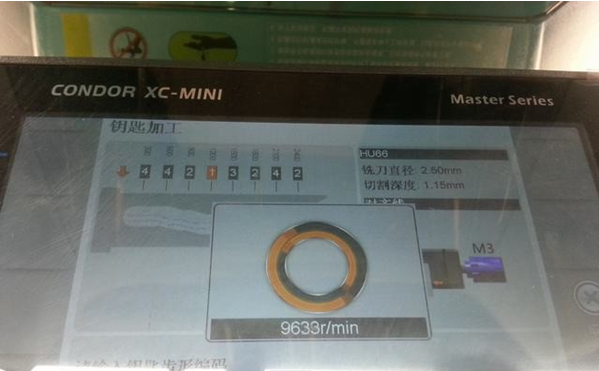
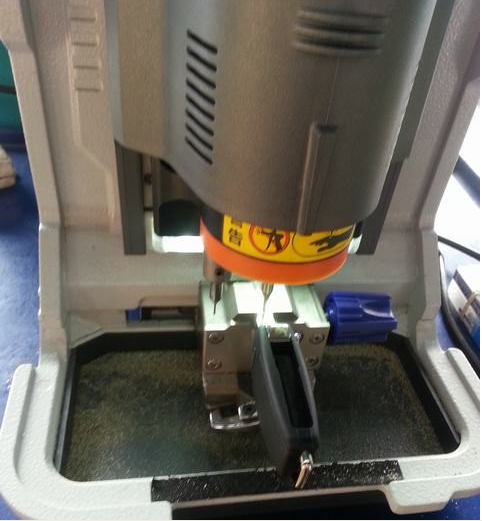
First of all, get a key cut with Condor XC MINI master series key cutting machine through 2IN1.
vvdi-audi-a4-all-key-lost-1vvdi-audi-a4-all-key-lost-2
Connect to VVDI interface
The following procedure displays in Chinese, but never mind, same function buttons displayed in English Menu.
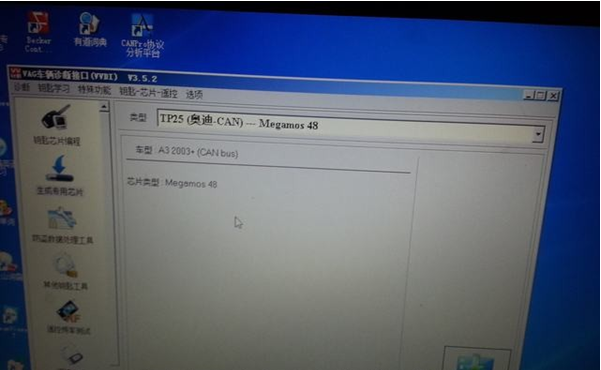
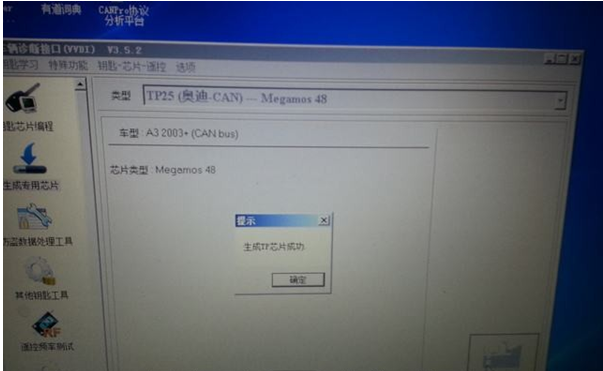
Come to Transponder Programming  interface, select TP25 (Audi CAN)-Megamos 48 CHIP. directly generate new key chip
vvdi-audi-a4-all-key-lost-3
vvdi-audi-a4-all-key-lost-4
Generate chip successfully
vvdi-audi-a4-all-key-lost-5
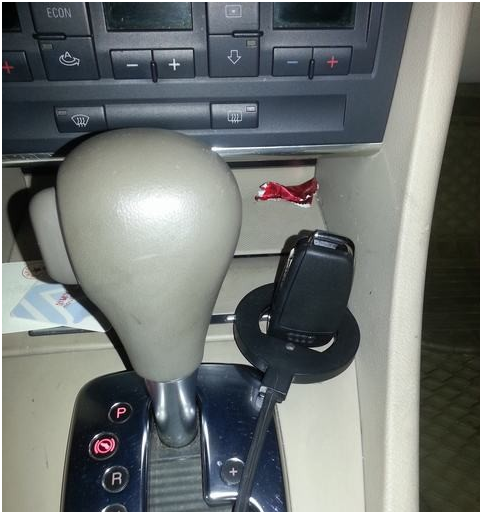
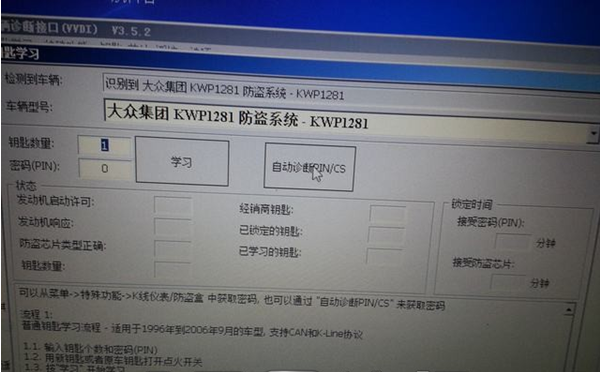
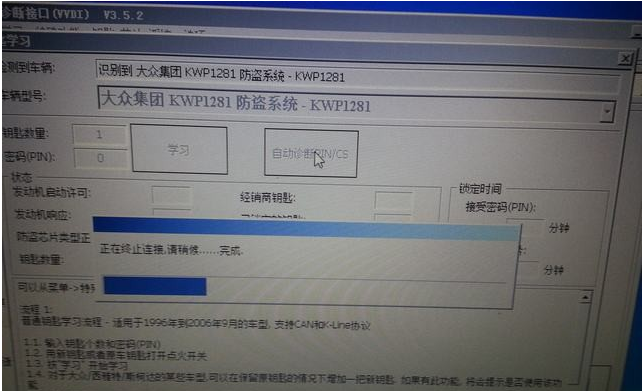
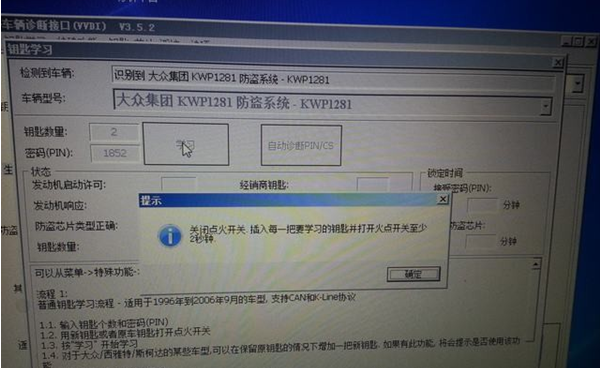
Key learning, click auto diagnostic IN/CS vvdi-audi-a4-all-key-lost-6
vvdi-audi-a4-all-key-lost-7
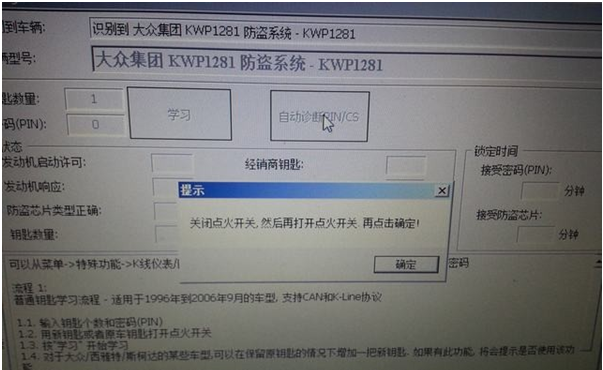
Turn ignition OFF, turn ignition ON, then press OK
vvdi-audi-a4-all-key-lost-8
Successfully read PIN code
vvdi-audi-a4-all-key-lost-9
vvdi-audi-a4-all-key-lost-10
Select Key Learning
vvdi-audi-a4-all-key-lost-11
Turn ignition OFF for 5 seconds, turn ignition ON, press YES
vvdi-audi-a4-all-key-lost-12
Turn ignition OFF, insert key to be learnt, turn ignition ON at least 2 seconds.
vvdi-audi-a4-all-key-lost-13
vvdi-audi-a4-all-key-lost-14
Test the second key follow the same operation. Two key has been successfully programmed.

3/09/2016

VVDI MB BGA Tool tested OK EIS and ELV type Mercedes

Locksmith feedback on Mercedes-Benz VVDI MB BGA Tool key programmer.
EIS type tested OK models:
ML Class:
w163: 1997-2005
w164: 2005-2011 – only NECpro57 can
w166: 2011- 2015 – if FBS3 OK with VVDI if lost all key
——————————-
B Class:
w245: 2005-2011
w246: 2011- 2015 – if FBS3 OK with VVDI if lost all key
——————————
SLS Class:
w197: 2010–2014 – if FBS3 OK with VVDI if lost all key
——————————
CLS Class:
w219: 2004-2010
w218: 2010– 2015 – if FBS3 OK with VVDI if lost all key
——————————-
E Class:
w212 with ELV only – if FBS3 OK with VVDI if lost all key

Above  only about EIS type,we have also tested W166 W246 W212 FBS3 all key lost ok.
write esl for this eis, a car w207 2011 year
currently parts of chassis(W166, W246, W212, W212<old>) support online calculation for all key lost.
About W204 you should change EIS with VVDI MB TOOL also ok.
you can read the user manual & update information write in detail.

Some frequently asked questions:
1- what does it mean: (K) ? w215, w220 (K).
K=K line Protocol
2- W220 S320 1999 if lost all key can i read data and password via OBD or IR with vvdi mb ?
Cannot support read via OBD directly,if you wanna read by OBD,should connect the the EIS K line.remove EIS get eeprom.
3- what is the single wire side OBD cable VVDI mb tool?
Its K line connector of OBD line

VVDI MB BGA TOOL package

1/18/2016

VAG VVDI 2 VVDI2 Commander positive feedback

We’e got a new VVDI 2 VVDI II  user that give us positive feedback from obdii365.com customer.
Full review as following:
I successfully use VVDI2 to add a key bcm2 on a 2013 audi a5.
2007 Audi A4 B7 RB8 crypto – mileage correction ok
Audi BCM2 add spare key by obd worked fine, and I did one on a 2013 A5 and it worked flawlessly.
A6/Q7 EZS Kessy: Added a dealer key (remote sourced from the dealer) without issues. Seemed to read everything properly but I had a working key to begin with.
Audi A6: Testet with A6 read kessy working, learned new key
Skoda Octavia 2006: got CS & PIN , programmed key fine, but not remote programming.
VW passat. B5: Pulled PIN, programmed key, corrected miles.
VW Passat B6 2009: Pulled PIN but couldn’t get 6 bytes CS, needed comfort dump.
VW Transporter T5 2006 : Pulled PIN Programmed key, no remote programming.
Audi A4 2006 : mileage correction success .
Audi A6 2003: Mileage correction fail. car not start. remove battery terminal. car start.
xhorse-VVDI-2
http://www.key-programmer.org/2016/01/18/xhorse-vvdi-2-vvdi2-commander-review-2016-01-18/

1/07/2016

Xhorse VVDI 2 Full Customer Review by a real user

Thanks Betto Zavaleta in Saudi Arabia for the review on original xhorse VVDI 2 Commander key programmer full package.
—
Bought one of vvdi2 full kits + VVDI 2 remote programmer after doing a lot of research from many sellers in China. The staff from obdii365 always responded quickly, answering all questions I had.
Shipping was very quick although DHL tracking didn’t work until package had arrived
(approx. 4 days).
Every item all appears to be in a good condition, each packed well in a paper box, no damage or scratch at all, although i though a plastic one would be better. The latest vvdi2 software 1.1.0 was in the disk (free download link i saw in the web also), then I installed the vvdi ii software and driver according to the user manual, common installation method, not difficult for me. Everything seems to work OK, which is exactly as stated.
vvd2

Lack of wireless connection to the vvdi 2 seems to be less convenient, but on cable it has worked consistently well anyway.

For people considering buying a kit like this for BMW & VAG group cars, the only advice I can give is that to buy the full package to avoid inconvenience of authorization (5th AUDI, BMW obd & CAS4+ authorization need extra pay if not full package; but it seems that they can open this function for those with Condor key machine.)  It’s a great toolkit to have for diagnostics, key programming, IMMO etc. though.

Overall – I can highly recommend buying vvdi 2 or others from this vendor since everything was as advertised, plus they have fast response via emails if we users have issues or questions when using their products.

12/15/2015

Xhorse VVDI2 VVDI 2 Commander User Manual


Original Xhorse VVDI2 VVDI 2 Commander key programmer software is newly updated to v1.1.0.OBDII365 here provides the free software download link.

How to update VVDI2 VVDI 2 software 

Operating system: Windows XP
Language: Chinese/ English
Update Online
After connect VVDI 2 to PC and install USB drivers, choose firmware version you want from firmware list. Press “Update Online” button, wait progress finish (about 2 minutes).
Internet connection is required.

Software Update

Internet connection is required.
Click “Menu->Software Update->Software Update” to check VVDI2 latest available software version, the software version requires firmware version support etc
Select “Download Link”, the system will download the latest software.
download-link
  When you use VAG, BMW, Transponder Programmer programs, if you are displayed following windows, which means your tool have newest software released.  Please download newest software with Update Online.
update-online-1

update-online-2
update-online-3