Showing posts with label vvdi mb tool. Show all posts

3/04/2025

VVDI MLB Tool Failed to Parse Server File Solution

 Problem:

I recently purchased vvdi key tool plus and VVDI MLB Tool, I have had mini key tool and key tool max for some time. I combined these devices on the same Xhorse account. Today, when I wanted to read MLB’s conclusion, it gave me this message, “Failed to Parse server file ”

VVDI MLB Tool Failed to Parse Server File

Solution:

You need to bind the MLB programmer to the device you will use it with, in this case key tool plus. It is not just plug and play. The MLB programmer should be shown on the tablet as a combined device in the combined devices section.

VVDI MLB Tool Failed to Parse Server File solution

Updated:

FIRST TIME YOU NEED TO BIND MLB DEVICE. IT WORKS NOW.

6/24/2024

VVDI MB Tool Benz Repair KM Car List

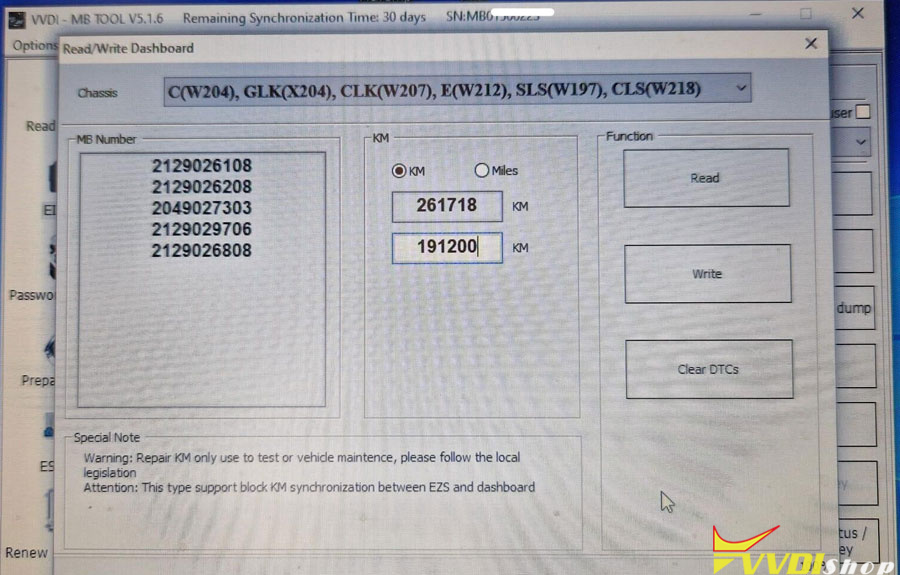
 Xhorse VVDI MB Tool supports writing KM (correct odometer) for the following Mercedes models:

C(W204), GLK (X204), CLK (W207), E (W212), SLS (W197), CLS (W218)
R-Class (W251), GL (X164), ML(W164)
E-Class (W211), CLS(W219)
S-Class (W221), CL (W216)
W166, W172, W246, W231
W205

VVDI MB Tool Benz Repair KM Car List


7/24/2023

How to Exchange Points for Tokens on VVDI MB?

 Question:  I have 1400 points but, no tokens. How to exchange points for tokens on Xhorse VVDI MB Tool?


There are 2 ways:

1. No need to exchange points to tokens. Only need to combine vvdi mb with xhorse account. 

It’ll automatically deduct them from your account after the password calculation.

It deducts the points equivalent to a token or 2.

It works on the key tool plus as well.

If combine device with xhorse app it allows you to calculate and make keys even though said 0 token.


2. If you need to exchange points to tokens, following guide below:

How to Exchange Points to Tokens in new Xhorse App?

7/11/2023

How to Solve Xhorse VVDI MB Tool “Failed: Error 3”?

Problem:

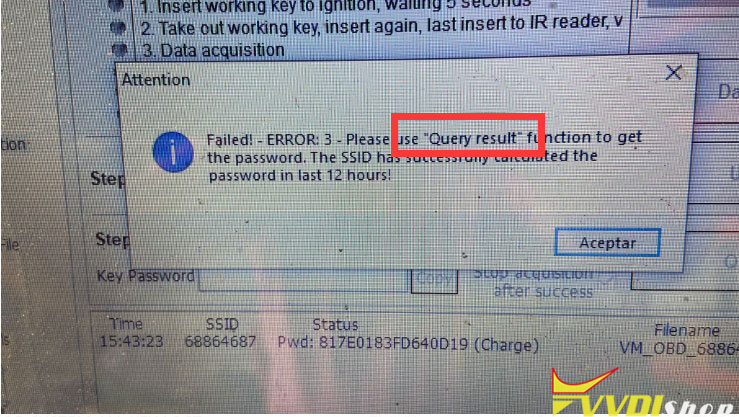
My xhorse vvdi mb tool gave me failed error 3 when during data acquisition procedure. Error image attached. Any solution?

Xhorse VVDI MB Tool “Failed: Error 3 1

Here is the clue.

The SSID has successfully calculated the password in the last 12 hours. Use “Query result” function to get password and then write key.

Xhorse VVDI MB Tool “Failed: Error 3 2

www.vvdishop.com

11/16/2022

Change W164 EZS with NEC Processor with VVDI MB Tool

 Is it possible to change Mercedes W164 EZS and AMAZONAS with NEC based processor? I have VVDI Prog, but it can do Motorola MCU, not Nec. What solution is possible? Only make Virgin ECU, ISM and adapt used EZS? Can i do this with VVDI MB or CGDI MB?

This is photo of plate inside EZS.

Change W164 EZS with NEC Processor with VVDI MB Tool

Here step by step instructions for replacing EZS:

change steps with VVDI MB Tool:

1. Use ezs & key from one vehicle

2. Read and save (1) once ezs data via obd. (new ezs)

3. Calculate key password from new ezs in password calculate menu (new ezs) !!!!!!!!!!!

Attention!!! Do not insert key in ezs anymore, before all procedure will ended!!!!

4. Calculate erase password in ezs menu (new ezs)

5. Paste key password you calculated (same menu)

6. Save EZS data(2)

7. Renew ezs via IR (new ezs) Now new ezs ready!

8. read old ezs via obd (old ezs key NOT inserted) !!!!!!!!!!!

Attention!!! Do not insert key in ezs anymore, before all procedure will ended!!!!

9. Save ezs data (3)

10. Replace original ezs to new

11. Load ezs data, saved from ori ezs (3)

12. Write VIN number via obd 13. Choice IR and write data, that you have read from ori ezs (3) via IR KEY PASSWORD MUST BE FROM NEW EZS

14. Read and save ezs data again (4)

15. Go to calculate key menu, load dump (4)

16. Paste key password and push “calculate”

17. save calculated dumps

18. Get key from new ezs and disassemble it

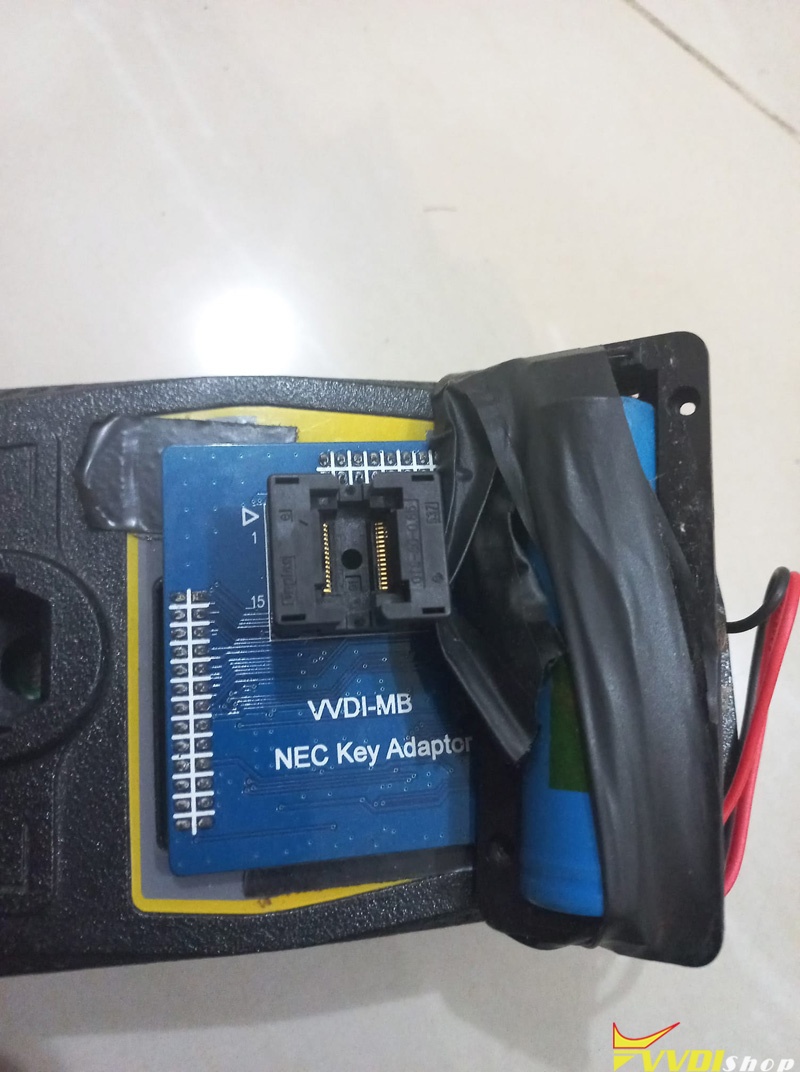
19. desolder NEC ic and put it to NEC Adapter

20. use “key” menu, choose “nec adapter” and read IC

21. Renew ic

22. solder Nec ic back to plate.

23. choice IR and insert key into vvdi ir key reader

24. Read key for check it have “unuse” status

25. load dump of key (step 17) and write key via IR (choice version 51 number of key is not important)

NOW YOU CAN INSERT YOU WRITED KEY IN EZS. Sometimes key will work after 3 times be inserted. The procedure will take one token.


The procedure can be applied to cgdi as well.

https://www.vvdishop.com/service/change-benz-ezs-with-nec-processor-with-vvdi-mb-tool.html

9/08/2022

VVDI MB Tool Original Mercedes NEC Key Renew Guide

 Original Mercedes Benz NEC key can be renewed by xhorse vvdi mb tool and vvdi key tool plus.


Original Mercedes NEC Key renew procedure: 
NEC chip sits on adapter. After renew, key is ready to write with new rom file.
Another feature is “digging” password – easy with vvdi tools as you can see.


Renew NEC Key with VVDI MB

renew benz nec key with vvdi mb 1

Go to Read and Write Key function
Select NEC Adapter
Identify key information

renew benz nec key with vvdi mb 2

Press Read v51 v57 password

renew benz nec key with vvdi mb 3

renew benz nec key with vvdi mb 4

renew benz nec key with vvdi mb 5

Press OK to save EEPROM

renew benz nec key with vvdi mb 6

Check NEC adapter wiring diagram

Try this VVDI MB NEC adapter. This works always in minutes.

renew benz nec key with vvdi mb 7

This adapter are tested by many works well but tried the green soldering board some time give error.

For example like this:

renew benz nec key with vvdi mb 8
Press Renew

renew benz nec key with vvdi mb 9

The OEM NEC Key has been renewed.

renew benz nec key with vvdi mb 10


Renew NEC key with Key Tool Plus:

Renew original nec key procedure with keytool plus is similar as vvdi mb tool.

Key tool plus has it own NEC adapters.

Menu path:
Immo programming->Benz-> Select from system-> Read Write Key-> NEC Adapter read and write key

renew benz nec key with vvdi key tool plus 1

renew benz nec key with vvdi key tool plus 2

renew benz nec key with vvdi key tool plus 3

renew benz nec key with vvdi key tool plus 4

renew benz nec key with vvdi key tool plus 5

https://www.vvdishop.com/service/renew-benz-nec-key-with-vvd-mb.html

8/25/2022

Xhorse VVDI MB Keeps Insert and Take out IR Adapter?

 Problem: Is it a normal process during xhorse vvdi mb tool password calculation?? If all key is lost?

vvdi mb keeps saying take IR adapter out of EIS and insert IR adapter to car.

I have a test platform connected. I bought this platform because this has eis cables.

Xhorse VVDI MB Keeps Insert and Take out IR Adapter 1

Xhorse VVDI MB Keeps Insert and Take out IR Adapter 2

Xhorse VVDI MB Keeps Insert and Take out IR Adapter 3

Solution:

You need the MB power adapter, otherwise, you’ll get sore fingers.

Xhorse VVDI MB Keeps Insert and Take out IR Adapter 4

Xhorse VVDI MB Keeps Insert and Take out IR Adapter 5

If not connect with Power Adapter, you need to replug IR adapter many many times. That’s will be a waste of too much time.

That test platform won’t work. The supply voltage must be interrupted at intervals.

vvdi mb+power adapter+eis cables is enough, you can buy ELV ESL cable set for vvdi mb like this:

https://www.vvdishop.com/wholesale/benz-eis-elv-5-in-1-cables-for-vvdi-mb.html

8/11/2022

How to Solve Xhorse VVDI MB Tool ‘Failed ERROR 3’?

 Problem:

I was trying to add key 2008 Mercedes-Benz CLS 63 AMG with the switch knob on the start button keyless entry using xhorse vvdi mb tool, the customer bought it for w219 keyless, found the key is the same as 211 209. vvdi mb failed me and reported failed error 3 product status is incorrect. Any idea?

Solve Xhorse VVDI MB Tool ‘Failed ERROR 3’ 1

Solution:

Synchronize device and bind vvdi mb. Then try again.

Solve Xhorse VVDI MB Tool ‘Failed ERROR 3’ 2


4/13/2022

Renew Mercedes M271 SIM4LKE with VVDI MB

 Xhorse VVDI MB BGA Tool + Benz ECU Renew Cable can support renewing Mercedes ECU covering CR3.XX, XR4.XX, CR5, CR6, CR60.XX, SIM271DE2.0, SIM271KE2.0, SIM4LKE, CRD.11, CRD2.XX, SIM266, ME9.7, MED17.7X, etc. Easy done in 2 minutes.


Here’s taking Mercedes M271 ECU as a demonstration.

Disassemble ECU from vehicle, connect SIM4LKE adapter & VVDI MB according to ECU model.

Renew Mercedes M271 SIM4LKE with VVDI MB 1

Renew Mercedes M271 SIM4LKE with VVDI MB 2

Renew Mercedes M271 SIM4LKE with VVDI MB 3

Open VVDI MB software:

Click “Renew ECU/Gearbox >> Read”.

Click “Erase Pass.” to get the password.


Benz ECU info is showing:

Personalized: Yes

Activated: Yes

Renew Mercedes M271 SIM4LKE with VVDI MB 4


Click “Renew”.

Erase target unit success.

Renew Mercedes M271 SIM4LKE with VVDI MB 5


Let’s read ECU again at this time.

Benz ECU info has changed to:

Personalized: No

Activated: No

Benz E

That means done.

Renew Mercedes M271 SIM4LKE ECU is successful.

Renew Mercedes M271 SIM4LKE with VVDI MB 6

www.vvdishop.com

https://www.vvdishop.com/service/xhorse-vvdi-mb-renew-benz-sim4lke-ecu.html

4/11/2022

How To Use VVDI MB TOOL OBD Clip?

 We may find that it is seldom used the VVDI MB Tool OBD Clip while programming Mercedes. In general, we more often use the OBD cable connector instead. So when and how to use the OBD clip?

Use VVDI MB TOOL OBD Clip 1


When programming Benz 204/207 with directional lock on car, it’s not able to read data with VVDI MB Tool by OBD directly. That’s because data will be interfered due to OBD connection. That’s why locksmiths always remove directional lock on bench to read immo data or match simulator.


Can we program Benz 204/207 without wiring harness on car?

The answer is yes.


By reason of filtration and interference from other car modules, it’s failed to read immo data by OBD. But we can bypass the interference through connecting OBD communication line on device to directional lock straightway. That’s what the VVDI MB OBD Clip can do: connect to directional lock.


How to use VVDI MB OBD Clip?

  1. Break open the communication line of directional lock;
  2. Clamp to communication line.

Note:

* DO NOT disconnect plugs of directional lock & ELV Emulator.

* Clamp to the corresponding line for red marked pin.

* Need to break wire skin.

Use VVDI MB TOOL OBD Clip 2

It’s recommended to use the way in case emergency without any EIS/ELV Test Lines.

www.vvdishop.com