Showing posts with label key tool max. Show all posts

8/30/2023

Xhorse XM38 This Option Not Support BMW Motorcycle Remote?

 Problem: 

I want to generate ID4A remote to a Niro 2023 using xhorse xm38 remote, but vvdi key tool max said this option does not support BMW motorcycle remote. What does it mean?

Xhorse XM38 This Option Not Support BMW Motorcycle Remote

Solution:

You cannot use Xhorse XM38 motorcycle remote to generate this remote, you will need universal XM38 or Toyota XM38.

7/06/2023

How to Check Car Mileage on Xhorse VVDI Key Tool Max?

 Here’s a small tip to guide you quickly check vehicle mileage on Xhorse VVDI Key Tool Max Pro/ VVDI Key Tool Max programmer. You’ll need to have a working key at hand.


Put the working key into Key Tool Max slot.

Transponder clone >> Read transponder

Here to check key information including key type, specific chip, key ID, key status, cloneable or not, encrypte mode, code mode, brand, chip type, programming status, frequency, kilometers(KM) and key number.


Slide down the screen to find KM, It shows 612754km.

That’s the vehicle mileage.


* It should be noted that the function does not apply to all cars.

Check Car Mileage on Xhorse VVDI Key Tool Max 1

Check Car Mileage on Xhorse VVDI Key Tool Max 2


6/15/2023

Xhorse Mini OBD Tool Add Key Volvo XC60 CEM R32C

 The car model is a Volvo xc60 from 17/7/2017 half keyless system with CEM R32C R5f64525kfd. Some have problem when reading CEM with autel xp400 also other programmers.


Here is the easy solution with the cheapest device- xhorse vvdi mini obd tool.

All problem solved with the cheapest device that can someone could imagine remote added successfully without dissembling the CEM.

Believe it or not, car is programmed with xhorse mini obd too. it just all you need.

You could use it with key tool max or just with an Android cell phone.
I connect the mini obd a go under volvo and the normal key system.

I click ok device connected and ask me if i want backup security data and he ask me if i want to continue and the procedure will take 8 hours.

Before click ok i add an additional power supply to the car and click ok. wait kindly. After one hour and 10% of data decryption, he prompts me ” recording location” and i click ok he enter programming mode read and save security data and ask to click start button once, and put the original key then remove it. Then put the key to be programmed to the slot and all work is done.
For me it worked from the first attemp if you didnt succed don’t panic .. you have to begin from the beginning but this time at first when the device prompts you to begin you give it the recording location that the device give it to you in the first access.

Hope it helps.

Xhorse Mini OBD Tool Add Key Volvo XC60 CEM R32C 1

Xhorse Mini OBD Tool Add Key Volvo XC60 CEM R32C 2

Xhorse Mini OBD Tool Add Key Volvo XC60 CEM R32C 3


12/15/2022

Xhorse Key Tool ID48 Clone Bind Device Issue Solution

 People report xhorse key tools (mini key tool, key tool max, key tool max pro, key tool plus) have issue with id48 cloning. Key tool asks to bind account.

Some error pictures shown below:

Xhorse Key Tool ID48 Clone Bind Device Issue Solution 1

Xhorse Key Tool ID48 Clone Bind Device Issue Solution 2

Xhorse Key Tool ID48 Clone Bind Device Issue Solution 3

Solution:

Xhorse has changed the ID48 cloning policy.

1, customer need set up xhorse phone number account
2 , customer need to bind his device (keytool, mini keytool, key tool max, keytool max pro, key tool plus) under his xhorse account
3 , customer need to log in his account on Xhorse APP for use id48 clone service
Note : Customer can not use id48 clone service if the xhorse account is not the one which binds with the device.

8/10/2022

Xhorse Mini Key Tool Generate Kia Rio 2018 4D Remote

 Tips to clone Kia Rio 2018 year 433mhz, 4d dst80 remote with xhorse vvdi mini key tool/key tool max.

Xhorse Mini Key Tool Generate Kia Rio 2018 4D Remote 1

Proble resolved with xhorse super remote key.

First generate KIA RIO correct model and after this generate only transponder. Programmed with the car and all work fine.

Xhorse Mini Key Tool Generate Kia Rio 2018 4D Remote 2

As long as the remote is right, just clone transponder with super remote or wireless xhorse key… Then remote via obd. Transponder doesn’t need to be right if cloning key.

8/09/2022

Xhorse Key Tool Max Pro Test Remote Battery

 The new Xhorse VVDI Key Tool Max Pro adds a battery test module that allows users to test battery status.


How to test remote battery with Key Tool Max Pro?

Go to Leakageand voltage function

By simply connecting to the leakage detection cable, users can test whether a remote battery is having electric leakage (range: 1μA~35μA) and detect the voltage of a remote battery (range: 0V~36V).

Check images below:

Xhorse Key Tool Max Pro Test Remote Battery 1

Xhorse Key Tool Max Pro Test Remote Battery 2

Xhorse Key Tool Max Pro Test Remote Battery 3

Xhorse Key Tool Max Pro Test Remote Battery 4

Xhorse Key Tool Max Pro Test Remote Battery 5


7/05/2022

Can Xhorse VVDI2 Program VW Passat 2005 Key via OBD?

 Is it possible to add Key for Passat year 2005 with xhorse via OBD?

Xhorse VVDI2 Program VW Passat 2005 Key

Some can, some you need to read ECU on bench for data. Better to clone chip and learn remote by OBD as suggested by more people, don’t risque braking the firewall plastic covers to get to the ECU (old and brittle sometimes).

Way 1:
Clone it with VVDI and remote by OBD. Easy money
Clone xhorse super chip XT27 with key tool max and add remote by OBD
Way 2:
Vvdi2 can program key for Passat 2005.  Read CS & pin from ECU … get 7th CS bit from working key, generate dealer key, learn key, done.
Check adapt VW Passat key with vvdi2

5/06/2022

Xhorse VVDI Mazda ID49 Smart Key Light Repair Function

Xhorse released Mazda ID49 Smart Key Light Repair function to solve Mazda dash ‘Keyless Entry Malfunction’ (key icon) after programming keys.  The keys are working properly (car starts and remote works)

Check Mazda CX-5 Xhorse Key Works Dash Shows ‘Keyless Entry Malfunction’

Xhorse VVDI Mazda ID49 Smart Key Light Repair Function 1

Here is the function explanation:


VVDI MINI Key Tool/Key Tool Max Path:

Special function >> Mazda ID49 smart key light repair >> Read/ Write

Xhorse VVDI Mazda ID49 Smart Key Light Repair Function 2

Note:

  1. The original car key is required.
  2. The main CPU chip of original car card is square, no matter what model, it needs to be generated by selecting “Mazda 3 Axela/CX-5(model 19) ID49”. If the main CPU chip of original car card is rectangular, select “Mazda 3 Axela ID49 3btn” for generation regardless of the car model.


Steps

  1. Put in the original key and read it.
  2. Put in generated remote and write.
  3. OBD clears the previously programmed remote and re-program the above remote. If the light is still on, it has nothing to do with the key data. Power off and clear the fault code.


Done.

www.vvdishop.com

3/29/2022

Cannot Charge Xhorse VVDI Key Tool Max Battery Solution

 Question 1): I have a problem charging the xhorse key tool max battery.

Question 2): My key tool max only lasts 2 hours top, now it will go from 90% to 10% in less than 10 minutes.

Solution:
Replace a new battery.  Stock battery is 3.7 2650mah.
You can get a xhorse replacement battery for key tool max or other higher volume battery.
Replacement requires soldering skills.  We are not holding the responsibility for the damage.
Better send back to use to replace the battery in case of damage.
Cannot Charge Xhorse VVDI Key Tool Max Battery  1

Here is the example. One of vvdishop.com customers got a  3.7 5000mah battery to replace it.
Only required minor modifications to the case to fit.  It does fit perfectly now. It lasts being on all day long now without an issue. So far so good.
Cannot Charge Xhorse VVDI Key Tool Max Battery  2

Cannot Charge Xhorse VVDI Key Tool Max Battery 3

Cannot Charge Xhorse VVDI Key Tool Max Battery 4

Cannot Charge Xhorse VVDI Key Tool Max Battery 5

3/27/2022

Xhorse Key Tool Max ID48 96bit Function Not Activated?

 Situation 1:

The ‘function not activated’ error occurs when you have not got the xhorse vvdi key tool max ID48 96bit cloning license activated.

Xhorse Key Tool Max ID48 96bit Function Not Activated 1

Take 10 brand new xhorse remotes and just generate any remote to them. Once you do that it will be activated, it has to be 10 new never used remotes, just generate each 1 1 time, you can generate them over again later when you use them.

Check detail instruction here: How to activate id48 96bit cloning on keytool max?


Situation 2:

I still have this error after generating 10 remotes and got the id48 96bit copy license activated, I don’t see the option under shop>function.

Xhorse Key Tool Max ID48 96bit Function Not Activated 2

Xhorse Key Tool Max ID48 96bit Function Not Activated 3

Xhorse Key Tool Max ID48 96bit Function Not Activated 4

Change network connection and sync device.

Update xhorse key tool max software or firmware and try again.

2/20/2022

Transfer Files from Xhorse Key Tool Max to PC

 Xhorse VVDI Key Tool Max is supported to transfer files to PC via USB. Generally, all files are acquiescently saved in the internal memory path: Xhorse/share/Mini_prog/year/memory type. Example may as below:

  1. Xhorse/share/Mini_prog/2022/AT24C64C(pressure) eeprom


But this path is not available from Windows file manager.

Transfer Files from Xhorse Key Tool Max to PC 1


4 steps to move Xhorse Key Tool Max files to PC

  1. Hold on HOME button on VVDI Key Tool Max for 10-15s to get access to system settings;

Transfer Files from Xhorse Key Tool Max to PC 2


  1. Open file manager and create your own folder in root drive;

Transfer Files from Xhorse Key Tool Max to PC 3


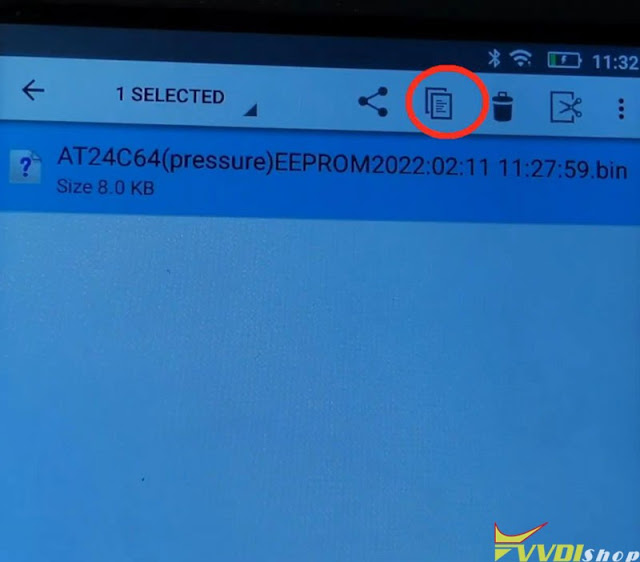
  1. Go to folder Xhorse/share/miniprog, mark file you want to copy(press and hold);
  2. Go back to root drive and paste the file in your own folder;

Transfer Files from Xhorse Key Tool Max to PC 4

Transfer Files from Xhorse Key Tool Max to PC 5

Now your file is in folder, you can easy access from Windows.

Transfer Files from Xhorse Key Tool Max to PC 6

www.vvdishop.com

1/20/2022

Xhorse VVDI Key Tool Max vs Key Tool Max Pro

 What’s the difference between the new xhorse vvdi key tool max PRO and the old key tool max?

Let’s check table comparison first:

ItemXhorse Key Tool Max
key-tool-max-1

Xhorse Key Tool Max Pro

key tool max pro


CPUQuad core CPUQuad core CPU
RAM1G+8G1G+8G
OBD moduleExternal Mini OBD ToolBuilt-in
CANFD module NoYes
OBD Power SupplyNo, power by USB onlyPower by OBD or USB cable
Battery Voltage TestNoYes
Software  
Immobilizer programmingWith Mini OBDBuilt-in
Cadillac CT4/CT5 CAN FDNoYes
Buick GL8/ ENCLAVE CAN FDNoYes
Chevrolet Cavalier / Trax  CAN FDNoYes
Service ResetWith Mini OBDYes, built-in
Generate remote (remote, smart card, Toyota XM remote, garage remote)YesYes
Copy remoteYesYes
Identify/copy chipYesYes
Generate chipYesYes
File make key (Immo data tool)YesYes
Other special functionsYesYes

In sum, the key tool max pro is the combination of key tool max + mini obd tool, with adapter module and battery voltage test.

www.vvdishop.com