Showing posts with label xhorse audi bcm2 adapter. Show all posts

8/04/2025

Xhorse New vs Old Audi BCM2 Solder Free Adapter

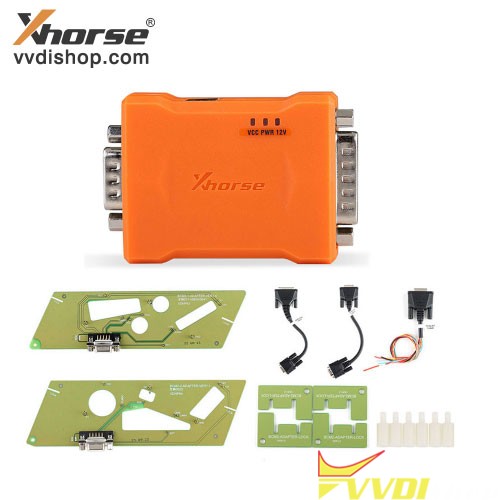
 New Gen2 Xhorse XDNPA2GL Audi BCM2 Encrypted Solder Free Adapter is available on vvdishop.com. What’s the difference between Gen1 and Gen2 Audi BCM2 adapter?


Xhorse New vs Old Audi BCM2 Solder Free Adapter

Check the comparison below:

ItemXhorse Gen1 Audi BCM2 Adapter

Xhorse Gen1 Audi BCM2 Adapter

Xhorse Gen2 Audi BCM2 Adapter

Xhorse Gen2 Audi BCM2 Adapter

Car List2013-2019 A4L,  A5, Q5

2013-2019 A6L,  A7, A8

2013-2019 A4L,  A5, Q5

2013-2019 A6L,  A7, A8,

Lamborghini, VW Touareg and more

BCM2 Versions0510, 0521, 0551, 0572, 0582, 0633, 0461, 0650, 0711,

0824, 0825, 0827

all BCM2 versions (03XX/ 04XX/ 05XX/ 06XX/ 07XX/ 08XX)
Compatible devicesVVDI Key Tool Plus , Multi Prog and VVDI2 + VVDI ProgVVDI Key Tool Plus, Multi Prog
Full dataYes, full Dflash + Pflash.

Supports BCM2 cloning (with the same hardware version)

Get BCM2 Immo data without original key IDYesYes
Compatible with 754J keyYesYes
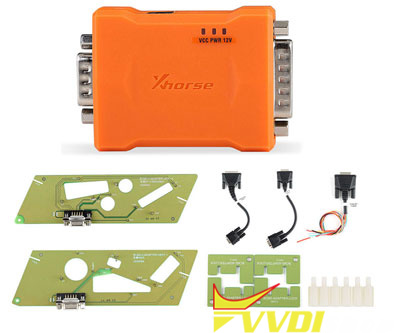
Package List1 x XDN62 BCM2 Adapter

1 x XDN63 BCM-1 Adapter

1 x XDN64 BCM-2 Adapter

1 x XDN65 BCM-A1 Cable

1 x XDN66 BCM-A2 Cable

1 x XDN67 BCM2-PROG Cable

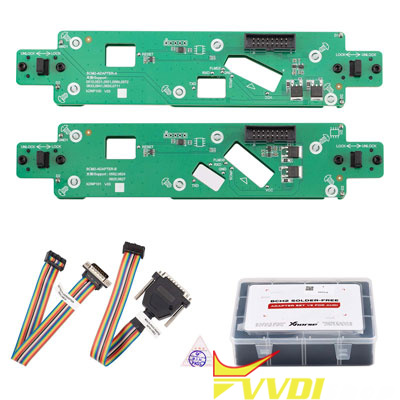
1pc x BCM2-A Solder-free Adapter
1pc x BCM2-B Solder-free Adapter
1pc x Adapter Cable for VVDI Key Tool Plus
1pc x Adapter Cable for MULTI-PROG

In sum:

The Gen2 adapter works with vvdi key tool plus and multi prog only.

The Gen2 Audi BCM2 adapter is the updated version of Gen1. It is an improved version that supports reading all BCM2 versions, regardless of hardware version. It also supports cloning BCM2s with the same hardware version. It can read full Dflash and Pflash data. Gen1 adapter cannot do BCM2 cloning.


www.vvdishop.com

3/21/2024

Xhorse Multi Prog Read Audi BCM2 with Solder Free Adapter

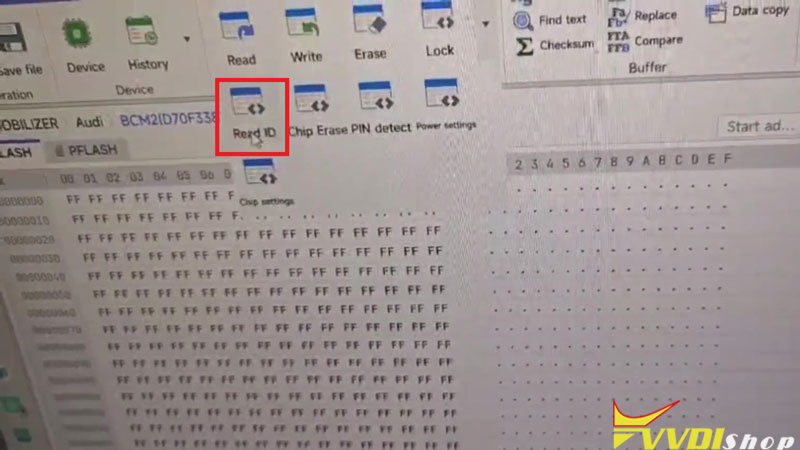
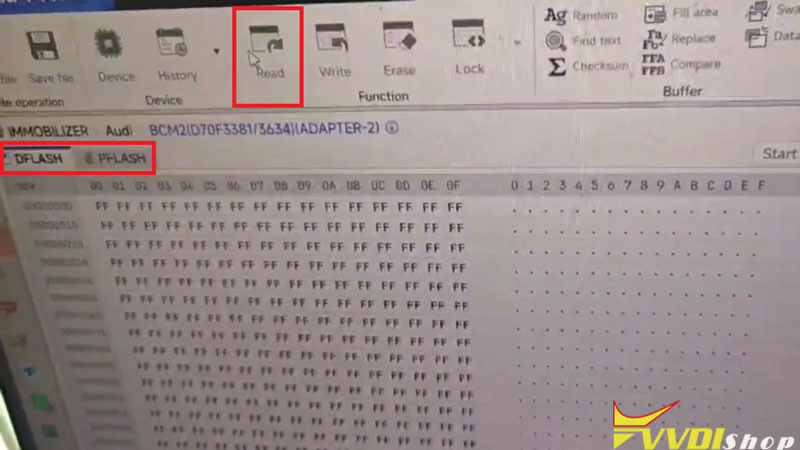
 Here we’re taking about how to read VW/Audi BCM2 module with Xhorse Multi-Prog Programmer without soldering. The Audi BCM2 Solder Free Adapter &VVDI2 will also be required.


Open Multi-Prog software,

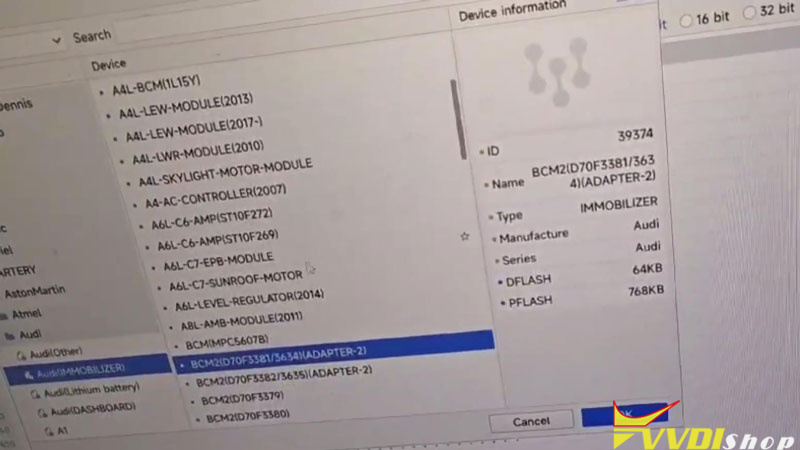
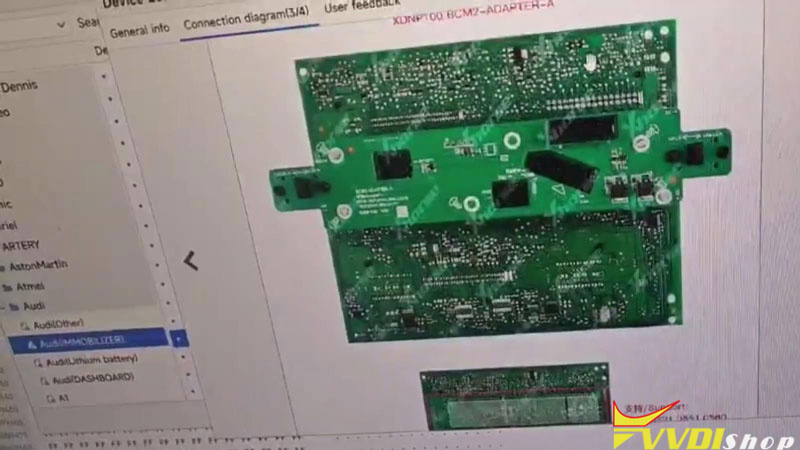
Device >> Selected BCM2 model: LOCK_BCM2-2(ADAPTER)(AUDI->AUDI) >> OK >> Details >> General info/ Connection diagram

Here we can get the adapter info and connection guide.


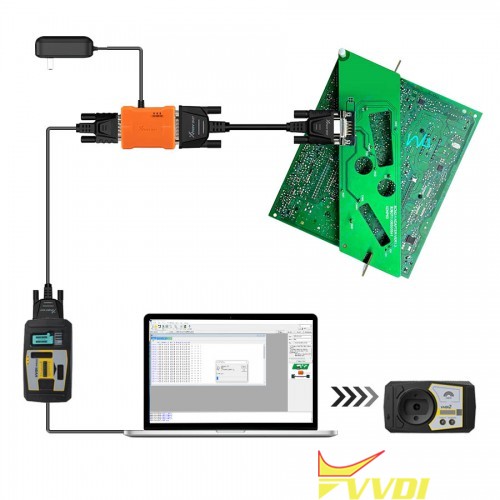
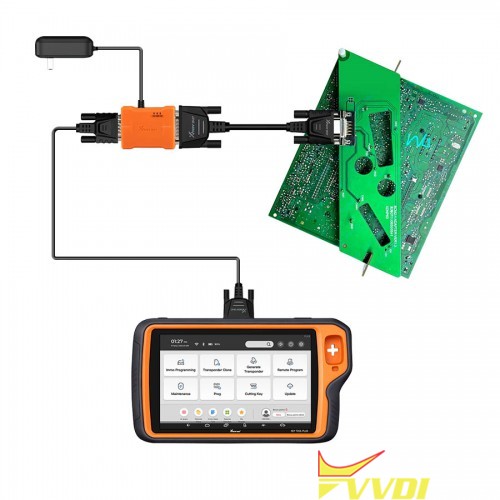
Connect Solder Free Adapter, BCM2 module and MultiProg programmer.

Power the adapter.

Connect to VVDI2.

Read DATA1 and save the data file.

Xhorse Multi Prog Read Audi BCM2 with Solder Free Adapter 1

Xhorse Multi Prog Read Audi BCM2 with Solder Free Adapter 2

Xhorse Multi Prog Read Audi BCM2 with Solder Free Adapter 3

Xhorse Multi Prog Read Audi BCM2 with Solder Free Adapter 4

Xhorse Multi Prog Read Audi BCM2 with Solder Free Adapter 5

Open VVDI2 software,

VW >> Key learn >> Fifth immobilizer system >> Step1: Show BCM2 information >> Load DATA1 file >> Confirm vehicle info

It will show this BCM2 supports continuing Step2.

Xhorse Multi Prog Read Audi BCM2 with Solder Free Adapter 6

Xhorse Multi Prog Read Audi BCM2 with Solder Free Adapter 7

Xhorse Multi Prog Read Audi BCM2 with Solder Free Adapter 8

Go back to Multi-Prog.

Read and save DATA2 file.

Continue with Step2: Get BCM2 immo data >> Load DATA2 file

VVDI2 will calculate the immo data of the module.

Click OK to save the immo data. The file can be used in dealer key generation and key learning.

We also need to save the service data that must be written back to BCM2 with Multi-Prog. Otherwise, the module cannot function properly.

Xhorse Multi Prog Read Audi BCM2 with Solder Free Adapter 9

Xhorse Multi Prog Read Audi BCM2 with Solder Free Adapter 10

Xhorse Multi Prog Read Audi BCM2 with Solder Free Adapter 11

Xhorse Multi Prog Read Audi BCM2 with Solder Free Adapter 12

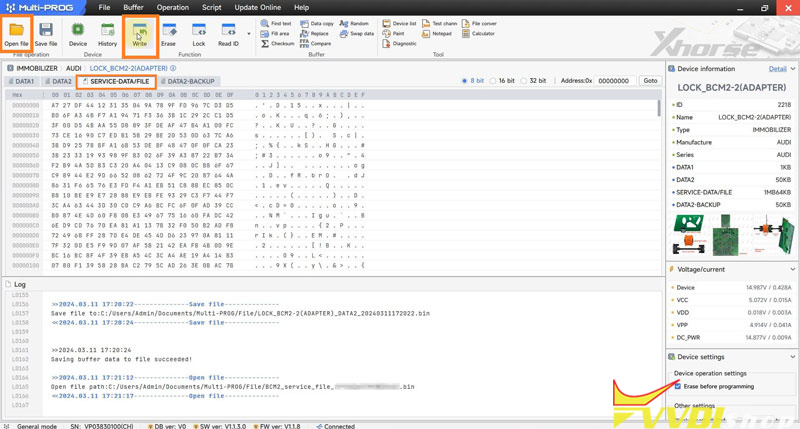
Switch to SERVICE-DATA/FILE in Multi-Prog,

Open file >> Load service data file >> Write

Chip writing success.


After installing the BCM2 module, it will work normally.

Done.

Xhorse Multi Prog Read Audi BCM2 with Solder Free Adapter 13

www.vvdishop.com

3/09/2022

Worth Buying Xhorse Audi BCM2 Solder Free Adapter?

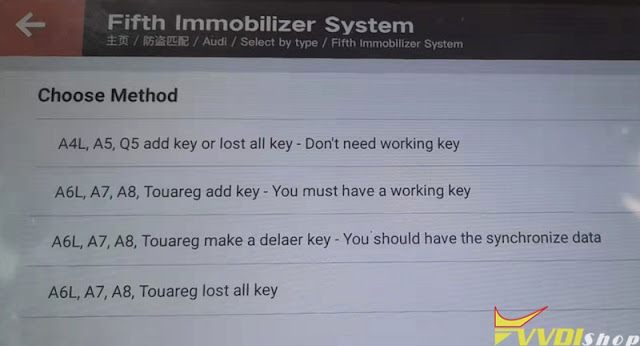
 To program VW Audi 5th IMMO keys like A4, A5, Q5, A6L, A8L, Touareg, Xhorse BCM2 Solder Free Adapter would help a lot. Users can easily select the corresponding method on VVDI Key Tool Plus to work with it.

Worth Buying Xhorse Audi BCM2 Solder Free Adapter 1

Worth Buying Xhorse Audi BCM2 Solder Free Adapter 2

Worth Buying Xhorse Audi BCM2 Solder Free Adapter 2

Worth Buying Xhorse Audi BCM2 Solder Free Adapter 4

There are mainly 2 types of car models in programming Audi 5th keys:

Worth Buying Xhorse Audi BCM2 Solder Free Adapter 5

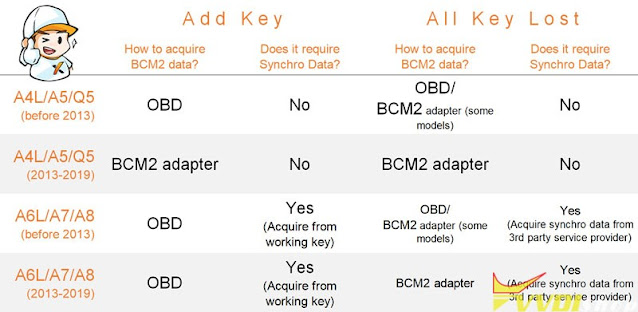
  • Models that no need sync data.

This type of models only need to get immo data for key adding & all keys lost. The representative models are A4, A5, Q5.


Ways to get immo data:

  1. For vehicles before 2012, can use VVDI to read by OBD directly; Or use VVDI PROG + VVDI2 to read & decode D-FLASH, P-FLASH from BCM. This type of non-encrypted BCM can be used for BCM clone & maintenance with VVDI PROG.
  2. For vehicles after 2012, Audi BCM2 Solder-Free Adapter is necessary to read immo data. After that, users will be able to convert data via VVDI2 or VVDI Key Tool Plus for key match.

Note: Data read by Xhorse BCM2 Adapter is only used for key programming, no support BCM clone maintenance.


Suppose that you don’t have the Audi BCM2 Adapter when all keys lost, you may have to pay an additional cost $170-$500 for data calculation via OBD. With the adapter, all these are free.

Worth Buying Xhorse Audi BCM2 Solder Free Adapter 6

Worth Buying Xhorse Audi BCM2 Solder Free Adapter 7

  • Models that need sync data.

This type of models need to get immo data & synchronous data simultaneously. The representative models are A6, A8, Touareg.


For key adding situation, either VVDI2 or VVDI Key Tool Plus can get immo data by OBD regardless of years. Users can get synchronous data from a working key without having to read BCM. It’s very relatively simple.


For all keys lost situation, certain CVT gearbox of vehicles before 2012 support to read BCM data via VVDI PROG. Then users can follow steps on VVDI2 or Key Tool Plus Pad to online calculate synchronous data.

(*Few cars are workable in this way, it requires experienced locksmith to read directional lock and engine data, short circuit communication line. It’s not recommended to do without experience.)


As for vehicles after 2012, those BCM are generally locked. At this time, the Audi BCM2 Solder-Free Adapter can help to read out data. After that, users should convert immo data via VVDI2 or VVDI Key Tool Plus. If it allows to read directional lock and engine data again, which means it supports to get synchronous data for all key lost programming. If not, users should find third-party calculation.


Price Difference

  1. Xhorse Solder Free Adapter is a one-time deal, only cost $121 to support many Audi models.
  2. Without adapters, users may have to pay $500 and more for data calculation.
  3. Calculation cost with data read by Xhorse adapter will be much lower than simply read by OBD.


Conclusion

It’s recommended to have Xhorse BCM2 Solder Free Adapter for locksmiths who usually program VW/Audi 5th immobilizer system keys. The adapter not only greatly save cost, but also earn more for next time job. It will pay for itself once using it.

www.vvdishop.com

11/09/2021

Can I Add Audi Q5 2015 Key with Xhorse VVDI2?

 As titled, possible to add key to an Audi Q5 2015 BCM2 encrypted using Xhorse VVDI2?


Yes, both add key and all keys lost.


You will need vvdi prog and new Audi BCM2 adaptor. Many people did a 2015 a5 with encrypted bcm2 using new adaptor.
Audi Q5 2015 Key with Xhorse VVDI2 1

Audi Q5 2015 Key with Xhorse VVDI2 2
Some positive feedback:
1). I did a 2015 a5 with encrypted bcm2 using new adaptor. 
2). I did add key yesterday and is work fine great tool
3). It works, the same job have today.
4). 2015 Q5 work all keys lost perfectly done by vvdi key tool plus and new adapter
Audi Q5 2015 Key with Xhorse VVDI2 3

Tips:

How do you do it when it is encrypted?

plug into car obd try read and make note of part no and software version, take bcm2 out put adaptor on for prog and read data1 under correct setting on prog, load data1 into vvdi2 and check info is correct, read data2 on prog and load into vvdi2, now you have immo file and service file, write service file back with prog, now put bcm2 back on car and program obd with immo file.


Read detailed operation instructions here:

https://www.vvdishop.com/service/use-audi-bcm2-adapter-with-vvdi-prog-vvdi2.html

and guide with key tool plus here

https://www.vvdishop.com/service/use-xhorse-audi-bcm2-adapter-with-vvdi-key-tool-plus.html

10/12/2021

Xhorse Audi BCM2 Data Reading Writing Error Solution

 Here comes the 2 working solutions to common Xhorse Audi BCM2 adapter data reading and writing problems using VVDI Key Tool Plus or VVDI Prog.

Xhorse Audi BCM2 Data Reading Writing Error Solution 1

  • Unknown error 130400.1
  • Writing service mode data to 99%, write failed


  1. Solution to “unknown error: 130400.1”

Read DATA1 success, reading DATA2 got “unknown error: 130400.1” error when progress goes to 2% it says “the data reading failed” with vvdi key tool plus.

Xhorse Audi BCM2 Data Reading Writing Error Solution 2

Xhorse Audi BCM2 Data Reading Writing Error Solution 3

How to fix?

Proceed with caution when you get “unknown error: 130400.1”. just check if the wiring or the adapter has stable contact and if the external power supply is stable, again try 1-2 data reading until successfully (do not read DATA1 again during this process, or do not try to unlock and try to install back to the car). After the data reading is normal, there will be no other problems, and then you can install back to the car.

Read more: How to connect/use Audi BCM2 adapter with vvdi key tool plus?


  1. Solution to the writing service mode data to 99%

Read both DATA1 and DATA2 data successfully, the IMMO data and service mode data are generated successfully. However, vvdi prog reports an error when writing service mode data to 99%, after trying again, the system pops up that the erasure failed. After that try to read DATA1 again, it will not be able to read.

Xhorse Audi BCM2 Data Reading Writing Error Solution 4

Xhorse Audi BCM2 Data Reading Writing Error Solution 5

How to fix?

If you have the same problem that the DATA1 and DATA2 data is read successfully, also the service mode data is saved, then just select the unlock option to unlock the CPU.

Xhorse Audi BCM2 Data Reading Writing Error Solution 6

Wait until the system says that the unlock is successful.

Xhorse Audi BCM2 Data Reading Writing Error Solution 7

Xhorse Audi BCM2 Data Reading Writing Error Solution 8

At this time, choose the service mode, then import and write the service data.

Xhorse Audi BCM2 Data Reading Writing Error Solution 9

After the data is written successfully, just install back to the Audi car, and the vehicle can work, you do not need to do any processing.

Read more: How to connect/use Audi BCM2 adapter with vvdi2+ vvdiprog?

Audi encrypted BCM adapter tech support: www.vvdishop.com