11/16/2023

Xhorse VVDI BEE Key Tool Lite Device Connect Failed Solution

 Problem:

My Xhorse VVDI BEE Key tool lite is not working. It seems that the USB contact is not good.
I managed to get the blue light on and a message sent with code. Error “device connect failed”. Any solution?

Xhorse VVDI BEE Key Tool Lite Device Connect Failed

Solution:

Go to mobile phone Settings, check if the mobile phone supports OTG function.

If yes, turn on OTG.


How to Enable OTG Android:

To Enable the OTG mode, Find OTG mode in Settings ⇾ Tap on OTG connections ⇾ Then Enable the connection (OTG Mode)

  1. Search for “OTG” in the mobile settings.
  2. Tap on the “OTG connection” option.
  3. Toggle the OTG connection to enable it.
  4. Once enabled, you can connect a pen drive or USB device to your smartphone.

enable otg function 1
enable otg function 2

enable otg function 3

www.vvdishop.com

11/14/2023

Xhorse Key Tool Max Toyota XM38 Failed to Write Data/

 Problem:

Xhorse VVDI key tool max cannot copy the new key car file. When generating emergency key with xm38 via EEPROM. it said failed to write data. Any solution?

Key Tool Max Failed to Copy Toyota 8A New Key File 1

Key Tool Max Failed to Copy Toyota 8A New Key File 2

Key Tool Max Failed to Copy Toyota 8A New Key File 3

Key Tool Max Failed to Copy Toyota 8A New Key File 4

Key Tool Max Failed to Copy Toyota 8A New Key File 5

Key Tool Max Failed to Copy Toyota 8A New Key File 6

Key Tool Max Failed to Copy Toyota 8A New Key File 7

Key Tool Max Failed to Copy Toyota 8A New Key File 8

Key Tool Max Failed to Copy Toyota 8A New Key File 9

Solution:

You cannot directly generate emergency key via eeprom. Need to use XM38 smart key to generate the corresponding type of smart card. Then generate AKL emergency key via eeprom.

Generate emergency key function only supports 2110 plat number smart cards for all keys lost.
Read the smart box data through OBD.


www.vvdishop.com

Xhorse VVDI2 Initialize SRWLock Not Found Solution

 Problem:

the entry point to the Initialize SRWLock procedure was not found in the DLL KERNEL32.dll
After upgrading xhorse vvdi2 software to version 7.3.5 on Windows Xp. Version 7.3.2 working ok. I tried it on 3 computers. This error is everywhere .The new update does not work on WindowsXP
What to do?


Solution:

Replace ConfigClient.dll file in that folders :

/BMW,
/transponder programer,
/vag,
/porsche


Feedback:

message” Initialize SRWLock procedure was not found in the DLL KERNEL32.dll” no longer shows.

11/13/2023

How to Activate ID48 96bit License in VVDI BEE Key Tool Lite?

 Question:

My Xhorse VVDI BEE Key Tool Lite ID48 96bit license is not activated. It asks to manually activate in Bonus points Mall. How to activate it?

Activate ID48 96bit License in VVDI BEE Key Tool Lite

VVDI BEE Key tool lite does not support ID48 96bit cloning. ID48 96bit license cannot be activated on the device. Need mini key tool, key tool max, key tool max pro or key tool plus.

BEE Key tool is the lite version of Mini key tool, it cannot do id48 96bit cloning, cannot clone remote and will not unlock remote.

11/06/2023

How to Solve Xhorse VVDI MB Power Adapter Response Error?

 Problem:

My mb power adapter is working fine with vvdi key tool plus. But when connected with vvdi mb tool (12V 1.5a), it says MB Power Adapter Response Error. Any solution?

Xhorse VVDI MB Power Adapter Response Error 1

Solution:

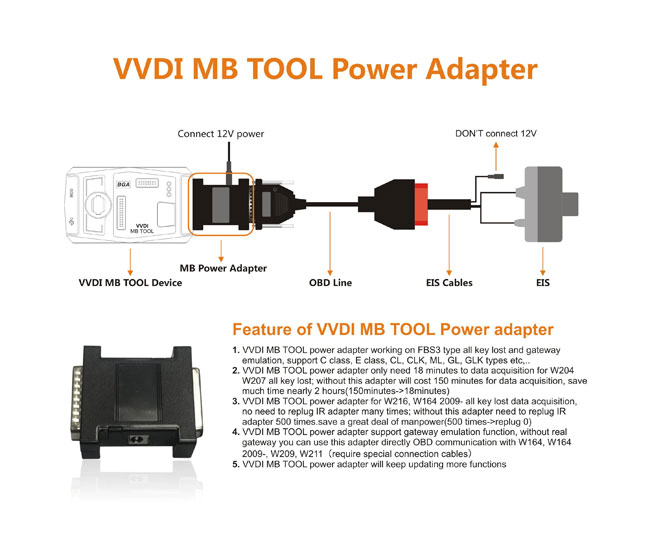
Key tool plus MB power adapter cannot be used with VVDI MB. They use different mb power adapters for fast password calculation.

Xhorse VVDI MB Power Adapter Response Error 2

Xhorse VVDI MB Power Adapter Response Error 3

VVDI MB Tool Power Adapter

Xhorse VVDI MB Power Adapter Response Error 4

Vvdi Key Tool Plus MB Power Adapter

10/30/2023

How to Solve Xhorse ID48 96bit Cloning Request Failed?

 Problem:

Failed to clone ID48 96bit transponder with xhorse vvdi key tool max Pro. Error request failed. Any solution?

Xhorse ID48 96bit Cloning Request Failed

Solution:
1. internet connection issue, change different network connection or try using mobile network (wifi hotspot)

2. Sometimes server is busy. after a few attempts it will work.

www.vvdishop.com

10/29/2023

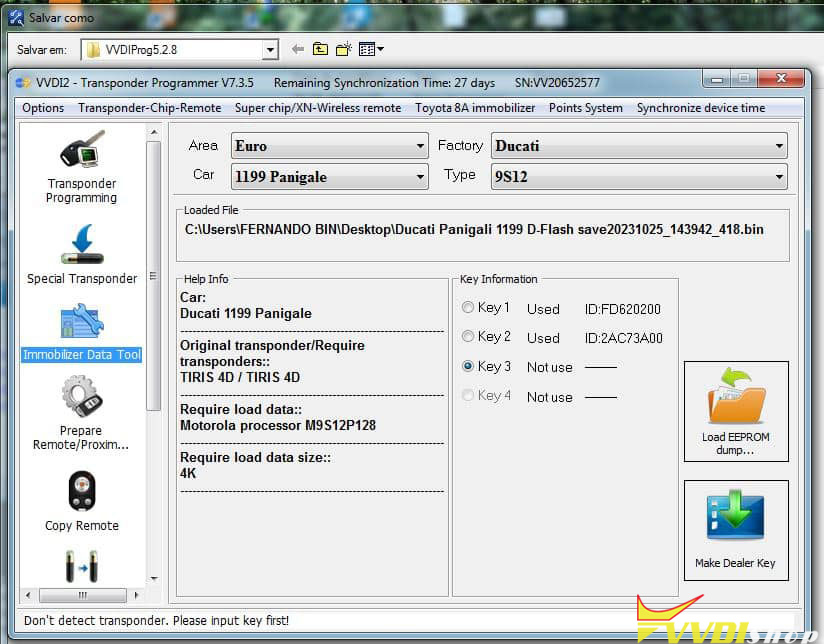
VVDI Prog and VVDI2 Program Ducati Panigale 1199 Key

 Ducati Panigale key programming 1199 reading eeprom with vvdi prog and programming transponder key with Vvdi2.

Choose new key position.

If choose a used key, when you open the switch the dash will ask for pin code.


Read motorola MC9S12P128 mcu with vvdi prog

Write key Ducati 1199 Panigale with vvdi2 via dump.

VVDI Prog and VVDI2 Program Ducati Panigale 1199 Key 1

VVDI Prog and VVDI2 Program Ducati Panigale 1199 Key 2

VVDI Prog and VVDI2 Program Ducati Panigale 1199 Key 3

VVDI Prog and VVDI2 Program Ducati Panigale 1199 Key 4

VVDI Prog and VVDI2 Program Ducati Panigale 1199 Key 5


How to Update VVDI Key Tool Max Pro IMMO Update Failed Issue?

 Problem:

Failed to update xhorse vvdi key tool max pro immo database, any solution?

Update VVDI Key Tool Max Pro IMMO Update Failed

Solution:

Change WiFi hotspot, update database again.

If still fails, do a factory reset and try again.

10/23/2023

Xhorse VVDI2 BMW OBD BDC SWFL Lost Solution

 Problem:

I was trying to add a new spare key to Bmw x1 2019 BDC with xhorse vvdi2 via OBD.

Now BDC has no communication, error SWFL Lost. Any solution?

Xhorse VVDI2 BMW OBD BDC SWFL Lost  1

Xhorse VVDI2 BMW OBD BDC SWFL Lost  2

Xhorse VVDI2 BMW OBD BDC SWFL Lost 3

Possible reason:

Failed to make sure proper voltage.


Solution:

Now you need to restore flash. You need to bench read flash and repair then write back to BDC.

Try to unlock on bench. Power supply stable at 13.5v. Try several times until flash writes ok.


Feedback:
Solved.  Flash with esys and removed bdc job on bench and done!

10/19/2023

Program Toyota Tacoma 2019 AKL with Xhorse XM38

 Toyota Tacoma 2019 (8A proximity) all keys lost programming using Xhorse Toyota XSTO01EN XM38 smart key.

  1. Generate XM38 and correct frequency with xhorse vvdi key tool max.

2. Programming all keys lost with xtool x100 pad2 pro.


if you don’t change the frequencies the presence doesn’t work. Just turn it on by moving the key closer to the start button.

Program Toyota Tacoma 2019 AKL with Xhorse XM38 1

Program Toyota Tacoma 2019 AKL with Xhorse XM38 2

Program Toyota Tacoma 2019 AKL with Xhorse XM38 3

Program Toyota Tacoma 2019 AKL with Xhorse XM38 4

Program Toyota Tacoma 2019 AKL with Xhorse XM38 5

Program Toyota Tacoma 2019 AKL with Xhorse XM38 6

Program Toyota Tacoma 2019 AKL with Xhorse XM38 7