8/09/2020

How to Change VW EDC17 Immo Data in EEPROM with VVDI2?

Here vvdishop.comm presents how work Xhorse VVDI2 VAG for change immo data in eeprom from Seat Ibiza EDC17U01 .


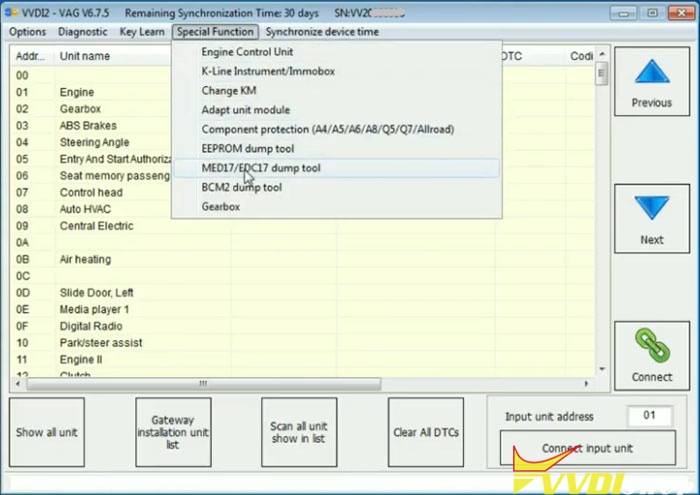
Run VVDI2 Quick Start->Seat->Special Function->MED17/EDC17 dump tool

vvdi2-change-edc17-immo-data-1

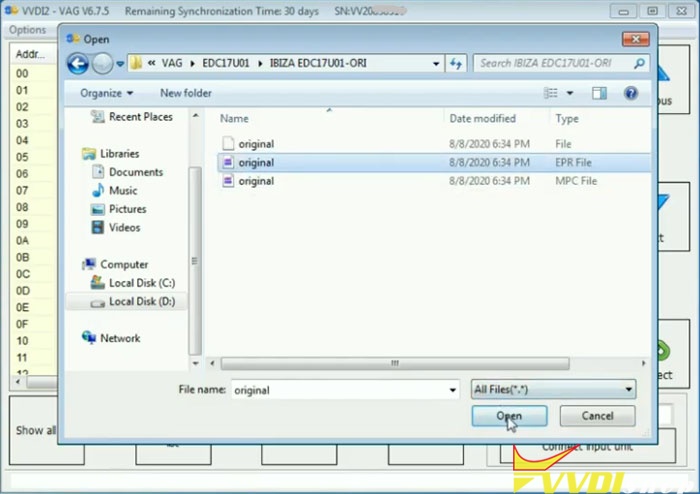
vvdi2-change-edc17-immo-data-2


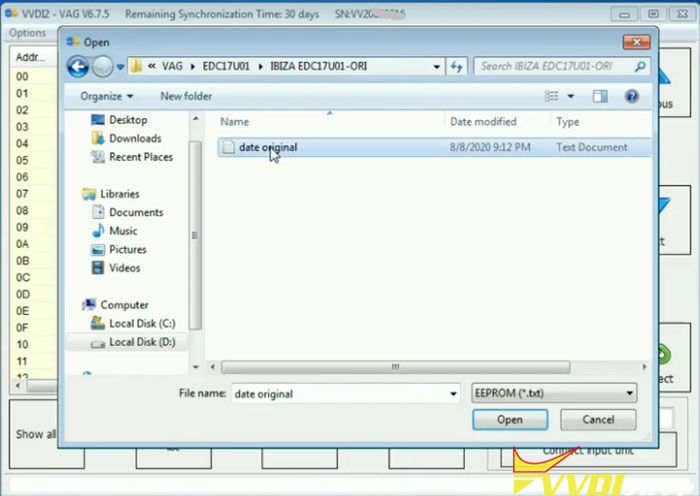
Load EEPROM File,  upload original Ibiza EDC17U01 eeprom

vvdi2-change-edc17-immo-data-3

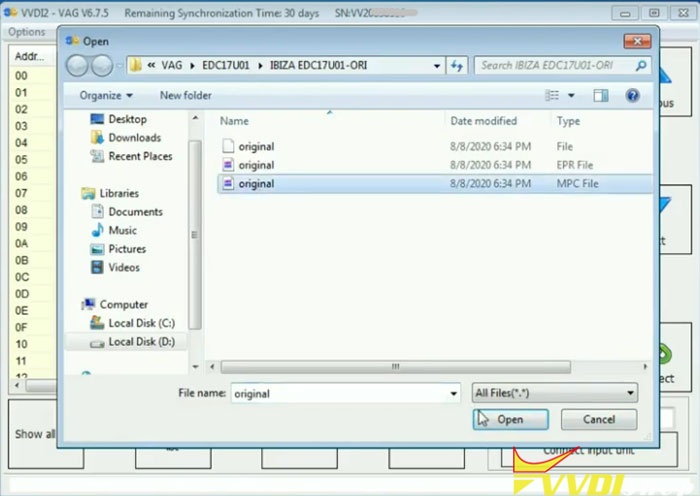
vvdi2-change-edc17-immo-data-4

Load Flash file, upload original EDC17U01 flash file

vvdi2-change-edc17-immo-data-5

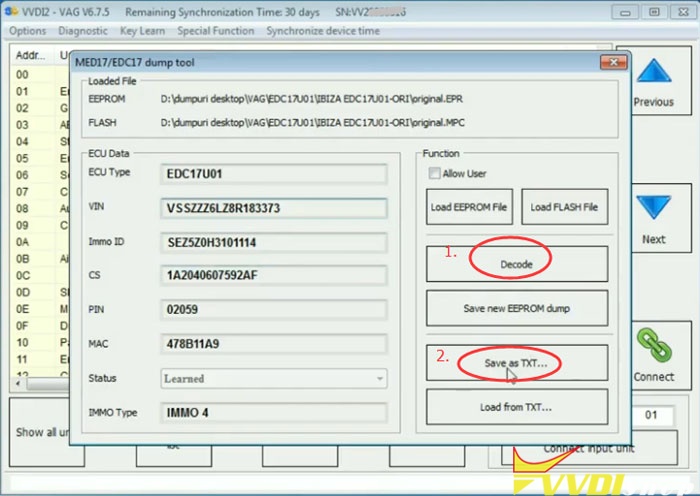
Then press Decode

vvdi2-change-edc17-immo-data-6

Decode ECU information, incl. ECU Type, CIN, CS, PIN MAC, Immo type

vvdi2-change-edc17-immo-data-7

Save as TXT

Upload EEPROM file and Flash File you want to change respectively

vvdi2-change-edc17-immo-data-8

vvdi2-change-edc17-immo-data-9


Then Decode
missing IMMO ID, Load from TXT saved previously

vvdi2-change-edc17-immo-data-10

vvdi2-change-edc17-immo-data-11

Decode success. Save new EEPROM dump.

vvdi2-change-edc17-immo-data-12

vvdi2-change-edc17-immo-data-13

Open txt file to check ECU information

vvdi2-change-edc17-immo-data-14

change EDC17 immo data in eeprom success.


www.vvdishop.com


https://www.vvdishop.com/service/vvdi2-change-vw-edc17-immo-data-in-eeprom.html

8/05/2020

Xhorse VVDI Prog Clone Mercedes W204 Front SAM Module

A Mercedes-Benz W204 C-class C200 2009 front SAM control module is water damaged, need to clone a new SAM.
First need to read dump data from old front SAM unit and clone to a new one.

In Xhorse VVDI Prog software, select 8-Other->Benz->W204 FRONT SAM Module
Check wiring diagram
vvdiprog-benz-w204-front-sam-cloning-1

vvdiprog-benz-w204-front-sam-cloning-2
vvdiprog-benz-w204-front-sam-cloning-wiring-diagram
Follow wiring diagram to connect vvdiprog MC912 reflash cable v3 with front SAM module
vvdiprog-benz-w204-front-sam-cloning-3

vvdiprog-benz-w204-front-sam-cloning-4

vvdiprog-benz-w204-front-sam-cloning-5

vvdiprog-benz-w204-front-sam-cloning-6

vvdiprog-benz-w204-front-sam-cloning-7

vvdiprog-benz-w204-front-sam-cloning-8

vvdiprog-benz-w204-front-sam-cloning-9
Read EEPROM and save dump
vvdiprog-benz-w204-front-sam-cloning-10

vvdiprog-benz-w204-front-sam-cloning-11

vvdiprog-benz-w204-front-sam-cloning-12

vvdiprog-benz-w204-front-sam-cloning-13
Read PFLASH and save data
vvdiprog-benz-w204-front-sam-cloning-14

vvdiprog-benz-w204-front-sam-cloning-15

vvdiprog-benz-w204-front-sam-cloning-16
Write EEPROM and PFLASH data to a new front SAM module using vvdi-prog, then install it to vehicle.
Done.

8/04/2020

VVDI Prog Read Opel Corsa-D RENESAS V850 BCM

How-to: calculate PIN code from Opel Corsa-D BCM dump. Before calculating, you need use xhorse vvdi prog programmer to read out dump file from Opel Corsa-D BCM.


Procedures:
Step 1: Read dump from BCM
Remove BCM and disassemble the cover to take PCB out.
Solder wires on PCB according to the wiring diagram. In this example, we take VVDI Programmer as example,the diagram show on the software.
vvdi-prog-read-opel-corsa-bcm-1
vvdi-prog-read-opel-corsa-bcm-2
In VVDI-Prog software select “2-MCU”–>”RENESAS-V850”–>”D70F3379”
vvdi-prog-read-opel-corsa-bcm-3
Select “P-FLASH” and click “Read” button
vvdi-prog-read-opel-corsa-bcm-4
It will take several minutes to read out P-FLASH data from BCM
vvdi-prog-read-opel-corsa-bcm-5
Save the P-FLASH data
vvdi-prog-read-opel-corsa-bcm-6
Then open it with a editor, like HEX Workshop Editor
vvdi-prog-read-opel-corsa-bcm-7
Step 2: Calculate PIN Code from Dump
Now you can calculate PIN code from BCM P-FLASH dump:
Open dump from FLASH and read value from address 3FD0 3FD1 3FD2
In this example,I have value F8 9A 5D
Double value from address 3FD1
Now we get value:F8 9A 9A 5D
Open dump from EPROM and read value from address 0010 to 0013
Save value,i have in EEPROM dump to address 0050 to 0053
In my example i have CC A8 A8 65
Now open HEX calculator and make value FLASH XOR value EPROM
In my case,F89A9A5D XOR CCA8A865=34323238
Ignore 3 and find value 4228
Now read reverse the value and it is PIN code: 8224!

8/02/2020

VVDI MB Program Benz GL450 2013 KeylessGo Smart Key

How-to: Program Xhorse KEYLESS-GO key for Mercedes-Benz 2013 GL450 GL-Class 4Matic (add a spare key) with Vvdi MB BGA Tool.
Device required:
Original smart key
vvdi-fbs3-smart-key
* The vvdi FBS3 keylessgo smart key can be used on W204 W207 W212 W164 W166 W221.
vvdi-fbs3-smart-key-and-key-shell
Procedure:
First of all calculate key password online and copy the pass
vvdi-mb-program-gl450-keylessgo-smart-key-1
Read EIS data
vvdi-mb-program-gl450-keylessgo-smart-key-2

Paste key password to corresponding area
Save EIS data
vvdi-mb-program-gl450-keylessgo-smart-key-3

Save data as HC05 format
vvdi-mb-program-gl450-keylessgo-smart-key-4
vvdi-mb-program-gl450-keylessgo-smart-key-5
Choose Prepare Key Fille->Load EIS File
vvdi-mb-program-gl450-keylessgo-smart-key-6

Select unused key position (i.e key 5 & key 7), and V51 format, Press Prepare Key File
vvdi-mb-program-gl450-keylessgo-smart-key-7

Save key data
vvdi-mb-program-gl450-keylessgo-smart-key-8

vvdi-mb-program-gl450-keylessgo-smart-key-9
Go to Read/Write Key-> Identification Key
vvdi-mb-program-gl450-keylessgo-smart-key-10

Renew key
vvdi-mb-program-gl450-keylessgo-smart-key-11

Select key data file (key 7)
vvdi-mb-program-gl450-keylessgo-smart-key-12

Write key
vvdi-mb-program-gl450-keylessgo-smart-key-13

Write key success
vvdi-mb-program-gl450-keylessgo-smart-key-14
Test the new keylessgo smart key
vvdi-mb-program-gl450-keylessgo-smart-key-15
Done.