4/20/2022

How to Fix Xhorse XKB508EN Wired Remote Battery Discharge?

 Question:  I have a problem with the Xhorse XKB508EN Wired Remote 2-button keys, they are discharging the batteries within 3 days. I use Panasonic CR2032 batteries.

Xhorse XKB508EN Wired Remote Battery Discharge 1

Xhorse XKB508EN Wired Remote Battery Discharge 2

Xhorse XKB508EN Wired Remote Battery Discharge 3

Solution:

Just remove the resistor marked circle below. It will not discharge batteries.

 Xhorse XKB508EN Wired Remote Battery Discharge 4

4/18/2022

How to Update Xhorse VVDI Mini OBD Tool via PC?

 Xhorse vvdi mini obd tool firmware can be updated via WiFi or PC. Here vvdishop.com shows how to update xhorse obd mini with PC. Fast and easy.


Software download

Download Xhorse Upgrade Kit here

Update Xhorse VVDI Mini OBD Tool via PC 1

Connect xhorse mini obd tool with PC via USB cable

Run Xhorse Upgrade Kit

Update Xhorse VVDI Mini OBD Tool via PC 2

Select MiniOBD device, Find device and run Upgrade

Update Xhorse VVDI Mini OBD Tool via PC 3

Update Xhorse VVDI Mini OBD Tool via PC 4

Update Xhorse VVDI Mini OBD Tool via PC 5

Update Xhorse VVDI Mini OBD Tool via PC 6

Update Xhorse VVDI Mini OBD Tool via PC 7

Wait until the update procedure is completed.

www.vvdishop.com

VVDI MB Cannot Get Calculation Times from Server?

 Question: My xhorse vvdi mb tool failed to calculate MB password online. Error Cannot get calculation times from server. Any idea?

VVDI MB Cannot Get Calculation Times from Server

You vvdi mb device is locked. It won’t calculate password anymore.

Please verify ownership of the device.

4/14/2022

Program 2016 RAM 1500 Push Start via Xhorse Smart Remote

 2016 ram 1500 push start proximity fcc GQ4-54T remote programmed fine using xhorse vvdi mini key tool and xhorse smart remote.

Program 2016 RAM 1500 Push Start via Xhorse Smart Remote 1

First Attempt:

I generated the one that says dodge ram (Dodge-RAM 1500 2500 3500 prox)

Program 2016 RAM 1500 Push Start via Xhorse Smart Remote 2

Remote programmed fine using the xhorse mini key tool.

When programming it says put the new fob against the pts button then press and release unlock

Tried with both remotes and learning failed both times
What am I doing wrong?

Second Attempt:
I think that’s the wrong one. There’s another that is a 46 chip. Try this one (RAM KeylessGo ID46 433MHz Prox). It worked. 
 Program 2016 RAM 1500 Push Start via Xhorse Smart Remote 3

4/13/2022

Renew Mercedes M271 SIM4LKE with VVDI MB

 Xhorse VVDI MB BGA Tool + Benz ECU Renew Cable can support renewing Mercedes ECU covering CR3.XX, XR4.XX, CR5, CR6, CR60.XX, SIM271DE2.0, SIM271KE2.0, SIM4LKE, CRD.11, CRD2.XX, SIM266, ME9.7, MED17.7X, etc. Easy done in 2 minutes.


Here’s taking Mercedes M271 ECU as a demonstration.

Disassemble ECU from vehicle, connect SIM4LKE adapter & VVDI MB according to ECU model.

Renew Mercedes M271 SIM4LKE with VVDI MB 1

Renew Mercedes M271 SIM4LKE with VVDI MB 2

Renew Mercedes M271 SIM4LKE with VVDI MB 3

Open VVDI MB software:

Click “Renew ECU/Gearbox >> Read”.

Click “Erase Pass.” to get the password.


Benz ECU info is showing:

Personalized: Yes

Activated: Yes

Renew Mercedes M271 SIM4LKE with VVDI MB 4


Click “Renew”.

Erase target unit success.

Renew Mercedes M271 SIM4LKE with VVDI MB 5


Let’s read ECU again at this time.

Benz ECU info has changed to:

Personalized: No

Activated: No

Benz E

That means done.

Renew Mercedes M271 SIM4LKE ECU is successful.

Renew Mercedes M271 SIM4LKE with VVDI MB 6

www.vvdishop.com

https://www.vvdishop.com/service/xhorse-vvdi-mb-renew-benz-sim4lke-ecu.html

How to Fix Xhorse Wired Remote Discharge Batteries?

 Question:  I have a problem with the Xhorse XKB501EN B5 Wired Remote 3-button keys, they are discharging the batteries within 3 days. they are giving the same defect, I used maxel, and Panasonic CR2032.

Fix Xhorse Wired Remote Discharge Batteries 1

Fix Xhorse Wired Remote Discharge Batteries 2

Vvdishop.com solution:

Fix Xhorse Wired Remote Discharge Batteries 3

Just remove the resistor marked above. It will not discharge batteries.

4/12/2022

How to Tell Xhorse Old or New Smart Remotes?

 Xhorse VVDI Remotes are constantly being upgraded with the development of chips and technology. For certain models are only workable for old vvdi remotes; for some latest models are restricted to new vvdi remotes.  In the process of updating, a little part of keys can be only generated via old types keys of smart keys.


Error  example “The latest remote no support (868.902 frequency), please use old remote (before June 2000) to generate.”

Tell Xhorse Old or New Smart Remotes 1

Faced with such a situation, it’s very helpful to learn to distinguish the Xhorse smart remotes.


Method1. Check Circuit Board

New VVDI Remotes: Remote chip with 2-sides pins.


Old VVDI Remote (2 types):

  1. Remote chip with 4-sides pins.
  2. 2-sides pins chip + 6-pins component.

Tell Xhorse Old or New Smart Remotes  2

Tell Xhorse Old or New Smart Remotes 3

The old type and new type vvdi smart key difference is:

The new model does not support 868.902, others are the same.

If you feel that it is troublesome to disassemble the key shell and take out the circuit board, you can also use key tool series to check.


Method2. Check on Xhorse Key Tools

This way is available on VVDI Key Tool Plus Pad, MINI KeyTool, Key Tool Max to detect remote version.


Query path:

Special functions >> VVDI remote function >> Detect remote

Put the smart remote into coil, then press detect.

And the result version will tell you how to distinguish:


New VVDI Remotes: V2.0 or above.

Old VVDI Remotes: below V2.0

Tell Xhorse Old or New Smart Remotes 4

Tell Xhorse Old or New Smart Remotes 5

www.vvdishop.com

Xhorse VVDI Mini Key Tool Fails to Unlock Audi 8E Key?

 Why I can’t unlock an Audi 8E key with Xhorse VVDI Mini key tool? in vvdi says, no j518 dump is required (picture 2)

Xhorse VVDI Mini Key Tool Fails to Unlock Audi 8E Key 1

Xhorse VVDI Mini Key Tool Fails to Unlock Audi 8E Key 2

Xhorse VVDI Mini Key Tool Fails to Unlock Audi 8E Key 3

Xhorse VVDI Mini Key Tool Fails to Unlock Audi 8E Key 4

Solution:

The Unlock 8E remote function will unlock xhorse 8E transponder ONLY.

Can not unlock OEM or aftermarket 8E transponder.

Only can be unlocked with immo data from that car. Cannot be done without original dump from original car that the key came from.

4/11/2022

How To Use VVDI MB TOOL OBD Clip?

 We may find that it is seldom used the VVDI MB Tool OBD Clip while programming Mercedes. In general, we more often use the OBD cable connector instead. So when and how to use the OBD clip?

Use VVDI MB TOOL OBD Clip 1


When programming Benz 204/207 with directional lock on car, it’s not able to read data with VVDI MB Tool by OBD directly. That’s because data will be interfered due to OBD connection. That’s why locksmiths always remove directional lock on bench to read immo data or match simulator.


Can we program Benz 204/207 without wiring harness on car?

The answer is yes.


By reason of filtration and interference from other car modules, it’s failed to read immo data by OBD. But we can bypass the interference through connecting OBD communication line on device to directional lock straightway. That’s what the VVDI MB OBD Clip can do: connect to directional lock.


How to use VVDI MB OBD Clip?

  1. Break open the communication line of directional lock;
  2. Clamp to communication line.

Note:

* DO NOT disconnect plugs of directional lock & ELV Emulator.

* Clamp to the corresponding line for red marked pin.

* Need to break wire skin.

Use VVDI MB TOOL OBD Clip 2

It’s recommended to use the way in case emergency without any EIS/ELV Test Lines.

www.vvdishop.com


2009 VW Tiguan All keys lost with VVDI2 in Service Mode

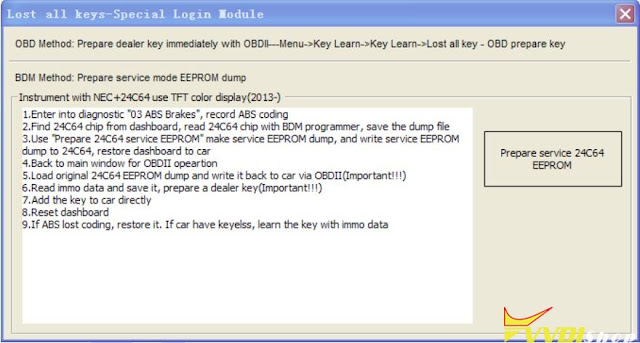
 Here is the tips to program 2009 VW Tiguan with all keys lost by xhorse vvdi2 in ABS service mode.  The procedure can also be applied to these login type include (CDCxx+24C32, A3/TT/R8 (CDC32xx), NEC24C32, NEC24C64, NEC24C64(2012 TFT color display), NEC24C64(2013-), NEC24C64(2013 TFT color display), Audi A1, Audi Q3).

  • Open the dash, read the eeprom with programmer.
  • Upload the binf le to the vvdi2 and mofidy.
  • Write the modified file to the eeprom
  • Connect the dashboard on the car and write the original file back by OBD
  • Then read the immo data and program the key.

Don’t forget to SAVE ABS coding with VVDI before the process. You can restore with VVDI2 too.

This function is in the same menu of vvdi2 as eeprom update section, dash with micronas + 24C32.


Xhorse VVDI2 Service mode

All login type have similar operation for lost all keys,

backup ABS coding->read EEPROM with BDM programmer->Prepare a service EEPROM data->write service EEPROM data to cluster->Put instrument in car->select correct login type->Load

original EEPROM file->activate car OBDII communication->write EEPROM via OBDII->read immo data->save immo data->make dealer key->add key->reset instrument.
2009 VW Tiguan All keys lost with VVDI2 in Service Mode

Service mode all Keys lost:

Some login type cannot read immo data while lost all working key. Login type include (CDCxx+24C32, A3/TT/R8 (CDC32xx), NEC24C32, NEC24C64, NEC24C64(2012 TFT

color display), NEC24C64(2013-), NEC24C64(2013 TFT color display), Audi A1, Audi Q3). This type can make dealer key with following steps:

1) Activate OBD communication by open dangerous light, press on the brakes for several times. Backup ABS coding, you can run backup function on bottom right corner, or enter diagnostics 03 ABS, backup abs coding

2) Find EEPROM chip from instrument, usually use 24C32 or 24C64 chip, read EEPROM dump with BDM programmer and save as original EEPROM dump

3) Enter “Service Mode”, load original EEPROM dump and prepare service EEPROM dump. Attention: DON’T overwrite the original EEPROM dump

4) Write service EEPROM dump to EEPROM chip (24C32 or 24C64)

5) Restore dashboard to car

6) Back to main window and select right login type

7) Load original EEPROM dump (IMPORTANT!!!)

8) Activate OBD communication by open dangerous light, press on the brakes for several times

9) Press “Write EEPROM” write original dump to dashboard via OBDII (IMPORTANT!!!)

10) After write success, read immo data and save (IMPORTANT!!!)

11) Make a new dealer key and add to immobilizer system

12) If car use keyless key, learn the dealer key with learn method (with immo data support)

13) Start engine with new dealer key, complete.

www.vvdishop.com