6/14/2021

How to Solve Xhorse VVDI2 Update Error Code 402?

 Problem:

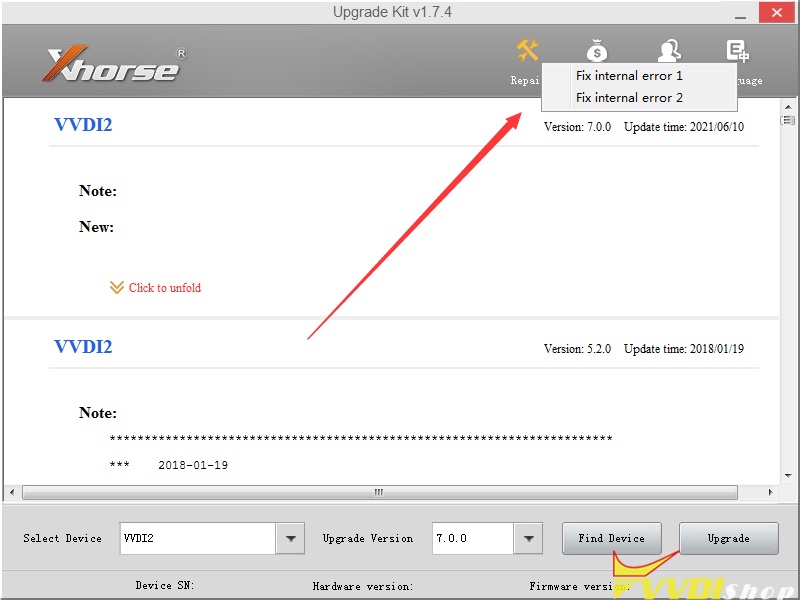
Hello, I failed to update xhorse vvdi2 full kit to v7.0.0, it displayed error code 402.03.02.A5.0E

xhorse-vvdi2-update-error

VVDISHOP.COM Working Solution:

xhorse-vvdi2-fix-internal-error

Try the Repair function to fix internal error 1 or error 2. 

Then update vvdi2 again using Xhorse upgrade kit.

If still fail to update, change other COM ports or another laptop.

Any questions feel free to contact vvdishop.com customer service.

6/10/2021

VW Golf MK7 MQB Super Remote Burn Failed Solution

 Problem:

Trying to make a spare for a VW golf MK7 mqb with xhorse mini key tool, got the super remote but keeps saying use proxy remote even though the cars not proxy. Any ideas?

vw mk7 mqb remote burn failed

Solution:

Use mqb style smart key. Mk7 Key is a semi smart. Super remote key is for transponder type key. So you need to use the proxy type key with flip blade.

Actually, it says “support type: Smart Key” so you have to take a XS series.  Smart key required because superchip cannot generate id88.


www.vvdishop.com

6/09/2021

Program Toyota Yaris 93C66 AKL by Xhorse Mini Prog Key Tool Max

 Easy 3 steps to complete Toyota Yaris 93C66 all keys lost job without soldering.  Xhorse Mini Prog and key tool max are required here to finish the task.

Step 1: Read and save eeprom

Step 2: Prepare dealer key

Step 3: write back new dump file


Le’s get started.

toyota-yaris-akl-xhorse-mini-prog-1

toyota-yaris-akl-xhorse-mini-prog-2

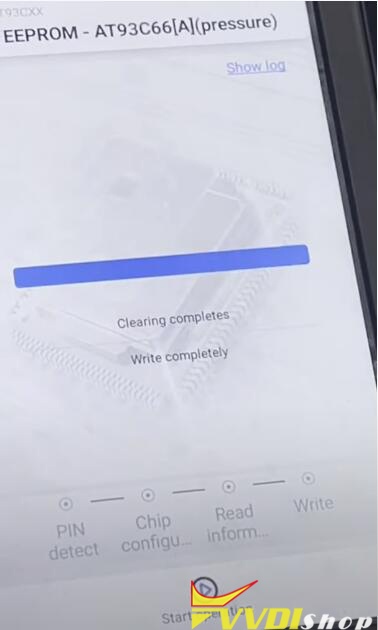
In vvdi mini prog app, select EEPROM Flash function-ATMEL-AT93CXX-AT93C66 (pressure)
clean the 93c66 chip pin

toyota-yaris-akl-xhorse-mini-prog-3

Connect the 93c66 Eeprom chip with mini prog and pin adapter

toyota-yaris-akl-xhorse-mini-prog-4

Press Read EEPROM
Put the adapter on the chip (press the light button to turn on the floodlight)
Click continue below or press START button on mini prog to start operation

toyota-yaris-akl-xhorse-mini-prog-5

Read Eeprom data success, save data.

toyota-yaris-akl-xhorse-mini-prog-6

In xhorse key tool max app, select Special function-Immo data tool-File management-Local file
You can see the Eeprom file was saved to MINI PROG folder

toyota-yaris-akl-xhorse-mini-prog-7

toyota-yaris-akl-xhorse-mini-prog-8

Select Eeprom file, click More and copy the dump to MINI OBD folder

toyota-yaris-akl-xhorse-mini-prog-9

In key tool max app, select Immo data tool-Aisa-Toyota-Yaris-2003 93c66-start execution

toyota-yaris-akl-xhorse-mini-prog-10

upload dump in MINI OBD folder
Insert a vvdi super chip into the indiction coil

toyota-yaris-akl-xhorse-mini-prog-11

Select an unused key position and prepare dealer key
Select use vvdi super chip
Making key in progress
Prepare dealer key success. It can start car engine after write back new dump file.
Add another key need load the new data file.
Press ok to continue

toyota-yaris-akl-xhorse-mini-prog-12

Save new key file to MINI PROG folder

toyota-yaris-akl-xhorse-mini-prog-13

In mini prog app, select EEPROM Flash function-ATMEL-AT93CXX-AT93C66 (pressure)
clean the chip pin
Connect mini prog and chip via pin adapter

toyota-yaris-akl-xhorse-mini-prog-14

This time select Write Eeprom
Upload new dump form MINI PROG folder to write back

toyota-yaris-akl-xhorse-mini-prog-15
Write success. The new key can start engine now.
Reinstall the Immo box to the vehicle and test the new key.

http://blog.vvdishop.com/toyota-yaris-93c66-all-keys-lost-done-by-xhorse-mini-prog-and-key-tool-max/

6/08/2021

VVDI2 V7.0.2 Unlock FEM/BDC for ISTA V4.28.41

 Xhorse VVDI2 V7.0.2 software supports unlock FEM/BDC directly for ISTA V4.28.41 version.


*** VVDI2 V7.0.2
*** 2021-06-08
*** Require firmware V7.0.0
************************************************************************
===== BMW V7.0.2 =====
1. Support unlock FEM/BDC directly for ISTA V4.28.41 verison
2. Bugfix


Free download VVDI2 V7.0.2 software

https://public-ap-southeast-1-1251058331.s3-ap-southeast-1.amazonaws.com/download/product/vvdi2/software/VVDI2-InstallerV702.exe

6/03/2021

VVDI Prog M35080 Fail to Erase & Write 160d0wq

 Problem

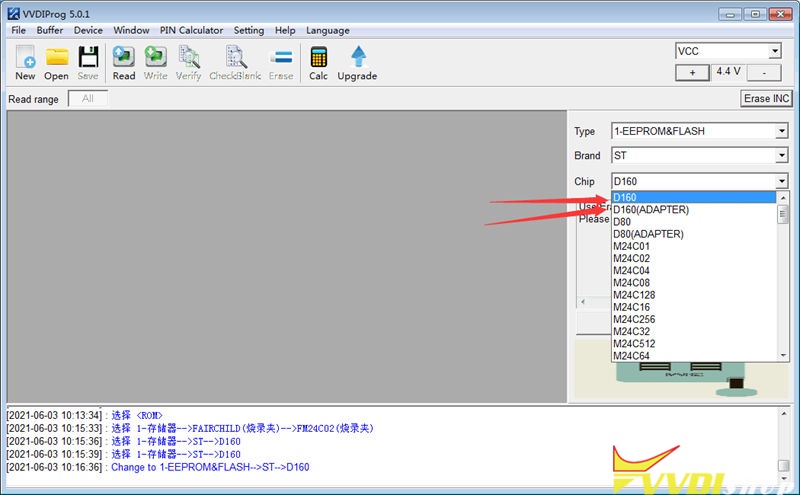
My Xhorse VVDI Prog M35080/D80 Adapter can read 160d0wq chip successfully, but cannot erase & write it. No error. It says cracking then erase and after erase. What’s the problem? Please help me.

vvdi prog 35080 adapter

Solution

Please make sure you’ve selected the correct options, it has probability of failure to erase & write the chip. It is suggested to use the Xhorse 35160DW Chip to do it instead.

vvdi prog read 35080

Note: The chip can be used as replacement of ST company 35080xxx, 35160xx, 080D0xx, 160D0xx …etc.


How to use 35160DW Chip with VVDI Prog?

  1. Backup data.

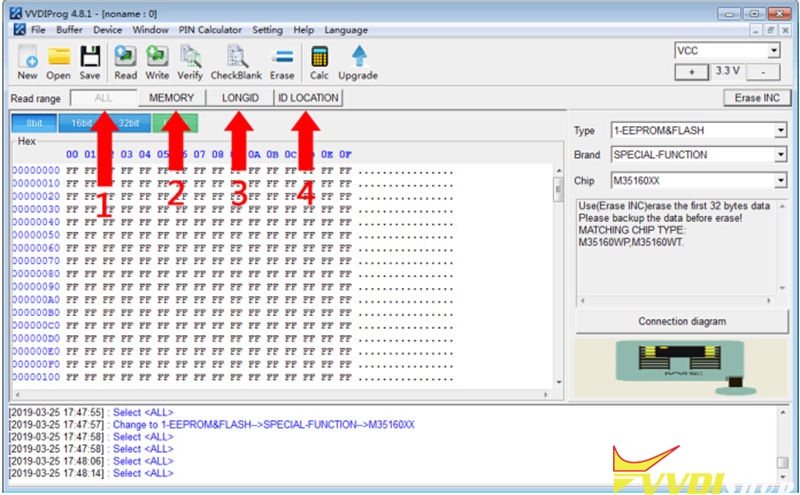
Read & save the dashboard original IC from “MEMORY + LONGID + ID LOCATION” or “ALL” option.

35160DW Chip vvdi prog


  1. Write data.

Replace original chip to 35160xx chip, write step1 to save 3 dumps to each partition(MEMORY/LONGID/ID LOCATION) on Xhorse chip by VVDI Prog.


  1. Mileage correction.

Perform “Erase INC” button(erasing the front 2 lines), select “ALL” or “MEMORY” option to read data for verify.


The front 2 lines should be all ‘0’ when reading data, manually input the target mileage, then perform “Write” option, completed!


  1. Verify data.

Soldering the chip back to dashboard, check whether it is working well without red dot.

https://www.vvdishop.com/

Program Toyota 8A Smart Key with Xhorse Mini OBD Tool

 How to unlock & program a Toyota 8A Smart Key using with Xhorse VVDI Key Tool Max + Mini OBD Tool via OBD?


This is a Toyota Smart Key that was already programmed to another vehicle. Now I’m gonna unlock and reprogram it, here we go.

xhorse key tool max mini obd toyota 8a smart key 1

  • Unlock Key

Plug VVDI Mini OBD Tool into OBD for connection.

Let’s read the key first, it is “Have learned”.


Go back to main page on Key Tool Max, press

Special function >> Unlock Toyota Smartkey >> Unlock


Unlock OK.


Go back to read the smart key again.

It is “Blank”.

So now we can use the 8A Smart Key to program to a new Toyota.

xhorse key tool max mini obd toyota 8a smart key 2

xhorse key tool max mini obd toyota 8a smart key 3

xhorse key tool max mini obd toyota 8a smart key 4

xhorse key tool max mini obd toyota 8a smart key 5

xhorse key tool max mini obd toyota 8a smart key 6


  • Program Key

Go to Mini OBD Tool main page, press

Immo programming >> Toyota >> Select by type >> Smart key system >> Type 3 (8A smart card) >> Start execution >> Add a key

xhorse key tool max mini obd toyota 8a smart key 7

xhorse key tool max mini obd toyota 8a smart key 8

xhorse key tool max mini obd toyota 8a smart key 9

xhorse key tool max mini obd toyota 8a smart key 10

xhorse key tool max mini obd toyota 8a smart key 11

Please switch ignition on.


Confirm key number, press “OK”.


Hold the 8A Smart Key touching on the IG switch, after hearing beep twice, key registration succeeded!


Test the key, it does work!

Key programming has done.

xhorse key tool max mini obd toyota 8a smart key 12

xhorse key tool max mini obd toyota 8a smart key 13

xhorse key tool max mini obd toyota 8a smart key 14

xhorse key tool max mini obd toyota 8a smart key 15

This is using VVDI Key Tool Max & Mini OBD Tool to unlock & reprogram a Toyota 8A Smart Key successfully.

https://www.vvdishop.com/


Read also:

Xhorse VVDI2 Prepares Toyota XM Proximity Remote

FAQ Xhorse Toyota XM Smart Proximity Key 

5/31/2021

Xhorse VVDI Prog V5.0.3 Update Feature

 Xhorse VVDI Prog software released new update on May 28th, 2021.

* This version DON’t need update firmware
+ Add FM3104,
FM3116,
FM3164,
FM31256,
options in
<1-EEPROM&FLASH>-><RAMTRON>
+ Add R5F11F_Data_8KB_Write,
R5F11FxJx_Flash_256KB_Write,
R5F11FxKx_Flash_384KB_Write,
R5F11FxLx_Flash_512KB_Write,
options in
<2-MCU>-><RENESAS-RL78-G1H>
+ Add R5F11Wx7x_Flash_4KB_Write,
R5F11Wx8x_Flash_8KB_Write,
options in
<2-MCU>-><RENESAS-RL78-G1M>
+ Add R5F11Yx7x_Flash_4KB_Write,
R5F11Yx8x_Flash_8KB_Write,
options in
<2-MCU>-><RENESAS-RL78-G1N>
+ Add MPC5644B,
MPC5644C,
MPC5645B,
MPC5645C,
MPC5646B,
MPC5646C,
options in
<2-MCU>-><MOTOROLA-MPC564XXXX>
+ Add MPC5746G,
MPC5747C,
MPC5747G,
MPC5748C,
MPC5748G,
options in
<2-MCU>-><MOTOROLA-MPC57XXXX>
+ Add SPC564B64,
SPC564B70,
SPC564B74,
SPC56EC64,
SPC56EC70,
SPC56EC74,
options in
<2-MCU>-><ST-SPC564XXXX>
+ Add MT22.1(MC9S12XET256)
option in <3-ECU>-><DELPHI>
+ Add CADILLAC-CATSL
option in <7-AIRBAG-><GM>
+ Add CAMRY(R7F701A22)
option in <7-AIRBAG>-><TOYOTA>
+ Add BAOJUN510-PEPS(MC9S12XEG384),
BAOJUN560-ESCL(STM8AF6226)(2015),
BAOJUN560-PEPS(MC9S12XEG384)(2015)
options in <8-OTHER>-><SAICMOTOR>
+ Add HOWO-STRYKER-SECURED-DASHBOARD(19)
options in
<8-OTHER>-><HOWO>
+ Add MISTRA-47-PKE-MOUDLE(17)
options in
<8-OTHER>-><Hyundai>
+ Add 70-CHIP-IMMO-MOUDLE
options in
<8-OTHER>-><KIA>


Free Download VVDI Prog software v5.0.3

https://mega.nz/file/4M1TGYgS#_XuD7j2BaxoWatnUXbHM2cBQFt35AnuQOlI3Z4ip6cw

5/26/2021

Program 2020 Kia Sportage Key by Xhorse VVDI Mini OBD Tool

 Xhorse VVDI Key Tool Max + Mini OBD Tool support to program a new remote for 2020 Kia Sportage success. This key isn’t a transponder key, a regular lxp90 blade is able to crank it. Now I’m about to show its procedure.


Plug VVDI Mini OBD Tool into OBD2 port, connect it with Key Tool Max via Bluetooth.

xhorse mini obd 2020 Kia Sportage Key 1

Immo programming >> Kia >> Select from model >> US market >> Sportage >> Remote key adaptation >> Start execution


Wait loading until 100%…


Please choose OBDII interface and turn on the ignition switch to ON.

Press “OK”.


Switch ignition off, remove the key, press “OK”.

xhorse mini obd 2020 Kia Sportage Key 2

xhorse mini obd 2020 Kia Sportage Key 3

xhorse mini obd 2020 Kia Sportage Key 4

Press UNLOCK or LOCK button for more than 1 second.


Match 1 remote successfully.

Press “OK” to program next one, press “Cancel” to complete.


You’ll hear a beep when match completed.


Remote match completely.

Press “OK”.


Let’s test the key, all are workable.

Key programming was done!

xhorse mini obd 2020 Kia Sportage Key 5

xhorse mini obd 2020 Kia Sportage Key 6

This is using VVDI Key Tool Max & Mini OBD Tool to add a remote for 2020 Kia Sportage. This key doesn’t have a chip so I only programmed the remote to vehicle.

https://www.vvdishop.com/