5/11/2021

VVDI MB Cannot Write Smart Key V42??

 Question:

Smart key version 42, the key was detected by xhorse vvdi mb tool. But the vvdi mb is not able to write this type of key.

vvdi-mb-cannot-write-smart-key-v42-1

vvdi-mb-cannot-write-smart-key-v42-2

vvdi-mb-cannot-write-smart-key-v42-3

vvdi-mb-cannot-write-smart-key-v42-4

Answer:

Your key are newly bought by benz dealer, are protected through unique password, only seller know this and can use/programmed them.

need reset NEC to factory state, when you will use them normally. Otherwise no way.

http://blog.vvdishop.com/xhorse-vvdi-mb-cannot-write-smart-key-version-42/


5/07/2021

Make Toyota XM Proximity with Xhorse VVDI2?

 How-to: generate Xhorse Toyota XM remote (8A) using VVDI2 key programmer.


generate-xhorse-xm-smart-key-with-vvdi2-1

The XM smart key does not come with key shell.  key shell is available on ebay or aliexpress.

Insert xhorse smart key into vvdi2.

In xhorse vvdi2 software, select Asia->Toyota->All remote-> 2110 314.35/315.10 type, tick From default database and press Prepare proximity remote

generate-xhorse-xm-smart-key-with-vvdi2-2

Read the following requirement:

The function requires special XM proximity remote and network connection.
It needs some bonus points for each XM proximity first use. (200 points)
Using Toyota proximity remote does not have bonus points.

Insert prox into vvdi2 coil before continue

generate-xhorse-xm-smart-key-with-vvdi2-3

Identify remote information

generate-xhorse-xm-smart-key-with-vvdi2-4

generate-xhorse-xm-smart-key-with-vvdi2-5

Synchronize with server

generate-xhorse-xm-smart-key-with-vvdi2-6

Calculating requires 5 seconds.

generate-xhorse-xm-smart-key-with-vvdi2-7

Preparing XM remote until succeeded

generate-xhorse-xm-smart-key-with-vvdi2-8

 https://www.vvdishop.com/service/xhorse-vvdi2-program-toyota-xm-proximity-remote.html

5/06/2021

Generate 40 bit 4D Ford with Xhorse Key Tool Max

 Here is the using tips of xhorse vvdi key tool max on generating 40 bit 4d ford transponder key.


Use super chip and generate the chip by selecting the option for the chip (New 4D chip (40 bits)).
key tool max ford 4d 40bit

Ford 80 bit chips are backwards compatible with the 40 bit keys. Just stock the 80 bit and you good to go.
Don’t delete keys as you can only use 1 super chip and need 2 keys minimum to program in or car won’t start.
Just add key, don’t do akl (all keys lost), you can add 1 key without another key by selecting add key instead of AKL.

5/05/2021

Xhorse VVDI2 Read EDC16U34 PIN Code on bench

 Succefully read PIN code from a VAG Bosch EDC16U34 ECU using Xhorse VVDI2 and GODIAG GT100breakout box on bench.

Read money data using vvdi2, looking for a pin code.

GT100 is a nice tool working on K-Line.

You can see the SIL indicator flashes which means K-line cummunication is ok.

Xhorse VVDI2 Read EDC16U34 PIN 1

Xhorse VVDI2 Read EDC16U34 PIN 2

Xhorse VVDI2 Read EDC16U34 PIN3

Xhorse VVDI2 Read EDC16U34 PIN 4

Xhorse VVDI2 Read EDC16U34 PIN 5

Xhorse VVDI2 Read EDC16U34 PIN 6

Xhorse VVDI2 Read EDC16U34 PIN 7


4/29/2021

Xhorse VVDI Prog V5.0.2 Software Update in April 2021

 Xhorse VVDI Prog software released a new update V5.0.2 on April 30th, 2021.


VVDI-Prog v5.0.2             (2021-04-30)
* This version DON’t need update
firmware
+ Add D160XX(ST),
D80XX(ST)
M35080XX(ST),
M35160XX(ST)
options in
<1-EEPROM&FLASH>-><SPECIAL-FUNCTION>
+ Add R5F10A/10B_Data_4KB_Write,
R5F10AxAx_Flash_16KB_Write,
R5F10A/10BxCx_Flash_32KB_Write,
R5F10A/10BxDx_Flash_48KB_Write,
R5F10A/10BxEx_Flash_64KB_Write,
R5F10A/10BxFx_Flash_96KB_Write,
R5F10A/10BxGx_Flash_128KB_Write,
options in
<2-MCU>-><RENESAS-RL78-F13>
+ Add R5F11B_Data_4KB_Write,
R5F11BxCx_Flash_32KB_Write,
R5F11BxEx_Flash_64KB_Write,
options in
<2-MCU>-><RENESAS-RL78-G1F>
+ Add R5F11Z_Data_2KB_Write,
R5F11ZxAx_Flash_16KB_Write,
options in
<2-MCU>-><RENESAS-RL78-G1P>
+ Add STM32F103xC,
STM32F103xE,
STM32F105x8,
STM32F105xB,
STM32F105xC,
options in
<2-MCU>-><ST-STM32>
+ Add Mitsubishi-Eclipse
Cross-BCM(D70F3380) option in
<4-IMMOBILIZER>-><Mitsubishi>
+ Add CEM-V40-2014(SPC560B60L7)
options in
<4-IMMOBILIZER>-><VOLVO>
+ Add CEM1(R5F64524)
options in
<4-IMMOBILIZER>-><VOLVO>
+ Add SRS(MC9S12DG128-UNSECURED)
options in
<7-AIRBAG>-><Hyundai>
+ Add ELANTRA-INDOOR-DISASTER-BOX(–17)
options in
<8-OTHER>-><Hyundai>

VVDIprog V5.0.2 Download link:
https://we.tl/t-u5x8Id3P07
The link is valid for seven days.

Xhorse VVDI2 VW Skoda Cluster Bench Pinout

 Problem:

I have s Skoda supreb 2012 which has one working smart key (orignal key MEGAMOS ID48), car push start button. Customer need another key so i program xhorse vvdi smart key with vvdi2 vag but end process in cluster dispalys 0-2.  0-2 mean no key learned still in programming mode. Key not program with near push start & original key only remote work, not ignition & not start.  I have saved original immo data from vvdi.

Than i remove odo & read nec24c64 eeprom & autel do automatic service mode & then write eeprom via obd & make cs, pin , mac. but end of same key not program.

xhorse-vvd2-skoda-superb-2012-key-1

xhorse-vvd2-skoda-superb-2012-key-2


Solution

Read 24c64 direct in PCB in a programer.
Put dump in service mode in vvdi2 and write back in the eeprom in programer.
it vvdi2 read the eeprom and then write the original eeprom previously read it the programer.
read the immo data and them write the backup you have of the immo data.

Need to learn 2 keys.
Original and new key.
You put key quantity 2
Reset instrument cluster
If it works this will allow you to restore the cluster to its original state!
You need original brand new keys or xhorse proximity key to the this job.
If vvdi prepare new dealer key them you have to add both key original and new using immo data option.

Connect the cluster on the bench with vvdi2 and do the steps above.
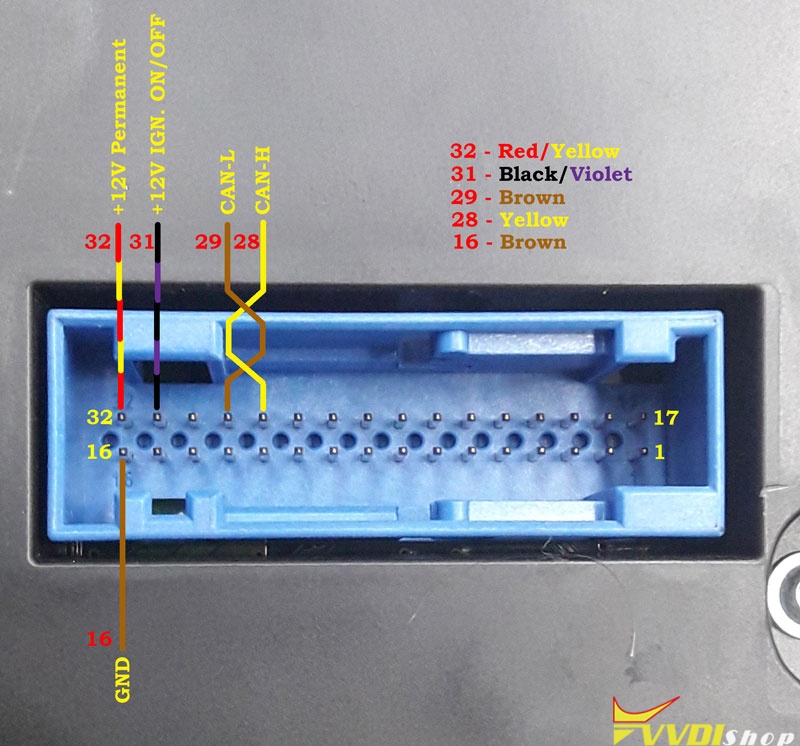
vvdi 2 allow direct connection to the cluster, only need connect power and ground to the cluster and CAN  lines.

xhorse-vvd2-skoda-superb-2012-key-3

xhorse-vvd2-skoda-superb-2012-key4


And here is another wiring pinout

xhorse-vvd2-skoda-superb-2012-key5

Credit to Mr. danyguit and cristo who provide pinouts above.


Test feedback:

Do the procedure above and car start with the original key. below attach picture

xhorse-vvd2-skoda-superb-2012-key-6

xhorse-vvd2-skoda-superb-2012-key-7

i try xhorse smart key & make dealer key & info with vvdi 2 = MEGAMOS 48 [ LOCKED] . I read orignla key detail = MEGAMOS 48 = TP24 [ SKODA ]
but when i make dealer key some error
the new key id checksum error , this key cat be learn to car
below attach pictures of error photo
then i learn key one original learn ok 1/2 , second new one fail & again car off
again do all make service mode & back immo data & again car start with original key

xhorse-vvd2-skoda-superb-2012-key8

xhorse-vvd2-skoda-superb-2012-key-9

Then i made vvdi super chip transpoder memamos 48 tp-24.
than lean key one original & one only transponder, all 2/2 success & original remote also work.

But second key only transpoder no remote.

vvdi2 proximity remote may support but my vvdi2 serial number has Chinese database so today change to EU database and try

Solved!!!

Finally i change my sn to global database & make proximity remote & write. All success.

http://blog.vvdishop.com/solved-vvdi2-skoda-superb-2012-24c64-no-key-found/

4/28/2021

Xhorse Mini Prog Key Tool Max Program 2013 VW CC Key

 How to use Xhorse Mini Prog + VVDI Key Tool Max to program a dealer key M95320 for 2013 Volkswagen Passat CC? Today I’ll demonstrate it on bench.


Read & Save EEPROM

Remove the outer shell to take out chip.

Hold and push Mini Prog straight down on the M95320 chip.

Press on Key Tool Max meanwhile,

xhorse-mini-prog-key-tool-max-2013-vw-cc-1

xhorse-mini-prog-key-tool-max-2013-vw-cc-2

xhorse-mini-prog-key-tool-max-2013-vw-cc-3

EEPROM and FLASH >> ST >> M95XXX >> M95320(pressure) >> Read >> EEPROM >> Start operation >> Continue >> Rename, OK


(Note: DO NOT lay down Mini Prog during reading.)


Read & save EEPROM file successfully.

The Mini Prog screen will show an OK button, which means “Done”.

xhorse-mini-prog-key-tool-max-2013-vw-cc-4

xhorse-mini-prog-key-tool-max-2013-vw-cc-5

xhorse-mini-prog-key-tool-max-2013-vw-cc-6

xhorse-mini-prog-key-tool-max-2013-vw-cc-7


Program Dealer Key

Switch to Xhorse Key Tool Max function page, press

Special function >> Immo data tool >> Europe >> VW >> Passat >> Comfort ID48 – 95320 >> Start execution >> Load EEPROM file

xhorse-mini-prog-key-tool-max-2013-vw-cc-8

xhorse-mini-prog-key-tool-max-2013-vw-cc-9

xhorse-mini-prog-key-tool-max-2013-vw-cc-10


Select an unused key position: key 4, press “Prepare dealer key”.


Select “Megamos 48”.

Place a new key into Key Tool Max coil.

OK >> OK


Prepare dealer key success.

It can start engine after write back new dump file.

Press “OK” to save the new dump file.

Rename, save >> OK

xhorse-mini-prog-key-tool-max-2013-vw-cc-11

xhorse-mini-prog-key-tool-max-2013-vw-cc-12

xhorse-mini-prog-key-tool-max-2013-vw-cc-13

xhorse-mini-prog-key-tool-max-2013-vw-cc-14

Let’s go back to Xhorse Mini Prog page to write new dump file.

EEPROM and FLASH >> ST >> M95XXX >> M95320(pressure) >> Write >> EEPROM >> Start operation >> Select dump file to load


Turn on Mini Prog and hold it straight on M95320 chip again.

Start operation >> Continue

(Note: DO NOT lay down Mini Prog during writing.)


Write completely.

Key programming has done!

xhorse-mini-prog-key-tool-max-2013-vw-cc-15

xhorse-mini-prog-key-tool-max-2013-vw-cc-16


Program 2013 VW Passat CC a M95320 key with Xhorse Key Tool Max & VVDI Mini Prog was successful!

https://www.vvdishop.com/

4/23/2021

Which Xhorse Tools Free Language Limitation?

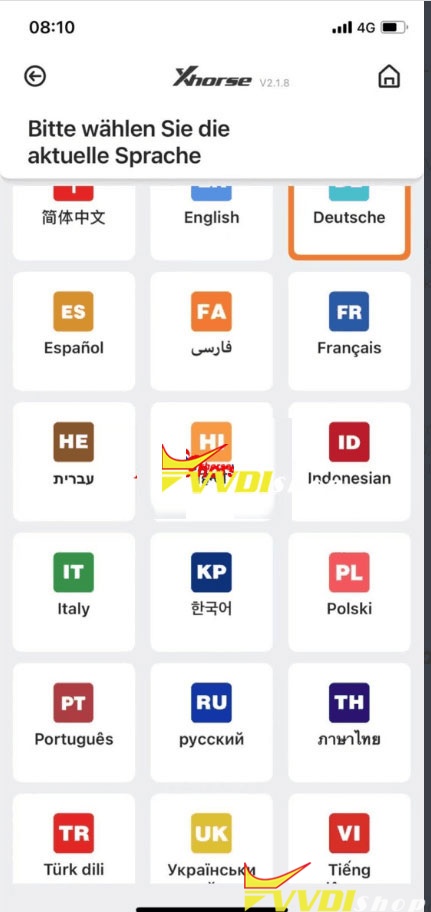
 Good news! Some Xhorse tools support free update multi-language. That means no more need to get the language authority from dealer. It is free with the last update.

xhorse-app-language

What Xhorse devices free language limitation now?

VVDI Key Tool

VVDI Mini Key Tool

VVDI Key Tool Max

VVDI Mini OBD Tool

Dolphin XP005

Condor XC-Mini Plus


Mini Key Tool, Key Tool Max, Dolphin XP-005 app language: 

English, German, Spanish, Persian, French, Hebrew, Hindi, Indonesian, Italian, Korean, Polish, Portuguese, Russian, Thai, Turkish, Ukrainian, Vietnamese

xhorse-app-language-2

Condor Mini/Mini Plus language:

Portuguese Spanish French German Czech Arabic Turkish Dutch Polish Bulgarian Norwegian Slovak Italian English Russian Chinese


Provide device serial number to change language you desired.


What Xhorse devices are still language limited?(until 23th, Apr.)

VVDI Key Tool Plus Pad

Xhorse Mini Prog

Panda key cutting machine


Any questions welcome to contact us.

https://www.vvdishop.com/